Participant
December 21, 2017
Answered

Accessibility-Tagging structure of PDF is different on mac than pc

  • December 21, 2017
  • 3 replies
  • 2496 views

Having an issue and can't find anything online that seems to relate. Using InDesign on a Mac and creating a PDF -have tried many different settings when creating the PDF-the tag structure on the Mac looks beautiful with only minor changes needed. But when open it on PC the tag structure is a disaster. Why is there a difference in the tag structure between the 2 computers? The document itself looks exactly the same, the problem is with the tag structure for accessibility.

Anyone have any idea what is going on? Any ideas on how to fix this? Thanks!
This topic has been closed for replies.
Correct answer Zaid Al Hilali

Olaf, unfortunately it does not change anything in the tagging structure of the pdf.

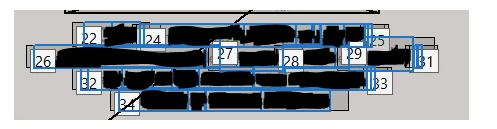
Here is tag structure on my pc  13 tags (22-34) in 4 lines of text

Here is how it is on Mac  1 tag for whole paragraph.

Now, granted it's not hard to fix it, but we shouldn't have to and we don't understand why it changes.


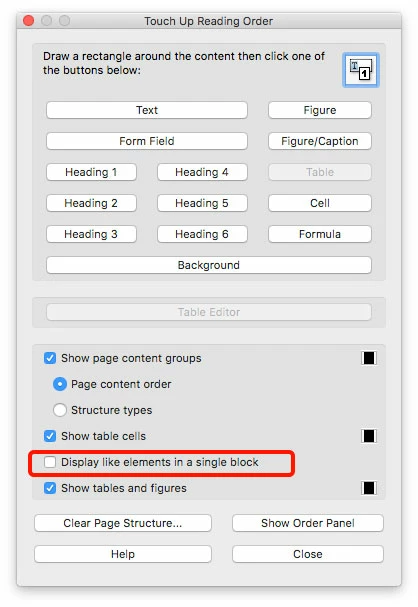
I'm relatively new to the Accessibility workflow. However your screenshots are not from Tags panel, it is rather your page layout while your Order panel is active.

Try this…Display "Touch up reading order" window and check/uncheck "Display like elements in a single block" see how it goes.

3 replies

Legend
December 22, 2017

Your reply answers my question, thanks.

Legend
December 22, 2017

You say the document LOOKS the same but is it the VERY SAME document, exported once on the Mac? Or is it the same InDesign document, also exported on Windows?

Legend
December 22, 2017

Are you saying the when you export the PDF from InDesign on Mac OS, and view that same PDF in the Mac version vs Windows version of Acrobat the structure is different? I can't see how that would happen.

Or are you seeing a difference when exporting the same InDesign file from Windows vs Mac version of InDesign?

Things to check:

  • Are the two versions of Acrobat identical version?
  • Are the two versions of InDesign (Mac/Win) identical?
  • When you export from InDesign (Mac/Win) are you using identical settings?
  • Check also that in the Articles panel menu the 'Use Reading Order in Tagged PDF' option is enabled in both versions.

Are you able to provide some step-by-step notes on how to replicate the issue? Screenshots of the differences in structure might also help.  Also specify OS versions as well as the InDesign/Acrobat version in which you are experiencing this issue.

lemsangelAuthor
Participant
December 22, 2017

The document is created in InDesign CC on a Mac. The pdf is created on the Mac from InDesign. when the pdf is opened in Acrobat Pro DC and the tag structure reviewed it is neat and cleaned, in paragraph form.

My job is to finish any tagging needed to make the document accessible. I work on a pc. When I open the pdf file in Acrobat Pro DC the tag structure is a mess, each line is separate and some lines have 2 or 3 tags each.

The versions of Acrobat are the same on both computers. Only the Mac has InDesign.

I think the question is not being understood. It is not a matter of it appearing different if exported to pdf on mac and exported to pdf on windows. It is only exported on the mac and is being opened and viewed on a pc.

The graphics staff has tried  pretty much every way possible to convert the file to pdf but they all do the same thing, clean on the Mac and a mess on my pc.

To replicate the issue would be to convert an inDesign file to pdf and save the pdf on a mac. View the tag structure on the mac. Go to a pc and open that pdf file and view the tag structure. In our case, it is totally different.

I can't do screen shots as the info is confidential.

Test Screen Name: I don't understand your question. The pdf visually as a finished product (not tag structure) looks like the print copy, like the mac inDesign image, like the Mac pdf image. It is not being exported on windows. Just being viewed to finish accessibility.

Inspiring
December 22, 2017

The Tags panel in Acrobat DC now has a new context menu item "Apply Role Mapping to Tags".

Could you try out your PDF on PC, once with that menu item toggled on, and once with that menu item toggled off.

Does it make any difference? Does it look "better" in one of the two cases?