


Participating Frequently
April 23, 2019
Answered

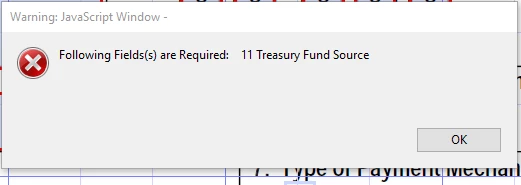
Acrobat 2017 Pro. On Java Script, Warning Message Box that a required field was missed. Do I have any control over the wording at the top of the box?
  • April 23, 2019
  • 1 reply
  • 1443 views

Do I have any control over the "Warning: JavaScript Window"?

I would like for it to say "You have missed required field(s)", is it possible to change?

This topic has been closed for replies.
Correct answer try67

No, that part can't be changed.


What you can do, though, is add your own text after it, like this:

app.alert("Following Fields(s) are Required: "+ cAllFields, 0, 0, "You have Missed a Required Field")

1 reply

try67
Adobe Expert
April 23, 2019

1. It can only be removed if the code is run from a trusted context, such as a folder-level script.

2. Yes, since this is done using JavaScript you can edit the text in the message window.

1961DawnBAuthor
Participating Frequently
April 23, 2019

This is my example of the Code that I am using to create the message. Could you help me figure out how to change the "Warning: JavaScript Window - " to "You have Missed a Required Field"

(function(){

var cAllFields="";

var cFlag="";

for(var i=0;i<this.numFields;i++)

{

    var cFldName = this.getNthFieldName(i);

    var oFld = this.getField(cFldName);

    if(oFld.type!="button" && oFld.required)

     { if (oFld.defaultValue === oFld.value)

         {

           cFlag = cFlag + "ABC";

           cAllFields = cAllFields + "   " + cFldName.substring(2);  

         }

     }   

}

if(cFlag.slice(0, 3) == "ABC")

{

app.  

app.alert("Following Fields(s) are Required: " + cAllFields);

}

})();

try67
Adobe Expert
April 23, 2019

No, that part can't be changed.