Bevi Chagnon - PubCom.com
Legend
August 31, 2023
Question

Acrobat 2023: How to revert to classic GUI user interface

  • August 31, 2023
  • 39 replies
  • 158228 views

ADOBE: Do not delete or merge this conversation thread.

This post is to consolidate the information from dozens of other posts about how to revert to the previous user interface in Acrobat.


It consolidates the information users need to know.


When Acrobat is updated to version 2023, it replaces the traditional user interface that's been in place for the past 20+ years with what Adobe is calling the "Modern Viewer," which has some severe technical problems (missing utilities) and a complete relocation of familiar tools, menus, and quick access tool bars.


In Windows Acrobat:

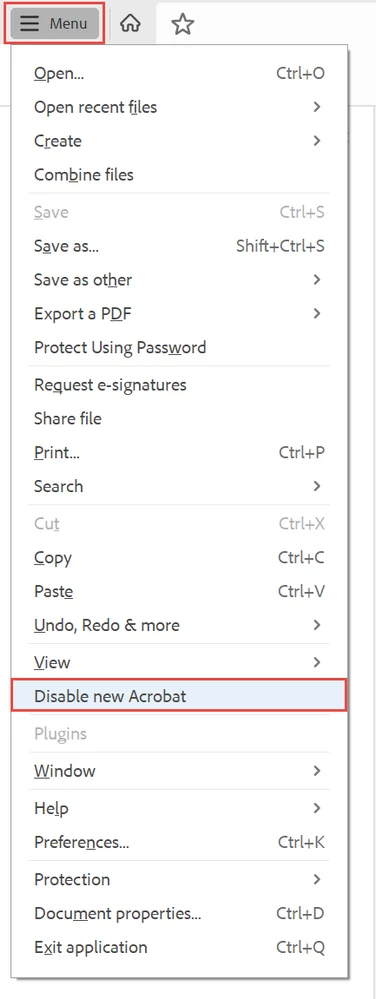
  1. Locate the "hamburger menu" in the upper left corner (3 horizontal bars where the old "File" menu used to be).
  2. Select Disable New Acrobat.

The hamburger menu in new Acrobat-Windows.


In Mac Acrobat:

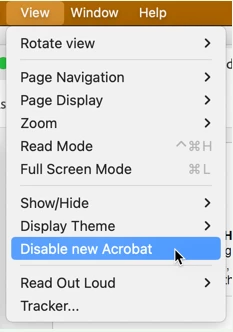
  1. From the View menu at the top, select Disable New Acrobat.


Let Adobe know:

You can voice your opinion about the new interface at UserVoice: https://acrobat.uservoice.com/forums/590923-acrobat-for-windows-and-mac/suggestions/47082691-ditch-t... 

Be sure to leave a comment about your opinion and experience with the new interface. They need to hear from us users.


FYI, UserVoice is Adobe's official website where it reads and takes into account suggestions and complaints from users of its various products.  On the other hand, this community forum is a user-to-user help forum and information posted here rarely reaches ears or eyes at Adobe.


Learn about the new interface:

https://helpx.adobe.com/acrobat/using/new-acrobat-experience.html


Hope this post helps you quickly get back to work!


39 replies

Participant
January 3, 2024

I got a new latop and it defaulted to the new layout. On Windows, I didn't see a way to customize the toolbars. The new layout was uncluttered, but I needed to click 2 or 3 times to get to something that was 1 click away before, so I reverted back to the old layout. Oddly, I can't find an easy way to switch from the old layout back to the new one, but I guess why would you?

AutumnRossG
Participant
June 6, 2024

I found it in View -> Enable New Acrobat.

Participant
December 12, 2023

This has been a lifesaver – thank you! I have emailed Adobe from my business account to complain – I compared the new-look Acrobat to the New Coke launch of the 1980s, which was also a huge fail.

Participant
December 11, 2023

Thank you, Bevi!  I spent 20 minutes trying to "fix" the toolbars in Acrobat before I said to myself, "someone out there has certainly run into this same issue and has a solution." Thank you for being that "someone" and helping me get back to work.

-Cheers!

Inspiring
October 24, 2023

Are you kidding me? Their response to a request to make the gui look and feel like the one we've been using for 20 years (and pay for dearly) is to say 'Screw you - we know better!"??????? That's absurd. Just make it an option for heaven's sake!

lesleyr19932400
Participant
October 24, 2023

Thank you, Bevi Chagnon. Getting me back to a version where I can actually work efficiently is a major improvement. Unlike the changes Adobe chose to make.

Participant
October 20, 2023

Thank you for sharing this tip to disable the new Acrobat.  This was exactly the help I needed to revert Acrobat back to a useful tool.  It seems to have worked in the desktop version, but the Chrome browser version still seems to be the new version.  I'd like to change it back also.  The new Acrobat was such a disaster that any new features don't make up for the time lost looking for solutions.  

Participant
October 19, 2023

My hamburger menu is gone as of today. I can't change from one interface to the other. Adobe Acrobat updated today - 10-19-23.


telred18
Inspiring
September 21, 2023

'Disable new Acrobat' didn't appear in my Mac's Acrobat View menu (Mac Studio, M1 Max, 32GB) so that helpful option wasn't available to me. I had to revert to an earlier version anyway because of plug-in incompatibility. All our Macs are now set not to automatically update Acrobat!

Community Manager
September 28, 2023

Hi @telred18 

Sorry for the trouble.
For Mac users, disabling the 'New Acrobat' is under the View Menu. If you didn't have the option, it means your application had the latest updates installed, but the Modern Acrobat UX/UI wasn't enabled for you. This option only appears if the Functionality is enabled for you.


~Tariq


gary_sc
Community Expert
Community Expert
September 28, 2023

Hi @Tariq Ahmad Ah, so how does one "enable" access to turn off the new UI? I've seen several requests for this on the forums and didn't have a clue as to how to advise them.


Thank you for this information.

Participant
September 21, 2023

FYI - Just want to let the Adobe team know that the "new look" did NOT go over well in our office. We have about 21 users and when I told them how to switch back to the original interface I got a collective "Thank you!". And it fixed the "quick print" issue one user was having. 

Community Manager
September 28, 2023

@Patrick28719251ayum 
Appreciate your time and sharing your feedback with us. To let you know we are aware of the Quick Print issue and the Product engineering team is working towards the fix. 

~Tariq

Participant
October 2, 2023

While you're at it, scrap the new UI. It isn't an improvement. If there are things that are meant to be an improvement, be specific and let us know, because most of us are not seeing them. Don't just give us platitudes about "notable changes you'll get used to one day...in all that extra time you have to relearn our software" (or something like that). 

Participating Frequently
September 20, 2023

The new interface is a big step backwards for usability. Furthermore, the new UI doesn't bring over any tool customizations that a user has added. Whatever problems there were with the old UI, they were minor, so I cannot understand why Adobe felt it necessary to blow it up and force users to spend significnat time to learn how to interact with a brand new and radically different and limited interface.