


Participating Frequently
April 13, 2024
Question

Acrobat - All fields set to number format have a default value of 1 instead of 0

  • April 13, 2024
  • 1 reply
  • 2553 views

I have created a form for insurance purposes where clients can list items in the first column then in the second column is the value of the item, in the 3rd is the quantity of that item and in the 4th is the subtotal for that item.

For the 2nd, 3rd and 4th columns, I have gone to Text Field Properties > Format tab > and selected "Number" from the dropdown menu.

Number options are set as follows:
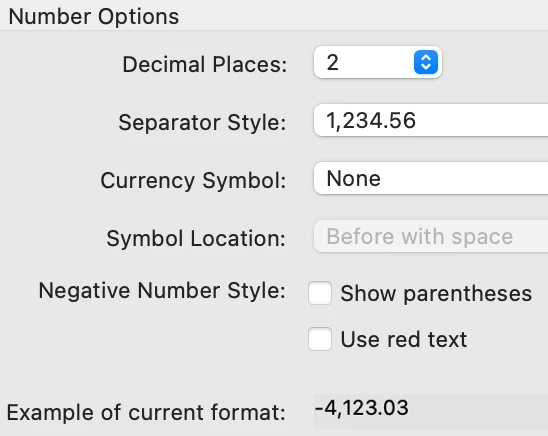
However, from the get go, all the number fields have a value of 1 rather than 0.

I have tried to find a way to make the value default to 0 but there doesn't seem to be anywhere to do that other than entering a 0 default value under Options and I tried that but it had no effect.

So this is how an unused form looks...

>

>

 

Ideally,I would like the fields to appear blank but for now, I'll settle for the more important issue which is having them set to zero. Under the current situation, I have a total of $91.00 when nothing has yet been entered!

Thanks very much, in advance.

m


This topic has been closed for replies.

1 reply

try67
Community Expert
Community Expert
April 13, 2024

After changing the default value you must clear the form for the fields to revert to it. It won't happen by itself just by setting the default value to "0", if the fields already have a different value applied to them.

magda71Author
Participating Frequently
April 13, 2024

Thanks. But the "1" values were never entered in the first place. They just appeared and they're there as I'm still creating the form.  In fact, I don't see any way to clear them.


try67
Community Expert
Community Expert
April 13, 2024

Thanks very much for this. This is my first attempt at doing anything wth acrobat pro so if you're up for it and have the time, could you:

a - tell me how/where you cleared the fields for them to revert to zero? I never saw them at zero in the first place so haven't a clue.

b - give me an example of the errors... I think I may know what you mean as I was in the process of renaming everything and I know that's going to change things. Is that what you mean?


A. Tools - Prepare Form - More Form Options - Clear Form (might be a bit different in your version, since Adobe keeps moving things around and renaming them, annoyingly).

B. Press Ctrl+J after changing the value of any field and you'll see something like this in the JS Console:


TypeError: this.getField("COM") is null
2:Field:Calculate
TypeError: f is null


These are all caused by incorrect field names used in your calculations. I recommend you re-do all of them, and make sure not to rename the fields after you do so. Alternatively, you can use a script to perform all of these calculations from a single field, since your field names are quite consistent.