



tlmurray23
Inspiring
February 22, 2025
Answered

Acrobat can't create full text index; can't create folder

  • February 22, 2025
  • 2 replies
  • 994 views

I've been using Acrobat's indexing pretty much since it was introduced and through several Macs (I'm an old Mac user since the MacPlus). This problem is on a new MacBook Pro M4 I bought a few days ago and freshly installed Adobe products.. My attempt at creating a full-text index ended up with this:

    Starting rebuild of Index : /Users/tlmurray/Documents/AcrIdx/Amazon.pdx
    Error: Could not create folder : /Users/tlmurray/Documents/AcrIdx/Amazon

    Error: Index build failed

    Deleting files from current index

    Error: Index build failed

 Permissions are the same here as they are for a new folder:
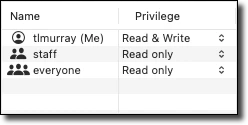
Even though these are the same as any other new folder, the problem looks like permissions. Any ideas?

Thanks.

Correct answer tlmurray23

Hi @tlmurray23, 


Sorry for the troubled experience.

Could you let us know where the files are located? Are they present locally on the machine or on the network drive? 

Ensure your copy Acrobat is updated. To check for any pending updates, launch Acrobat > Help > Check For Updates.


Disable Protected Mode (For Testing Only):

  • Navigate to Acrobat  > Preferences > Security (Enhanced) and temporarily disable “Enable Protected Mode at startup” to see if it improves performance. (Re-enable it afterward for security.) Once the option is unchecked, please restart Acrobat. 

  • And then try the behavior again. 

If nothing works, please collect the logs again and share the log ID. 


Thank you for your patience and support. 


~Tariq


First, the "are-you-kidding?" answer: It's my local drive, as one could see simply by looking at Catalog.png and the text in my earlier posts. And yes, my Acrobat is updated, as it would have to be as my Macs were formatted from scratch and I said in my text.

Second, the "hey, thanks!" answer: Turning off protected mode worked!


And that points out what I call a bug, as I'm not doing anything that should call for messing with that setting. 

2 replies

Bilal Ansari
Community Manager
Community Manager
February 25, 2025

Hi @tlmurray23 ,

Kindly share the diagnostic logs ID for us to understand the issue better. You can follow the steps mentioned at https://helpx.adobe.com/acrobat/kb/acrobat-diagnostics.html

tlmurray23
Inspiring
April 2, 2025

So, nothing yet? I have had three Macs I formatted from total scratch and none can make an index. I submitted another diagnostic: 3d998857-6fdf-4837-a745-429b97dda67e

Community Manager
April 4, 2025

Hi @tlmurray23, 


Sorry for the troubled experience.

Could you let us know where the files are located? Are they present locally on the machine or on the network drive? 

Ensure your copy Acrobat is updated. To check for any pending updates, launch Acrobat > Help > Check For Updates.


Disable Protected Mode (For Testing Only):

  • Navigate to Acrobat  > Preferences > Security (Enhanced) and temporarily disable “Enable Protected Mode at startup” to see if it improves performance. (Re-enable it afterward for security.) Once the option is unchecked, please restart Acrobat. 

  • And then try the behavior again. 

If nothing works, please collect the logs again and share the log ID. 


Thank you for your patience and support. 


~Tariq

JR Boulay
Community Expert
Community Expert
February 22, 2025

It's an old-school process, dating back to the days of CR-ROMs and very slow hard disks, that's not very intuitive for the user
Today, searching an unindexed document is very fast. For long documents, you can always use the built-in index, which speeds things up a little.

Acrobate du PDF, InDesigner et Photoshopographe
tlmurray23
Inspiring
February 23, 2025

I do it to search many docs at a time (some of them a hundred pages), and to let customers know I am paying attention. 

Customer: We don't lowercase that word. Ever.

Me: In the last six months, in 214 documents and about 8000 pages, it was lowercase 329 times and uppercase 485. 

Customer: How did you figure that out?

Me: That's why I make the big bucks.