


Acrobat DC automatically converting track changes in Word to Accept Changes
I can open a Word (Office 365) document in Acrobat DC and it will automatically create a pdf that correctly shows all the track changes in the Word Document. However, when I use the Acrobat tab in Word or use the Acrobat print command in Word, the new pdf that is created always reflects that all tracked changes were accepted when creating the pdf. As a note: Microsoft print to pdf works correctly.
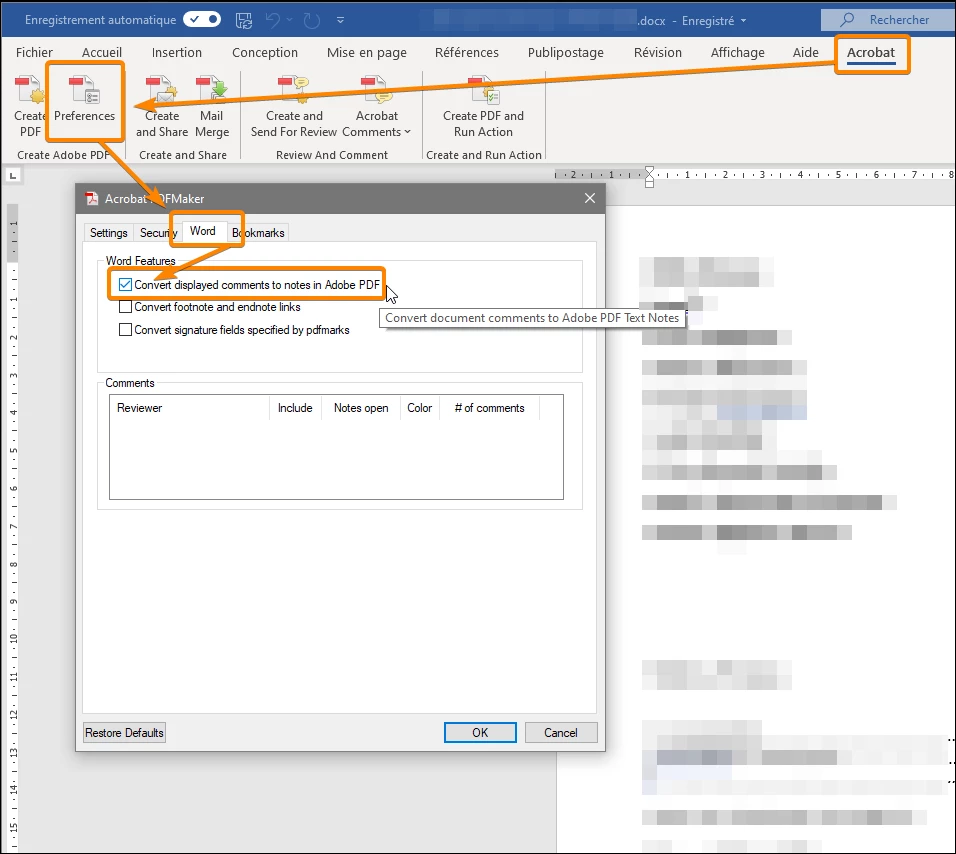
The Acrobat technical person told me that was the way it is and cannot be changed. I think that is BS. There has to be some setting in the Word addin for Acrobat that is telling Adobe to allow Word to accept all changes prior to creating the pdf. Why would I be able to open a Word doc in Acrobat directly and have it correctly create a pdf showing changes.
I know someone know what command or setting I need to modify in the Word Acrobat addin preferences to make it act correctly. Gave up on Adobe tech support on this one! Thanks up front. Curt
 AdChoices