Participant
July 24, 2020
Answered

Acrobat DC crashes - Play embedded video

  • July 24, 2020
  • 7 replies
  • 25258 views

Hi all,

I have a PDF file created last year with InDesign, who contains several embedded videos.

This week I realized that when I open the PDF file with Acrobat DC/ or Acrobat Reader, each time one of the video should start, Acrobat DC directly craches.

Are you expericing the same?

It seems this is due to the last update of Acrobat.

Any idea how to solve this issue?

Thanks in advance,

Best regards,

Stephane

Correct answer gauranja

Hi community, this is an ongoing issue with Windows Media Playback that we are investigating with Microsoft. The issue is primarliy affecting devices which have both and integrated graphics processor along with a discrete graphics card. While we are working on solving the underlying problem, we have discovered a temporary workaround which works by setting a default GPU for Acrobat. The workaround can be implemented using the Windows 10 Display Settings:
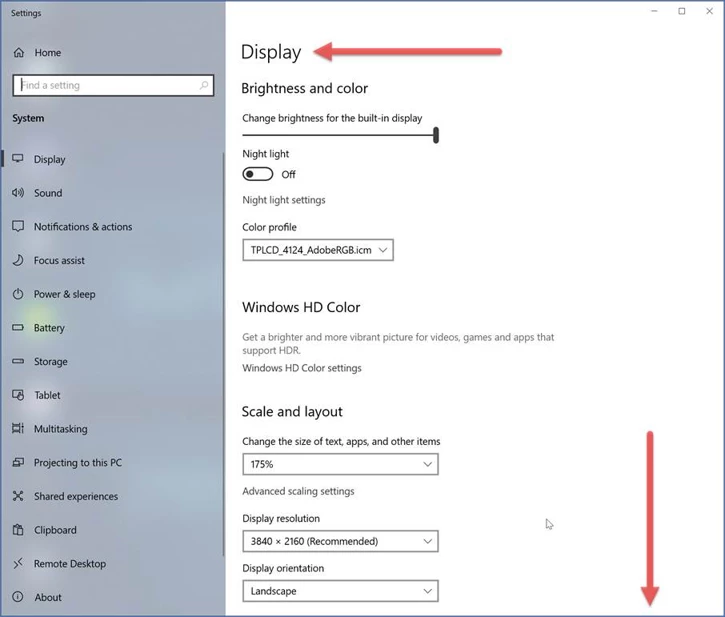
Under Display Settings, head on over to Graphics Settings:
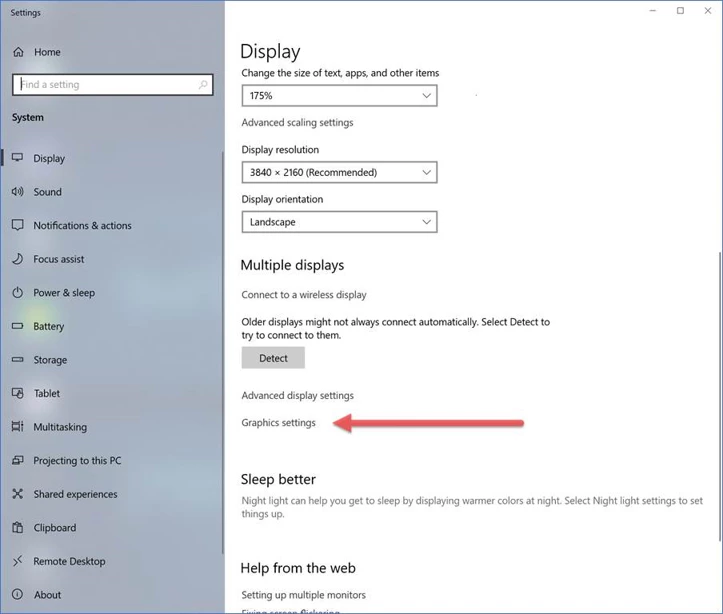
You get a screen that lets you choose, by application, which display adapter (GPU) you wish to use:
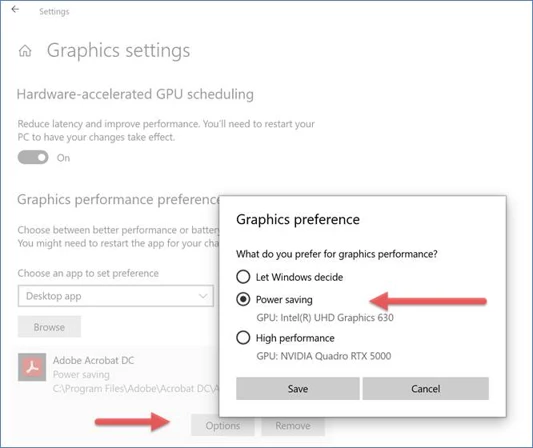
Add Adobe Acrobat (you will need to browse through the appropriate Program Files (x86) or Program Files file structure to point to the executable for the applications you wish to add here). Then click on Options and choose which GPU you want. In this case, I chose Power saving which on this system was the built-in Intel® UHD Graphics 630. Hit Save and you should be good to go.


7 replies

Participating Frequently
November 27, 2021

I was SO hoping this would solve my issue.  When I imbed a video into a PDF in the most current version of Acrobat using a very short MP4 video created with Adobe Rush, all I get is a black box with a green line playing the audio when I hit the play button.  Windows 10.  Just went through all the steps and then tried again, no change.  Still just a green audio line.

Participating Frequently
November 28, 2021

Try following the steps in this community thread. It doesnt really solve the problem totally, but it allows you to actually see the videos. The drawback that we still need an answer on from Adobe is why the graphics card impacts the video playing back. In order for anyone else to view your PDF with videos, they have to follow the same steps. 


Under Display Settings, head on over to Graphics Settings:


Participating Frequently
November 28, 2021

Hi, I already did all of that and I still only get a green audio line.

And if all of my customers are going to have the same issue, then it is not worth it to put it into my product line.

I certainly hope Adobe and Microsoft are able to figure a way out of this.

My other option is going to have to be selling a package of both the PDF and a seperate file of the how-to video.

The problem with that is, many customers are not at all internet or computer savvy and are not going to understand/realize that they need to download two seperate files to obtain their entire purchase.

gauranjaCorrect answer
Participating Frequently
February 19, 2021

Hi community, this is an ongoing issue with Windows Media Playback that we are investigating with Microsoft. The issue is primarliy affecting devices which have both and integrated graphics processor along with a discrete graphics card. While we are working on solving the underlying problem, we have discovered a temporary workaround which works by setting a default GPU for Acrobat. The workaround can be implemented using the Windows 10 Display Settings:

Under Display Settings, head on over to Graphics Settings:

You get a screen that lets you choose, by application, which display adapter (GPU) you wish to use:

Add Adobe Acrobat (you will need to browse through the appropriate Program Files (x86) or Program Files file structure to point to the executable for the applications you wish to add here). Then click on Options and choose which GPU you want. In this case, I chose Power saving which on this system was the built-in Intel® UHD Graphics 630. Hit Save and you should be good to go.

Participant
March 4, 2021

I have a number of eBooks with embedded content all of which worked fine, but I am now running a new computer with windows 10 and adobe acrobat reader DC and the embedded video, which is set to autorun causes the file to crash on opening. I have done the recommended workaround but still to no avail. A second file with embedded video doesn't crash but then the video content won't open.. probably why it isn't crashing.. This is a concern, these books have required hundreds of hours of invested time. Please advise if you have further answers / solutions.


banekoma
Participant
February 19, 2021

Same problem on PC!

Please find the solution Adobe.

Kind ragards, Bane

Participant
February 10, 2021

Same problem.

Acrobat Pro DC v2021.001.20135 on Windows 10

When trying to open a video embedded into a PDF, Acrobat crashes (the program window closes without any error message). Hope this will be fixed soon!

Meenakshi Negi
Community Manager
Community Manager
February 10, 2021

Hi Mirko,


Thank you for reaching out and reporting this.


Would you mind sharing any sample PDF so we may replicate the behavior at our end? It will help us to replicate the issue at our end.

Please also share the crash logs with us. You may use the steps suggested in the following help document to collect the crash logs: https://helpx.adobe.com/acrobat/kb/collect-logs-crash-freeze.html 


Let us know if you need any help.


Thanks,

Meenakshi


Participant
February 11, 2021

Sure, here's the link to download a PDF sample and the crash dump:

WeTransfer link (valid for 1 week) (911Mb)

In the event viewer the error I get is this:

Nome dell'applicazione che ha generato l'errore: Acrobat.exe, versione: 21.1.20135.27840, timestamp: 0x6018e1a4
Nome del modulo che ha generato l'errore: D3D9.DLL, versione: 10.0.19041.662, timestamp: 0x3292e3dc
Codice eccezione: 0xc0000005
Offset errore 0x0004d172
ID processo che ha generato l'errore: 0xaa0
Ora di avvio dell'applicazione che ha generato l'errore: 0x01d70051d3dc42d7
Percorso dell'applicazione che ha generato l'errore: C:\Program Files (x86)\Adobe\Acrobat DC\Acrobat\Acrobat.exe
Percorso del modulo che ha generato l'errore: C:\WINDOWS\SYSTEM32\D3D9.DLL
ID segnalazione: afd1c140-3cb2-442b-a857-fb28069f3a7a
Nome completo pacchetto che ha generato l'errore: 
ID applicazione relativo al pacchetto che ha generato l'errore: 


Participant
February 4, 2021

Same problem here, still nolved in the latest updates. 

Participant
February 4, 2021

*not solved

Stevens & Cove
Participant
December 11, 2020

I have been having the same issue for the past year. And seeing the previousl person has yet to reply, I'll take this opportunity....


I tried to re-insert yet another video today.

I'm running PC

Version: 2020.013.20074 Adobe Pro DC. 


I inserted a small mp4 on my PC and my partner's Mac. 

Settings: Play video on visible and on open.


When viewing the saved PDF on a mac it runs fine.

On the PC, it has a pop-up screen 'Connecting...' then after a few seconds, the programme blips out of existence. just closes down (See below).


Participant
December 11, 2020

I have the same issue.

Acrobat DC 20.013.20074 (last version)

Windows 10 : last version


I can import my video but when reading it it crashes.

I try :

- uninstall / reinstall

- reboot

- 3 embed multimedia player

- remove security view/documents

- I tried with 3 PC all crashes or black screen

- Works on apple


You have a main problem with multimedia player on windows version. Please solve it!

Amal.
Community Manager
Community Manager
July 24, 2020

Hi StephaneHol


We are sorry for the trouble. As described the Acrobat DC is crashing upon playing the embedded video in a PDF file that is originally created from Indesign.


Would you mind sharing the version of the Adobe Acrobat/Reader DC you are using? To check the version go to Help > About Adone Acrobat/Reader DC and make sure you have the latest version 20.009.20074 installed. Go to Help > Check for updates.


If it still doesn't work, please try to turn off the protected mode for testing. Go to Edit (Windows), Adobe Acrobat DC (Mac) > Preferences > Enhanced Security > Turn off the protected mode and uncheck the Enhanced Security > Click ok

Note: Please trun on the security after testing.


If it still doesnt work, please craete a new test user profile with full admin rights or wnable the root account in Mac and try using the application there and check.


Keep us posted with the results


Regards

Amal

Participant
October 21, 2020

Didn't work for me.

Meenakshi Negi
Community Manager
Community Manager
October 21, 2020

Hi Sushmitadeb,


Thank you for reaching out.


Could you please let us know if the issue occurs on playing video from any PDF or with some particular PDF?

Would you mind sharing any sample PDF with us? So we can replicate the issue on our end.

Share the Acrobat and OS version on the machine. You may use the steps suggested in the following help document to check the application version: https://helpx.adobe.com/acrobat/kb/identify-product-version.html

Please ensure that the application is updated to the latest version. In the application, go to Help > Check for updates.


Let us know if you need any help.


Thanks,

Meenakshi