


Participating Frequently
April 10, 2015
Answered

Acrobat DC User Interface: Way to Change Theme? (Too Bright)

  • April 10, 2015
  • 54 replies
  • 162409 views

Just installed Acrobat Pro DC -- an first thing I notice compared to my typical darker themes (Windows, Office, and even previous Adobe product versions) is that the user interface is extremely bright. It's like surfing bright webpages, and hard on the eyes.

Is there any way to darken the UI (Themes, etc.) ?
This topic has been closed for replies.
Correct answer AshuMittal9644438

Hi Travis,

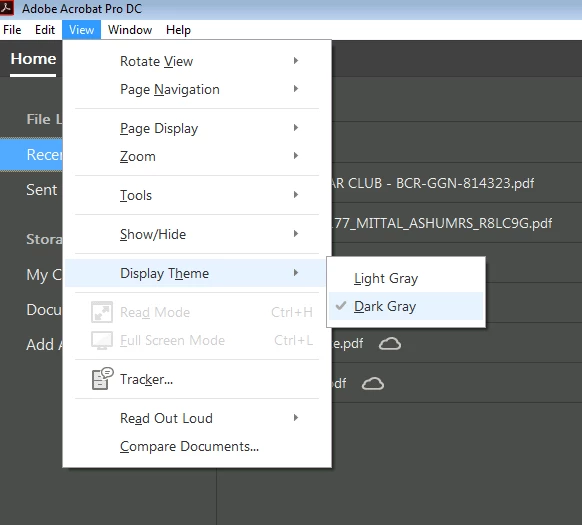
Acrobat DC update released today (10th May, 2016) introduces a new darker theme. Please open Acrobat DC application and go to Help > Check for updates to apply the latest update (2015.016.20039).


Next, go to View > Display Theme > Dark Gray and restart Acrobat.

More details here: What's new in Adobe Acrobat DC

Please try this out and let us know your feedback.

Thanks,

-ashu

54 replies

Participating Frequently
April 11, 2015

Looking for a way to "manually force" the background color at least to change over here at StackOverflow... if anyone here knows where it is coded.

Note the old color (Adobe XI) was #565656. The new color is #F0F0F0. Wow -- the new one really is almost paper white!

New Participant
April 10, 2015

The lack of constrast makes dificult to read and work with it. I revert to the previous version until this is fixed. Its like the ugly Windows 8.x and 10 UI design that is flat and ugly with lack of contrast. Same in Office 2013, Visual Studio, etc. This flat and "modern" UI wich is fashionable lately, its not usefull.

Participating Frequently
April 10, 2015

cbenci & JaviAlva,

I did not mention that, but I could not agree more. There is NO contrast between my document and the user interface.

This is a case where seamless is a VERY bad thing. I'm a student/trainee. How am I supposed to focus on my study material when Adobe inserts its face onto every document? I'm almost tempted to go back to BlueBeam now...

I will submit a feature request and report it back here. If there's a way we can all second the motion, maybe they'll do it sooner.

Thanks guys,

Travis

Participating Frequently
April 11, 2015

Feature request has been submitted. No feature request confirmation reference was provided. This thread was linked to in the feature request.

(Again, I encourage others to request similarly, maybe they count requests:

https://www.adobe.com/cfusion/mmform/index.cfm?name=wishform

)

Now, whether or not to buy the pesky overly-bright version... What sucks is that subscribing doesn't make it any better, and Adobe would prefer subscriptions anyway... on with the trial.

Thanks guys!

Known Participant
April 10, 2015

Completely agree. The UI is way too bright and makes it very difficult to judge colours onscreen. It's almost impossible to read a document as there is little to no differentiation between a white page background and the outside of the page.

In fact, Acrobat DC seems to me to be a completely unnecessary update. It feels like a toy now.

Anubha Goel
Community Manager
Community Manager
April 10, 2015

Hey acrobatdcuser,

Acrobat DC has been designed like this with a brighter User Interface.

Please fill the Feature Request Form to wish for a darker UI so that your request could be passed on:

https://www.adobe.com/cfusion/mmform/index.cfm?name=wishform

Regards,

Anubha

sinra
Inspiring
April 28, 2015

It is not bright interface, it is vanished-out interface. Can't believe that beta-testers accept something like this.