


Participating Frequently
April 10, 2015
Answered

Acrobat DC User Interface: Way to Change Theme? (Too Bright)

  • April 10, 2015
  • 54 replies
  • 162409 views

Just installed Acrobat Pro DC -- an first thing I notice compared to my typical darker themes (Windows, Office, and even previous Adobe product versions) is that the user interface is extremely bright. It's like surfing bright webpages, and hard on the eyes.

Is there any way to darken the UI (Themes, etc.) ?
This topic has been closed for replies.
Correct answer AshuMittal9644438

Hi Travis,

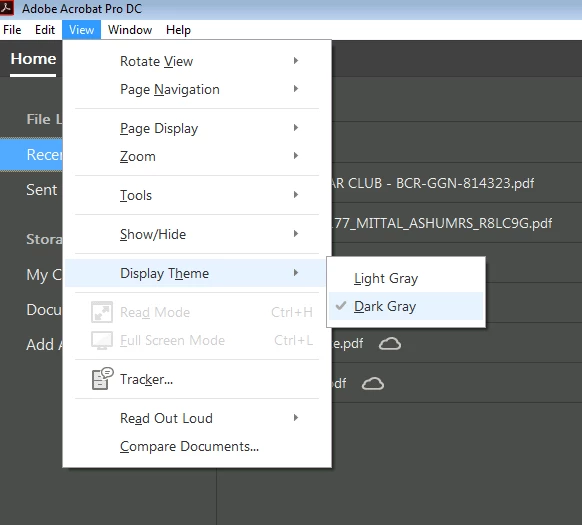
Acrobat DC update released today (10th May, 2016) introduces a new darker theme. Please open Acrobat DC application and go to Help > Check for updates to apply the latest update (2015.016.20039).


Next, go to View > Display Theme > Dark Gray and restart Acrobat.

More details here: What's new in Adobe Acrobat DC

Please try this out and let us know your feedback.

Thanks,

-ashu

54 replies

Participating Frequently
April 25, 2015

Fine....some upper management suit just LOVES his glaring, bright white app background contrasting against his seemingly always dark documents. So, naturally, that means NO ONE can EVER change it?!?! I'm stumped.

New Participant
April 23, 2015

One short look a the new UI and I immediately dumped it and re-installed Acrobat 11. Thank God I'd saved the previous download on a  server drive location....

But I gotta ask... Are you guys (at Adobe) kidding me (us)..?! I was barely able to find most of the 'tools' I've gotten quite accustomed to using, and now seemingly 'need'... and if I'm wasting time looking for what I need, just how productive is that?

But apparently, it might appear that you've adopted one aspect of Microsoft's new 'mantra' - "change for the sake of change..." - and damn the customer input...  ("WE know what you REALLY want/need... Just ask us ...")

MAJOR redesign mistake... Sorta like Windows 8 - or for that matter, Vista - and now 10...(?!)    Um, guys?  How's about you just ASK us what we'd like in the next version, and what we'd like to see changed ...? (What a concept...)

New Participant
April 23, 2015

Gotta add my 2 cents worth. Aside from all the comments here about the look, As I customized the top bar, the icon for Display: Single Page view and Zoom to page level are nearly identical! Hope this screen snippet works:

That's just silly. Even an entry-level UI designer wouldn't do that.

pilvi-cloud
Participating Frequently
April 23, 2015

Yes, I've noticed problems with the new toolbar also. Those buttons looking nearly the same is ridiculous. In addition, the new toolbar is only one level high and the buttons are a little too big so I can't fit hardly any of my own custom buttons and they end up being stuck in the "..." menu. I wish they would make the buttons smaller and allow a second level of toolbar buttons if desired.

In addition, after the program is (I should say "was" since I reverted back to XI) loaded for a few seconds, it logs into my Adobe account and shows my name in the top right and takes up more space on the toolbar and some of my custom buttons disappear.

Also, what's with the GIANT "Home  Tools  Document" taking up a huge piece of real estate on the left of the toolbar? I'd like the option to remove those. I don't find myself ever needing Home or Tools. All the tools I want are on the right already or in the toolbar (but I can't see them!), and all that Home shows is basically recent documents which can be simply shown in the File menu (pretty much the standard for most programs for many years), and there is no need for a whole page for that.

Inspiring
April 22, 2015

This UI is new, but that’s about the only positive attribute I can give Acrobat DC. It’s a classic example of oversimplification to the point where basic features are not accessible in an intuitive way anymore!

Its not just the brightness, the whole UI is terrible! I really hope this new UI is an April fool’s joke... It would be a nightmare if this teletubbies design spills over into Premiere or Photoshop!!!

Thanks for posting procedure for reinstalling Acrobat XI. Will do!

PS: Form should follow function and not the other way round!

pilvi-cloud
Participating Frequently
April 22, 2015

The interface is so terrible. I couldn't take it any longer. I had to revert back to Acrobat Pro XI and now I'm so much happier. It didn't take long. I followed these instructions and it worked:

Acrobat DC uninstalled Acrobat XI | How to get Acrobat XI back

New Participant
April 22, 2015

When interface will be fixed?  Can't work with it, it's too bright.

April 16, 2015

This theme isn't even approaching acceptable! How did this make it into production, was it QAd at all, are there any UX people (or artists/ professionals) at all at Adobe? I mean, I think we are all used to sub-par products from Adobe, but products that fill a niche and at least look good. Acrobat DC is unusable!

The drop down menus look like all options are disabled: White forms, white menus, light text and no highlighting!? Why?

anotherdog
Participating Frequently
April 22, 2015

I too fell into the DC hole. Oh great and long overdue update to Adobe Acrobat. Two days of fighting this horrible program and another couple of hours to de-install and and re-install XI pro. I mean this is the CORE of adobe publishing. how can you guys be allowed to create this bloated mess?
For the future:
Interface unusably bright, I just cant look at this thing.
Magnification and layout presets in .pdf files not honored. I hope my customers are not seeing this too?
Delay as the program scans the .pdf to read out loud for gods sake! Read out loud?
Pointless large bright buttons for my flailing three year old fingers.
Sorry I have run out because at this point I uninstalled and rolled back to XI.

Sorry Acrobat team. If this was a TV show it would be cancelled after the pilot.

Sandy Campbell
Known Participant
October 12, 2016

I agree. I installed and de-installed DC twice (since, for some reason, you can't have both installed at the same time), mistakenly thinking that they might have improved it with an update. It takes two or three steps to do what I used to accomplish in one step, and some features are crippled (developmentally disabled?), such as the commenting tools. The Acrobat UI has become more Microsoft than an Office app!

pilvi-cloud
Participating Frequently
April 14, 2015

I agree that the interface is way too bright. It's very hard to tell the difference between the white background of a document and the interface. In addition, the menu items (under File, Edit, etc.) are either 50% gray (selectable) or super light gray (not selectable) and barely visible (using Windows 7). The menu items are even lighter than the active and inactive toolbar buttons.

I'd like to go back to Acrobat Pro XI until they work this out but don't see any easy option to revert to the previous version in the Creative Cloud management application.

Known Participant
April 14, 2015

I don't understand the purpose of the redesigned Acrobat Pro. Is this an April Fool's joke? I hate it. It sucks. Looks like it was redesigned by the My Little Pony crew. It is too light, the pastel colors are awful, icons are too big, the menu items are grayed out, this must be a joke.

28110942
New Participant
March 4, 2016

LOL!!!  Couldn't agree more, it's just like f*&%ing iMovie ... couldn't they make a lite version for whoever they are designing for and leave the apps the way they were for their loyal customers of 20+ (almost 30?) years?  Is it possible to go back to an old version when CC is constantly updating?

TᴀW
Brainiac
April 13, 2015

Way too bright...

Known Participant
April 12, 2015

I‌ HATE IT. I'm a long term Adobe user (multiple products) and HATE the new UI. It is f**king (in bold 72 pt font) terrible. It would be understandable if this was done to be consistent with CC but this is a huge step back. Did I mention how much I hate it?

New Participant
December 19, 2016

this freakn sucks!