


Participating Frequently
April 10, 2015
Answered

Acrobat DC User Interface: Way to Change Theme? (Too Bright)

  • April 10, 2015
  • 54 replies
  • 162409 views

Just installed Acrobat Pro DC -- an first thing I notice compared to my typical darker themes (Windows, Office, and even previous Adobe product versions) is that the user interface is extremely bright. It's like surfing bright webpages, and hard on the eyes.

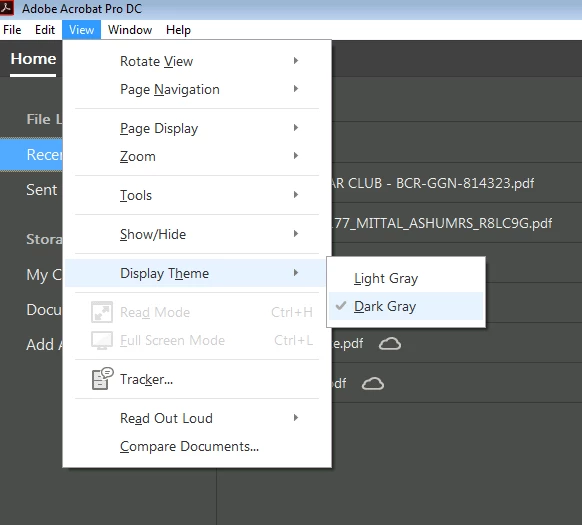
Is there any way to darken the UI (Themes, etc.) ?
This topic has been closed for replies.
Correct answer AshuMittal9644438

Hi Travis,

Acrobat DC update released today (10th May, 2016) introduces a new darker theme. Please open Acrobat DC application and go to Help > Check for updates to apply the latest update (2015.016.20039).


Next, go to View > Display Theme > Dark Gray and restart Acrobat.

More details here: What's new in Adobe Acrobat DC

Please try this out and let us know your feedback.

Thanks,

-ashu

54 replies

New Participant
June 18, 2021

ADOBE should release a CLASSIC Theme Interface! As so many big companies of music DAWs do, so people can choose what they prefare.   I must agree with many here, reading out of the white is not as confortable as the older version. 

New Participant
April 9, 2020

Is there any way to set the dark grey theme as default? I have to manually adjust every time I reopen adobe. I've tried setting the document preferences to 'Restore last view settings when reopening documents', but it does not seem to make a difference.

kellyh72750455
New Participant
April 11, 2018

MUCH BETTER THANK YOU.

New Participant
July 10, 2017

Go to view, Display Theme, Select Dark or Light theme.

Participating Frequently
May 16, 2017

Do you believe this has been going on for two years!

Participating Frequently
May 16, 2017

Oh God, do I agree with all of the above. Unfortunately, you are right in that a new generation of coders that are raised in the DC/Marvel style of programming are not going away.  The classic programming idioms of the desktop and the Human Interface Guidelines are passe! 

Adobe, I understand my generation of productive workers is retiring and passing away. We are being replaced with programming styles that venerate style over function and efficiency.  Yet efficiency and productivity are what pays the bills!  If you want the worker bees to be able to make honey, don't mess with the design of the hive!

DC is way too inefficient and hard to use--and the DC (and Windows 10 and Office 2017) minimalist design (let alone Android Material Programming) is going to cause a drop in productivity, until somebody else comes along and steals it from you!

Sigh.... I am using Adobe DC because I have to in order to create interactive forms for my clients.  I have spent hours doing what I used to do in less than one hour.  And I am not charging my customer the full freight of that.  DC is not worth the subscription in my opinion. I am a software slave to Adobe, yearning for the days when there was competition!

You slave in software,

Ray

New Participant
February 9, 2017

I just upgraded to Adobe DC, and this product feels like a kid's toy.  Buttons are annoyingly colorful.  I wanted to buy a professional product, and this feels like I bought my five year old a set of bendable plastic toys.

New Participant
December 17, 2016

Actually if you just apply the dark theme, it will just change the interface not page background

So, follow the steps , i hope it will clear your query

STEP-1

Change the theme

View--> Display Theme--> Dark UI

STEP-2

Change Page Background Color/Text Color/ Use High Contrast etc.

Edit-->Preferences-->Accessebility --> click on Page Background Color (Change as per your requirement)

bricefr
New Participant
September 20, 2016

The last versions of Windows make editors - like in this case Adobe - bring us awful interfaces just to comply with the new "visual aspects" of the systems which are clearly a joke. Do we really need HUGE menu entries and toolbar icons to be able to click on it with a 32x32 mouse cursor icon? Awful flat design where you can't distinguish anything? Flikering interface? I think this is the new generation of developers, who are Web developers by definition and don't even know of to develop a good optimized user-centrics client-side user interface. Go back to your JS/CSS/HTML and please stop provinding us such horrible software. I will uninstall this crap and use the Chrome PDF plugin as it seems this is the way to go now.

AshuMittal9644438
Adobe Employee
AshuMittal9644438Correct answer
Adobe Employee
May 10, 2016

Hi Travis,

Acrobat DC update released today (10th May, 2016) introduces a new darker theme. Please open Acrobat DC application and go to Help > Check for updates to apply the latest update (2015.016.20039).


Next, go to View > Display Theme > Dark Gray and restart Acrobat.

More details here: What's new in Adobe Acrobat DC

Please try this out and let us know your feedback.

Thanks,

-ashu

Known Participant
September 12, 2016

Hi Ashumittal,

Thank you for the update and appreciate your reply.

I still think this is an issue.

Both the menu bar and scroll bars are light themed when I change to the dark theme which to me is almost as distracting as the original light theme. See attached pic.

I really hope that the Acrobat UI is overhauled very soon. There is a lot of wasted space with oversized buttons and unnecessary full screen menus and dialogue boxes.

In my opinion, with it's current UI, Acrobat doesn't feel like it's a part of the Creative Cloud suite of products and cheapens the Acrobat brand a great deal.

Participating Frequently
September 12, 2016

Amen, brother (or sister!) abenci.  The huge buttons, toolbars and rows and columns of oversized inalterable widgets--everything gets in the way of displaying the document I want to work on.  And Acrobat insists on stacking toolbars; afaict, there's no way to merge toolbars. It's bad on my large screen monitor; I would think it would be virtually unuseable on a laptop or other small monitor.  The application I use at home to edit PDFs (PDF-Exchange) has quite small buttons/ icons on its toolbars, and I can merge toolbars, and I can remove buttons that I have no use for from the toolbars.

In short, despite a huge customization dialog, there's next to nothing that I can customize about the Acrobat interface, and it's literally in my face.