


New Participant
July 21, 2015
Answered

Acrobat DC when opened causes the Adobe AcroCEF file to multiply in Windows Task Manager

  • July 21, 2015
  • 5 replies
  • 34235 views

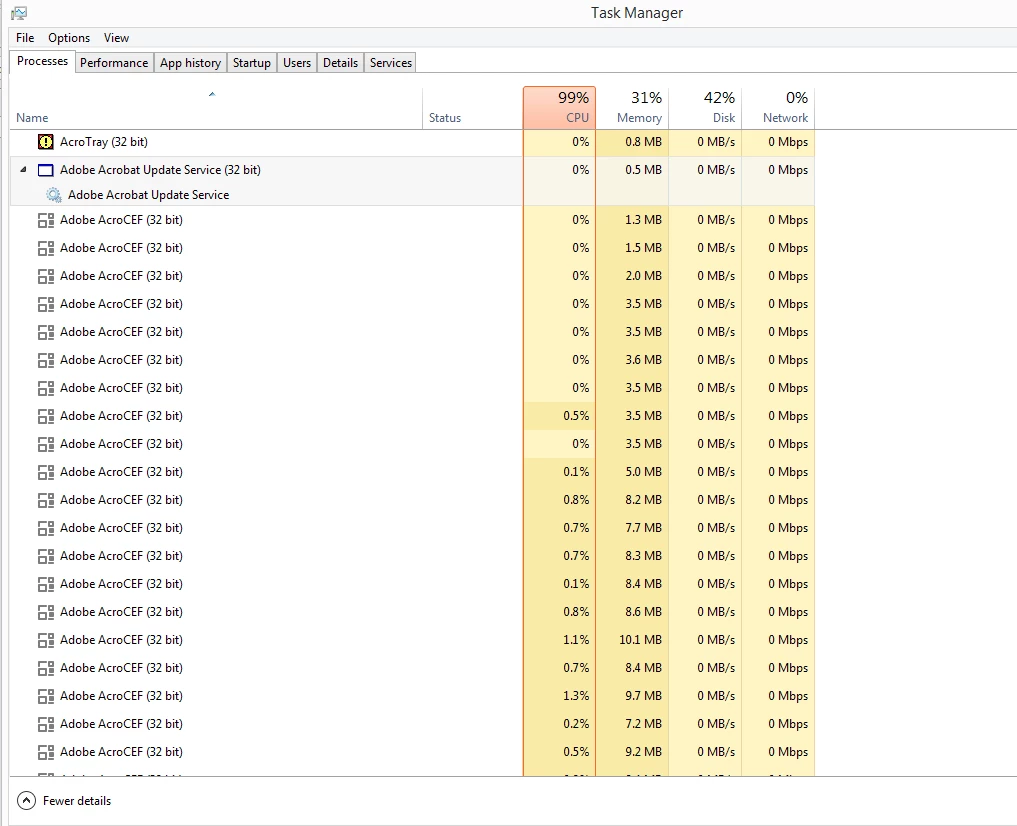
Acrobat DC when opened causes the Adobe AcroCEF file to multiply in Windows Task Manager and the CPU goes to 100%. I have a screen capture of Task Manager to show you what I'm referring to. I have to close Acrobat to make the file stop multiplying itself. Also cannot save the Binder file after trying to combine pdf files into one file. I logged out of Creative Cloud and back in again and I also uninstalled and reinstalled the program but the problem still occurs.
This topic has been closed for replies.
Correct answer chris scotts

Right click your shortcut icon, go to Compatibility and 'Run this program in compatibility mode for:  Windows XP (Service Pack 3)'.   I also have 'Run this program as an administrator' checked... but that didn't do anything by itself.

This solution has so far cured my problem.

5 replies

New Participant
June 27, 2023

Make sure the "Adobe Acrobat Update Service" is not disabled. That fixed it for me.

helpermom
New Participant
September 24, 2015

I have a Toshibba laptop with 6GB of RAM and an I7 processor running WIndows 7 Professional.  My recent class had Dell computers (all the same) with 6 GB of ram running Windows 7 standard.  I kept getting this issue and will have to kill the processes.  2 of the students encountered the issues while the other 10 did not.  It does seem to be the hardware or O/S, but rather it appears that if you have multiple PDF files open at one time that when the issue occurs.   I do hope that Adobe finds a fix for this issue.

New Participant
August 21, 2015

Was this issue resolved? I am also having many computers with this problem. AcroCEF.exe is opening hundreds of times if I even open Acrobat DC professional or standard.

Inspiring
September 8, 2015

I also have this problem

chris scottsCorrect answer
Inspiring
September 8, 2015

Right click your shortcut icon, go to Compatibility and 'Run this program in compatibility mode for:  Windows XP (Service Pack 3)'.   I also have 'Run this program as an administrator' checked... but that didn't do anything by itself.

This solution has so far cured my problem.

Sunil_Soni
Adobe Employee
Adobe Employee
July 29, 2015

Hi Lisa206, Please check your inbox and respond with required information.

Sunil_Soni
Adobe Employee
Adobe Employee
July 21, 2015

Hey Lisa206, Please provide more information about your system configuration and OS.

Is it happening just after Acrobat Launch ? if Yes, how do you launch acrobat with or without document ?

Or this issue is occurring in some specific workflow/scenario, if Yes, please provide exact steps.

Lisa 2021Author
New Participant
July 21, 2015

Hi, thanks for responding. I have windows 8.1, I had it installed on an external hard drive with all my other creative cloud applications. So today I tried uninstalling again and reinstalled into the c drive.

Adobe should add a reset button that lets you know what the default folder is in the preferences section of the creative cloud manager because I had to find the correct folder in the c drive which I think is program files x86 and then the Adobe folder in that folder. So that's where I reinstalled it. It still caused the same problem. I updated Wndows with a few updates that were needed, that didn't help either. Then I reinstalled Acrobat 8 from Creative Suite 3 which I still had a copy of. Fortunately I keep all the registration numbers of previous versions.

The problem occurs as soon as you launch Acrobat DC and it cannot save combined files. Something is very wrong with this program. It used to work fine the day before yesterday, but for whatever reason this does not work any longer.

Sunil_Soni
Adobe Employee
Adobe Employee
July 22, 2015

Hi Lisa, thanks for providing more information.

Based on your reply, it seems there are two issues :

  1. There are multiple instances of "Adobe AcroCEF.exe" in task manager.
    • Do you still see this issue ?
      • If yes, how many documents you have opened and how you opened them ?
        • All documents together(e.g. selected all documents and opened using Acrobat)
        • or opened one by one
      • Open single PDF document with Acrobat DC and observe number of "Adobe AcroCEF.exe" in task manager
      • Try opening couple(e.g. 3 - 4) of documents and observe number of "Adobe AcroCEF.exe" in task manager
  2. You are unable to download/save combined files.
    • Please provide concrete steps you followed for combining files
    • Please provide number of files and their size, that you are trying to combine
    • Are there any other Adobe product running at the same time.