


New Participant
February 27, 2019
Answered

Acrobat Exits when trying to view interactive PDFs

  • February 27, 2019
  • 6 replies
  • 12114 views

When trying to view an Interactive PDF with video embedded I get the following message 'This PDF cannot be viewed in Acrobat or Reader, and the application will now exit'. This only happens when I try to view a page in the PDF that has video embedded, I can view any other page in the PDF with no issues. This happens if I have created the PDF (from InDesign) or I try to open a PDF created by another person. Anyone having the same issue and any idea why this may be happening? I am on a MacBook Pro, macOS Mojave 10.14.4 Beta using the latest versions of Indesign and Acrobat DC.
This topic has been closed for replies.
Correct answer AkanchhaS8194121

Hey Fill32, 

As shared, that this problem only appears when you try to view the pdf generated from InDesign. Have you tried any other pdf that has a video embedded in it but created using Acrobat or any other pdf creator? Does it work or play the video for you?

Check the following-

  • Though you have mentioned that you are using the latest Acrobat DC, still we would like you to cross check the version. DC Release Notes — Release Notes for Acrobat DC Products
  • You can set the legacy multimedia player options under Edit > Preferences > Multimedia (legacy) if you know your preferred media player.
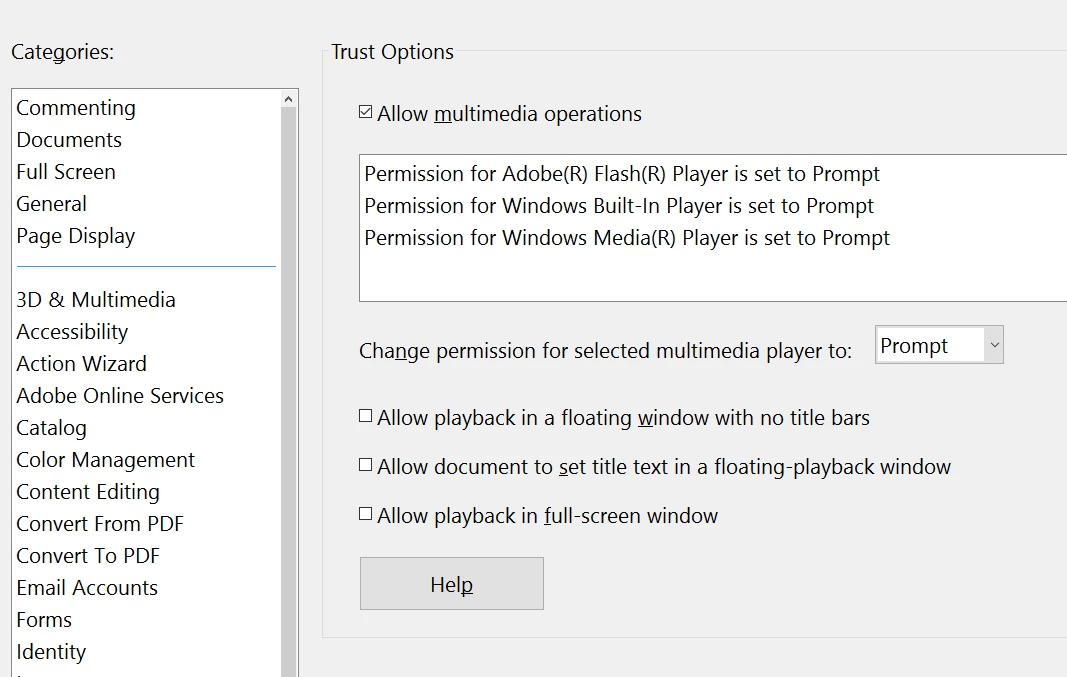
  • Open Acrobat>Edit >Preferences> check Multimedia Trust (legacy) and check what all operations are allowed under it-

  • For testing, disable "Protected View" under Preferences>Security (Enhanced).

Note: Changing the above security settings could pose security risks. We suggest you to turn it back On once you are done with testing.

Let us know the result.

Regards,

Akanchha

6 replies

New Participant
June 12, 2023

I know this is really old, but I just ran into this with Adobe Standard 2020 and Windows 11 22H2.  I had this same issue with 3D rendering using AutoDesk PDFs.  Plain old Adobe Reader would open them, but Standard would not.  I went to Edit-->Preferences--> Multimedia & 3D and changed the Renderer Options-->Preferred Renderer:  Software (in the drop down, mine was at DirectX 9).  Reader also had "Enable playing of Multimedia and 3D content" unchecked.  It then opened the file without a hitch, but I know this is for a different program so who know if it will also work in this case.

New Participant
January 31, 2021

2 years later and this bug still isn't fixed? Akanchha steps don't work, but even if they had I can't change the preferences on every students computer we share a PDF with! What has Adobe done to make sure video plays within the PDF? I'm not using Indesign, I'm inserting video directly with Adobe Acrobat. Then I save, view the report, it crashes when I try to play the video


ls_rbls
Braniac
July 6, 2019

I also found these two links useful:

InDesign system requirements

InDesign system requirements

How to export

Export InDesign files to Adobe PDF

robl90085355
Participating Frequently
October 14, 2019
I think the main issue here is that Acrobat used to work with embedded videos... and has never been a problem. Now, Adobe have forced the use of Flash to play embedded videos, the quality is hugely diminished, and now it doesn't seem to play at all, and crashes out. This bug just needs fixing, Adobe need to allow the playing of videos without using Flash and hanging onto an old technology. Please can Adobe give me a resolution, or a time when this will be fixed. Thanks
ls_rbls
Braniac
July 6, 2019

Hello,

I am somewhat  familiarized with Adobe Reader DC and Adobe Acrobat PR DC and  I would like to jump in and share some of my less qualified ideas in lieu of the lack of responses as expressed above in this thread.  I do understand the technical frustrations that some of may bump with  when trying to achieve important things with a computer.

I have to acknowledge though, that I've never used InDesign, that I am a MS Windows user,  and that my responses are a little long (not necessarily to the point);  I will, however, always strive  be as  empathetic as I can be to get to the root of a technical issue. That is as qualified as I can get and give something back to the community.

So I've been reading some of the concerns expressed here and I  came up with a few observations.

As a MS Windows10  user, for example, it is very common to backup your work, uninstall software, use cleanup tools, reinstall the offending software, apply all the necessary updates to include patches or recommended hot-fixes from the vendor(s).

--Assuming that all of the uninstall / reinstallation of software was performed as the first troubleshooting attempt, then apply all necessary  updates and fixes as the secondary troubleshooting attempt, then install/enable or update the correct flashplayer plugin for your operating system (and browser) as the third troubleshooting attempt, then,  check for what other Adobe  applications are being shared between the Adobe Acrobat and InDesign products.

Log in to the Adobe  Creative Cloud Service with your user account and see if there are any other apps that are shared between the two products; disable /enable as needed and check if that would do any difference.

When, and if,  all of those steps were fullfilled, it becomes a lot easier to narrow down if the file conversion problem is actually related to export configuration issues from the InDesign app, or , importing to PDF  configuration settings need to be modified  in Adobe Acrobat (or on both).

The rich-media addon tool by  itself is very straight forward so I wouldn't spend too much time fighting with it, except for the fact that the correct adobe flash-player plugin needs to be installed in your systems.

Also, the default video player that handles the actual playback of the embeeded file in the PDF document, the media format assigned to the video file when it was created with InDesign,  and:

--- Is the converted to PDF file optimized? reduced in file size? compressed in any way during the export?

---if the selected video player in Adobe Acrobat is able to  retain height and width ratios of the interactive content or original video.

---video format; what  type of video file is it?

----is it a file to be played  invoking a   URL  from  Adobe Acrobat?

Please refer to this link: Adding multimedia to PDFs

And instead of using "Print" check this option : "The Adobe PDF (Interactive) format is for saving aPDF with interactivity added in InDesign, like links, buttons, video, and more"  see link below

Share InDesign projects |

New Participant
July 5, 2019

I have completed all the suggested changes in Acrobat preferences and i still cannot view Embedded Videos in pages in a PDF, it crashes on those pages, had support person from adobe remote on for over an hour, then gave up. issue still not resolved. Using the latest version of Mac OSX Mojave and Latest Acrobat Pro DC.

Can somebody please fix this issue.

Jason

londonstef
Participating Frequently
July 5, 2019

Hello all,

exactly the same issues here still, I've posted messages to Adobe, nobody cares. A lot of our lectures are in interactive PDF from Indesign. I will start to lobby our university to cancel their Adobe Creative Cloud business plan. This silence from Adobe is absolutely ridiculous. If anybody has ideas how to get some sort of qualified response or at least an acknowledgement from them that would be great.

best

Stefan from Imperial College London

AkanchhaS8194121
AkanchhaS8194121Correct answer
Braniac
February 28, 2019

Hey Fill32, 

As shared, that this problem only appears when you try to view the pdf generated from InDesign. Have you tried any other pdf that has a video embedded in it but created using Acrobat or any other pdf creator? Does it work or play the video for you?

Check the following-

  • Though you have mentioned that you are using the latest Acrobat DC, still we would like you to cross check the version. DC Release Notes — Release Notes for Acrobat DC Products
  • You can set the legacy multimedia player options under Edit > Preferences > Multimedia (legacy) if you know your preferred media player.
  • Open Acrobat>Edit >Preferences> check Multimedia Trust (legacy) and check what all operations are allowed under it-

  • For testing, disable "Protected View" under Preferences>Security (Enhanced).

Note: Changing the above security settings could pose security risks. We suggest you to turn it back On once you are done with testing.

Let us know the result.

Regards,

Akanchha

Participating Frequently
November 17, 2019

Hello Adobe!!

I have the same problem... new Mac, last OS X and the last Adobe Creative Suite. 

I need help on how fix this problem. 
Acrobat crash exactly in the same way described here from the others. 
I am a professor and I need the pdf can contain Video. 

please, how can we fix this problem?!? 

Participating Frequently
November 29, 2019

Try the steps in this link: https://helpx.adobe.com/creative-cloud/help/uninstall-creative-cloud-desktop-app.html


This links shows hot to uninstall the Creative Cloud desktop app properly.


HELLO,

Finally I have the time to do what you have suggested me.

So I did all in the link, then I have uninstalled all the app (indesign, acrobat, etc) and then reinstalled.


IT DOESN'T WORK. THE PDF CRASH ON THE VIDEO PAGE. EVERYTIME.


What can I do???

IT'S A BIG PROBLEM…