Inspiring
June 14, 2023
Answered

Acrobat just updated. How do I reset the user interface to the traditional layout

  • June 14, 2023
  • 16 replies
  • 32325 views

The new user interface on Acrobat is a jumbled mess to anyone that has been using Acrobat for several years.


Is it possible to revert back to the traditional user interface?  I'm in the middle of several projects and I'd rather not waste time trying to learn a new user interface right now.

Correct answer Bevi Chagnon - PubCom.com

Yes, for now you can revert to the "traditional" user interface.


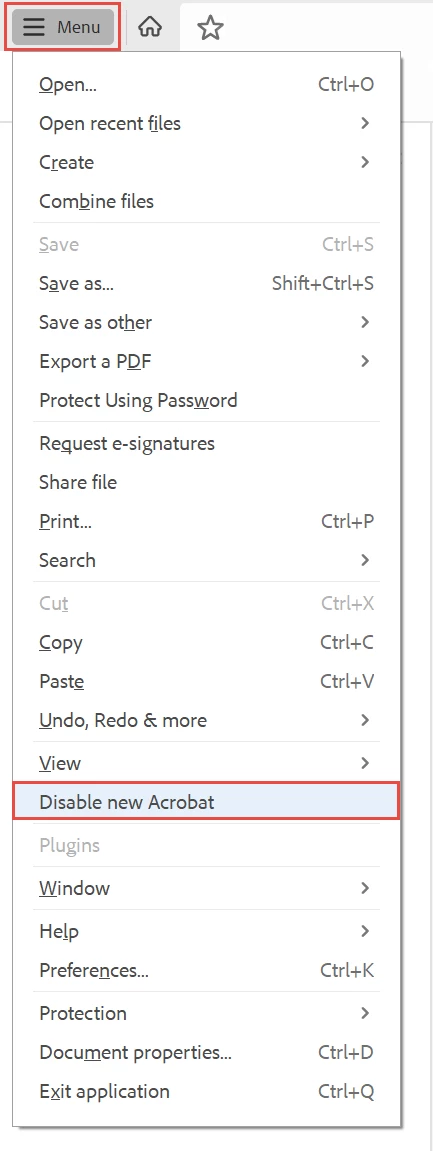
You can revert to the classic GUI interface by following the instructions here for both Mac and Windows users:

https://community.adobe.com/t5/acrobat-discussions/acrobat-2023-how-to-revert-to-classic-gui-user-interface/td-p/14052807 


And the above sentence tells a lot about the new interface:

  • A hamburger menu — although commonly used on mobile, are not necessary on desktop applications where the screen has enough "real estate" to provide a full menu. So users are not looking for or expecting a hamburger menu.
  • A hamburger menu that didn't have a label, so people looking for the 35-years-plus "File" menu were lost. And users certainly weren't looking for 3 horizontal bars to reach the controls for saving, printing, and exiting.
  • A menu system that is made up of little grey icons without labels. What do they mean? What do they do? WTHK!  And they can't be organized into a menu/panel of just the tools needed.
16 replies

Participant
March 13, 2024

I signed into this thread to offer a specific complaint about the new interface. I often want to view documents with 2 pages and no scrolling. In the new interface this is EIGHT clicks!  Menu/view/page display/2page [interface resets itself] Start again: menu/view/page display/no scrolling !!  Why it cannot at least keep page display active for selecting more then one option at a time is unclear. Well, it is clear, somebody goofed when they coded the interface.  

andreask85831847
Participating Frequently
January 19, 2024

Until today, I had totally ignored the fact that Acrobat shows different behaviour concerning updates than any other Adobe CC software. Meaning it is auto updating by default.

Everyone who is – like me – still in shock about the new interface: Please make sure to deactivate the auto update in the settings within Acrobat itself. This is particularly critical as you cannot – again in contrast to all other applications – install older versions of Acrobat through the management options of the CC App.

Also note, that all answers from Adobe people here strongly suggest that the UI changes will be eventually forced on all of us for good, i.e. that they will remove the option to revert the UI back rather sooner than later. You know, they will "guide us" to what they think we want.

This is beyond repulsive, even for Adobe standards.

Participant
January 19, 2024

Thanks. I just canceled the auto update.

Participant
December 19, 2023

Please ALWAYS keep the ability to revert to the old interface.

ALL of my customers thanked me when I showed them how to revert...


Participant
December 1, 2023

Let's talk accessibility... does Adobe know anything about that?  They talk a big game on the website, but when you completely overhaul the user interface of a software program that people have been using for years, many of those users who are neurodiverse, and you have an accessibility nightmare.  I can't tell you the number of times I have given up and just closed it.  The new layout is horrible.  All of these icons with no explanation of what they do.  I've selected buttons only to discover they do something completely different from what was expected.  I can't find anything anymore.  Work is taking me twice as long.  Seriously, if there was another software for PDFs I would be looking into changing right now.
The old interface needs to stay as an option for accessibility reasons.

Participant
November 6, 2023

I agree, and I have been looking at the comments from adobe, and its all the same comment, which shoes they are not listening.  I just found on my menu options an option to diable the new adobe layout.  


Participant
October 5, 2023

1000% yes on this. It is a jumbled mess and tools I use all the time - document splitting - is broken.

Participant
October 23, 2023

I am the only techincal writer for the division of a company that ships machines costing 100s of thousands of dollars. The machines can't ship without manuals and I don't have time to train on/learn a new completely different version of software when I am struggling to meet tight deadlines during the last quarter of the year. If the machines don't ship, we don't make our numbers and I and my collegues may lose our jobs. Leave the configruation alone!

Participant
September 20, 2023

Wouldn't it be nice if developers asked the actual users if they think things need to be changed? Book publishers don't change how a book is laid out, it has been the same way for hundreds of years with few complaints! Don't go changing things just because you can, or to justify a job position, PLEASE!


AnandSri
Community Manager
Community Manager
September 5, 2023

Hi All!


We appreciate your valuable feedback! We're always looking for ways to make Acrobat better, and we appreciate the time and effort you have taken to share your feedback with us.

We acknowledge that the new Acrobat represents a notable change, however we hope that as you get familiar with the new interface, you are able to be more productive & get more out of Acrobat. With the new interface, we aim to:


  1. Provide a simplified viewing experience that helps reduce clutter & optimise it for most used PDF actions that are relevant while viewing a document.
  2. Easily allow users to discover PDF tools they need by ensuring tools are intuitively grouped and a click away,
    • For example, all tools that allow content, page & file level edits can be found under one action-based verb called “Edit”; tools that allow converting files to & from PDFs can be found under “Convert”; tools that allow filling & signing documents or requesting signatures from others under “Sign”.
  3. Most importantly, the new interface enables users to effortlessly move between different PDF tools to complete their document related tasks.
  • For example, someone viewing comments in a PDF should also be able to easily edit the text of it without interrupting their workflow.
  • A user can seamlessly perform page level edits such as reordering, inserting, extracting, rotating or deleting pages while editing content and/or commenting on the file.


We would also like to highlight that we have exhaustively tested these changes with users over the past 12 months, keenly monitoring user behaviour & addressing top user issues before gradually rolling out the new interface to the Acrobat user base.


A point to note is that as we made these changes in the interface, we have ensured all tools & features that are currently supported, retain their familiar functionalities and workflows as they did in the previous version. We are proactively addressing any gaps or issues reported by users related to any break in current workflows.


We will follow up on this response with a detailed article explaining the changes, a guide to help familiarise you to the new interface, along with regular updates on upcoming changes.


Thank you once again for your feedback and do look forward to our upcoming releases!


~Anand Sri.

c.pfaffenbichler
Community Expert
Community Expert
September 8, 2023


A point to note is that as we made these changes in the interface, we have ensured all tools & features that are currently supported, retain their familiar functionalities and workflows as they did in the previous version.

@AnandSri , that seems strange … because I still get this (when clicking »Create custom tool«): 

Amal.
Community Manager
Community Manager
September 8, 2023

Hi there,


Hope you are doing well.


We acknowledge that the new Acrobat represents a notable change; however, we hope that as you get familiar with the new interface, you can be more productive and get more out of Acrobat.


We are actively working on all the currently unavailable features, such as 'Create custom tool', and user interface. And we will address them with the highest priority.


As you get more comfortable with the new interface, please contact us with specific questions on tools, features, or functionalities. We’re happy to provide helpful resources and answers to your questions.


If your critical workflows are impacted, you can switch to the old UI from the “Menu” on the top left corner of Windows and View Menu on MacOS. We will follow up with a detailed community-featured post, guiding you to familiarise yourself with the new interface and regular updates on upcoming changes.


~Amal

Participant
August 31, 2023

I hate it as well!! Layout was all different with most of the options missing or who know where.  I revert back to old version, thank goodness!

c.pfaffenbichler
Community Expert
Community Expert
September 1, 2023
quote

I hate it as well!! Layout was all different with most of the options missing or who know where.  I revert back to old version, thank goodness!

Interface changes can be annoying in and of themselves, but in this case it seems to actually include a degredation of functionality. 

Bevi Chagnon - PubCom.com
Legend
August 14, 2023

Tell the Acrobat engineers and marketing department to ditch this new "Modern" Acrobat interface. It doesn't work.


VOTE HERE: https://acrobat.uservoice.com/forums/590923-acrobat-for-windows-and-mac/suggestions/47082691-ditch-the-2023-user-interface-in-acrobat


|    Bevi Chagnon   |  Designer, Trainer, & Technologist for Accessible Documents ||    PubCom |    Classes & Books for Accessible InDesign, PDFs & MS Office |


