


New Participant
March 20, 2023
Answered

Acrobat PDFMaker was not able to mail merge the document

  • March 20, 2023
  • 12 replies
  • 39147 views

As the title suggests, I am running into this error and cannot get this feature to work no matter what I try.
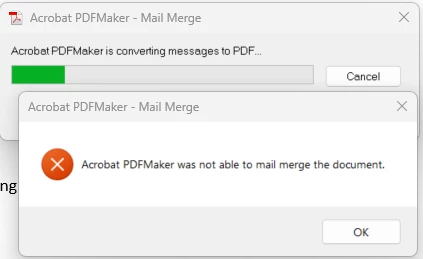
 

My operating systems and applications are fully up-to-date at the time of this posting. The versions of my operating system and related applications are as follows:

  • Windows 11 Enterprise, 64-bity, 22H2, OS Build 22621.1413
  • Adobe Acrobat Pro, Continuous Release | Version 2023.001.20064 | 64-bit
  • Microsoft Word for Microsoft 365 MSO (Version 2302 Build 16.0.16130.20298) 64-bit
  • Microsoft Excel for Microsoft 365 MSO (Version 2302 Build 16.0.16130.20298) 64-bit
  • Microsoft Visual C++ 2015-2019 Redistributable (x64) - 14.29.30139


To eliminate the possibility of a specific Word document or Excel datasource being the issue, I created a very basic and straight-forward test mail merge and datasource and am still running into the issue.


Installing Microsoft Visual C++ 2015-2019 Redistributable (x64), as recommended in a few other Adobe Support articles I found did not correct the issue.


I've also enabled logging and haven't found any useful information, as it appears to suggest its completing successfully even through it is not. Below are the outputs of the logs:


PDFMWord.log:

Mon Mar 20 11:30:18 2023 [INFO]: VBA::InitializePDFMakerDLL:Initialization of PDFMaker DLL started...
Mon Mar 20 11:30:18 2023 [INFO]: VBA::InitializePDFMakerDLL:Initialization of PDFMaker DLL Successfully Completed.
Mon Mar 20 11:30:18 2023 [INFO]: VBA::ShutdownPDFMakerDLL:Release pointers of PDFMaker DLL's.
Mon Mar 20 11:30:36 2023 [INFO]: VBA::PDFMakerConvertUsingSettings:PDFMWord to PDF conversion workflow started...
Mon Mar 20 11:30:36 2023 [INFO]: VBA::InitEverything:Initialization Started...
Mon Mar 20 11:30:36 2023 [INFO]: VBA::InitializePDFMakerDLL:Initialization of PDFMaker DLL started...
Mon Mar 20 11:30:36 2023 [INFO]: VBA::InitializePDFMakerDLL:Initialization of PDFMaker DLL Successfully Completed.
Mon Mar 20 11:30:36 2023 [INFO]: VBA::SetAppLanguage:Set PDFMaker Language Started.
Mon Mar 20 11:30:36 2023 [INFO]: VBA::SetAppLanguage:Set PDFMaker Language Completed.
Mon Mar 20 11:30:36 2023 [INFO]: VBA::InitEverything:Initialization Successfully Completed.
Mon Mar 20 11:30:36 2023 [INFO]: VBA::PDFMakerConvertUsingSettings:Log events corresponding to review/Share button click Info.
Mon Mar 20 11:30:36 2023 [INFO]: VBA::ConvertToPDFEx:Started Convert to PDF workflow...
Mon Mar 20 11:30:36 2023 [INFO]: VBA::PrintingEntryWithNoOptionsDlg:Initialization of PDFMWord was successful, now ready to start CreatePDFFile workflow.
Mon Mar 20 11:30:36 2023 [INFO]: VBA::CreatePDFFile:Creation Of PDF Started...
Mon Mar 20 11:30:36 2023 [INFO]: VBA::CreatePDFFile:Current Active Doc Font is Office Font.
Mon Mar 20 11:30:36 2023 [INFO]: VBA::GetFinalPDFFileName:Get PDF File Name.
Mon Mar 20 11:30:36 2023 [INFO]: VBA::Preprocess:Preprocessing for EMF started...
Mon Mar 20 11:30:36 2023 [INFO]: VBA::Preprocess:Preprocessing for EMF Successfully Completed.
Mon Mar 20 11:30:36 2023 [INFO]: VBA::GetFinalPDFFileName:Get PDF File Name.
Mon Mar 20 11:30:36 2023 [INFO]: VBA::CreatePDFFile:Successfully Got EMF.
Mon Mar 20 11:30:36 2023 [INFO]: VBA::ShutdownPDFMakerDLL:Release pointers of PDFMaker DLL's.
Mon Mar 20 11:30:36 2023 [INFO]: VBA::ConvertToPDFEx:Convert to PDF workflow Completed.


PDFMEngine.log:

Mon Mar 20 11:30:36 2023 [INFO]: PDFMEngineImpI::PDFMEngineConvertDoc:Doc To Pdf conversion has started.
Mon Mar 20 11:30:36 2023 [INFO]: PDFMDocExporter::convert:Doc To Pdf conversion has started.
Mon Mar 20 11:30:36 2023 [INFO]: WordExporter::doExport:Word Exporter Workflow has started...
Mon Mar 20 11:30:36 2023 [INFO]: WordExporter::doExport:Word Exporter Workflow has Ended Successfully.
Mon Mar 20 11:30:36 2023 [INFO]: PDFMDocExporter::convert:Doc To Pdf conversion has ended with return value 4 .
Mon Mar 20 11:30:36 2023 [INFO]: PDFMEngineImpI::PDFMEngineConvertDoc:Doc To Pdf conversion has successfully completed.
Mon Mar 20 11:30:36 2023 [INFO]: PDFMEngineImpI::PDFMEngineConvertDoc:PDFMEngine Workflow has Completed with return value 4 .


Furthermore, the issue seems to only be present with the Merge to Adobe PDF/Mail Merge function within Microsoft Word. All other functions of Adobe PDF Maker within Microsoft Word are working as intended.

Correct answer Wes28508813bswq

I'm having this issue and it's now June 2025. None of the solutions suggested here work. I can save as Adobe PDF fine, but Mailings -> Merge to PDF fails with the 'Acrobat PDFMaker was not able to mail merge the document' error. I don't know where to go from here.


A couple of hours later (not counting the 3 hours I had already spent on it this week), and I managed to get it working (for now). I had to run Word as administrator, go to Options -> Add-ins, Manage COM Add-ins ->Go. them remove the Acrobat PDFMaker Office COM Addin. Closed and re-opened Word as administrator again, followed the steps above except this time pressed Add (on the Add a COM Add-ins). then had to browse through C:\ to where PDFMOfficeAddin.dll was located (the location may differ on your computer depending on which Adobe product you have). Once I added the COM add-in back in, I was able to Mail Merge to PDF again. I have no idea why this worked or why Adobe engineers are still working on a fix. I also don't know if this fixed it permanently, only time will tell. Hope this helps someone, that error message is so poor, it tells the user nothing.

12 replies

New Participant
October 4, 2023

I have exactly the same issue. Tested on a document successfully merged and sent using the same method a few months ago ... it no longer works. 


Amal.
Community Manager
Community Manager
October 4, 2023

Hi @Brenda31003006xd7r 


I have sent a private message with more information. Please check.


~Amal

New Participant
October 16, 2023

Any news on this? I had a person that could successfully mail merge 3 weeks ago and can longer do so. Eveything is updated. Did Adobe make a change?

Amal.
Community Manager
Community Manager
March 21, 2023

Hi @default1fcmpmh800dy 


Hope you are doing well and sorry to hear that.


As you have the latest OS and application version, please make sure you have a User Name and Initials filled out under Word Options>Popular in Word and Excel.


Also, make sure you don't have any unusual characters or red-lined objects in my document, try to turn off ALL the grammar/spell check features and see if that helps.


You may also go through the help page https://helpx.adobe.com/acrobat/kb/troubleshoot-acrobat-pdfmaker-problems-office.html and check.


Regards

Amal


New Participant
March 21, 2023

I've ensured that user name and initials are filled out for all Office applications.I've completely turned off all proofing within Microsoft Word. I am still getting the same error.


Additionally, I've tried several solutions listed from the help page (as well as some others I've found from Adobe Support Community posts) and none of them resolved the issue. The solutions I tried include:

  • Turning off/disabling all options under PDFMaker preferences under the Security, Word, and Bookmarks tab and selecting "Smallest File Size" for conversion settings
  • I've repaired installations of both Adobe Acrobat Pro and Microsoft Office (which I don't believe the installations are the issue anyway because both are rather freshly installed, as is the operating system).
  • Confirmed no other macros are present or running
  • Launched Microsoft Word as an administrator
  • Launched Microsoft Word with the "/a" switch and then loaded the PDFMaker COM add-in manually. Because this did not work, it may eliminate factors such as:
    • Word auto macros, issues with the global template (normal.dot), other add-ins, Templates in the Word and/or Office Startup folders, other COM add-ins, Word Data key in the Windows Registry, and Word Options key in the Windows registry.
  • Freshly re-created a very basic test document and test datasource (yet again)


I've also reviewed the PDFMWord.dll and PDFMEngine.dll log files and there's no change from what I had originally posted above. I've also confirmed the file versions of these .dll files as version 23.1.20064.0. Are there perhaps any known compatability issues with Adobe Acrobat Pro 2023.001.20064 (current latest version) and Microsoft Word 365 Version 2302 Build 16.0.16130.20298 (current latest version)?


Amal.
Community Manager
Community Manager
March 22, 2023

Hi @default1fcmpmh800dy 


Thanks for sharing the observation and trying out the suggestion.


I have shared the details with the development team for review, and will share more information as soon as I get any input.


Regards

Amal