
Inspiring
March 20, 2022
Resuelto

Acrobat Pro 2020 - Preferences - Convert to PDF - PNG - What are the best settings?

  • March 20, 2022
  • 3 respuestas
  • 2630 visualizaciones

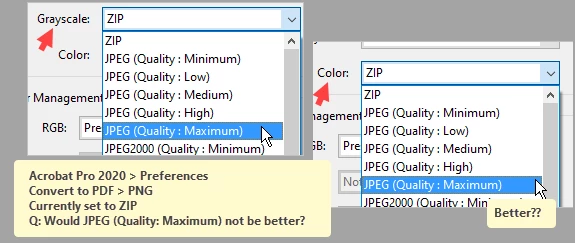
Up front, I do not remember where I got it from.... but all these years I have set the above as follows:

Scan Optimization: UNchecked

Compression
Monochrome: JBIG2 (Lossless)
Grayscale: ZIP
Color: ZIP

Color Management
RGB: Preserve embedded profiles
CMYK: Off
Greyscale: Off
Other: Preserve embedded profiles

Frankly, I never thought of anything else. However, I noticed there are also JPEG Quality Settings.
JPEG (Quality: Medium), JPEG (Quality: High), etc.
What are the best settings?
To be honest, I am not sure what 'ZIP' means.
Maybe ZIP is the best quality?

thanks

Este tema ha sido cerrado para respuestas.
Mejor respuesta de Brad @ Roaring Mouse

"To be honest, I am not sure what 'ZIP' means.
Maybe ZIP is the best quality?"

In a way, yes. ZIP is one of the oldest compression formats that is lossless. In fact, it's actually the basis of the compression technology used in PNG files. It's quite useful for images that have a lot of contiguous pixels of the same exact colour. e.g a black & white scan, or flat colour objects. For more photographic colour and greyscale images, where each adjacent pixel may be different, it's not as useful as it finds little to compress, hence the routines in JPEG compression are more successful.

3 respuestas

Brad @ Roaring Mouse
Community Expert
Community Expert
March 23, 2022

"To be honest, I am not sure what 'ZIP' means.
Maybe ZIP is the best quality?"

In a way, yes. ZIP is one of the oldest compression formats that is lossless. In fact, it's actually the basis of the compression technology used in PNG files. It's quite useful for images that have a lot of contiguous pixels of the same exact colour. e.g a black & white scan, or flat colour objects. For more photographic colour and greyscale images, where each adjacent pixel may be different, it's not as useful as it finds little to compress, hence the routines in JPEG compression are more successful.

gary_sc
Community Expert
Community Expert
March 23, 2022

Quote Brad: "For more photographic colour and greyscale images, where each adjacent pixel may be different, it's not as useful as it finds little to compress, hence the routines in JPEG compression are more"


Yes, but at the cost of degradation. 


Speaking of ZIP, when one is saving a TIF image within Photoshop, one is presented with an option to compress the image. The choices are LZW, ZIP, and JPG. To be honest, I've never used JPG compression with TIF. However, I saw an interesting article on the differences between LZW and ZIP compression, and the final bit of information was that you get better/faster compression with 8-bit images using ZIP and for 16-bit images, you should use LZW compression. 


adwul62Autor
Inspiring
March 24, 2022

Both many thanks for the replies. Truly appreciated. My screenshots are set to be saved as PNG. With one or two applications I can not set the format as it is set by design (to JPG). My Epson scanning software stores the files as JPG. It is mostly (if not all) screenshots that I am talking about and personally I believe TIF may be some overkill.
I just created a screenshot - of the above answers - resulting in a 137.987 bytes PNG file and a 3.502.994 bytes TIF, a file that is roughly 25x the size of the PNG. Maybe this is crucial in the case of photos, but for screenshots...

Anyway, in this scenario, i.e. simple screenshots, I believe that PNG and ZIP would then be the best way.

Again, thank you both!

p.s. @gary_sc 
Nice article about the scanning! (Scanning Clean, Searchable PDFs).
Situation looks quite familiar I can say... 🙂

gary_sc
Community Expert
Community Expert
March 23, 2022

HI Adwul,


Gosh, if life had easy answers for all questions, it would be pretty dull. ;>)


But I think I did give you the basics of what's important: one gets a better quality ANYTHING if the quality of the ingredients is the best. So, IMHO, JPG is the worst format to use because it has the opportunity to have image degradation, and that can affect the quality of the final product, the PDF. 


Now, you didn't mention if you are talking about scanned images or screenshot images. Both are non-lossy so both do not have that problem/issue. For me, when scanning, I always use TIF. The original files are humongous, but once converted to PDF, they are excellent in size. When taking screenshots, I always use PNG. 


The issue with scanning though is that a poor quality scan can ruin any PDF. See this article I wrote some years back that covers the issues and potential solutions. The one big difference that has occurred over the years is that scanning software that comes with office/home office machines has significantly dumbed down their software so that accessing things like "Level" is becoming more and more of a challenge. Some auto-correction tools, like selecting "Document" (over Photograph), is OK for good quality documents, but if there are any issues, the results may fail.


http://photosbycoyne.com/Gary's_Help/Scanning/clean-scanning.html


Good luck, I hope I've given you some things to work with.

gary_sc
Community Expert
Community Expert
March 20, 2022

Not fully sure what your question is and I'm not fully sure if you are talking about converting PDF to an image, if you're talking about the scanning process, or if you're talking about how images are stored within PDFs. 


But here is some basic image information.


JPG is a lossy format. That means that it loses information during the saving process. The greater the compression, the more information that is lost. (In addition, every time you open a JPG, make a change, and re-save it, it loses more information. This is called JPGing a JPG.) For most outside images, you'd be hard-pressed to see the damage, but when you have things like text (high contrast and lots of solid colors/shades), you can really see the degradation.)


JPG2000 is one of the ways around this loss. On the negative side, its files are much larger than other formats.


PNG-8 files have taken over the GIF format and are GREAT for images of limited colors/shades (they are limited to 256 colors/shades). To go beyond this, you need PNG-24, which are much larger files. Both versions can support transparency.


TIF images (my personal favorite), are very large files but if you scan an image as a TIF, at 300 ppi, it will have a storage size of about 8 MB. After it's been OCRed, it will be between 80-140 kb, depending on the amount of text in the document.


I know this is not answering all of your questions, but I'm still not sure what your questions are.

adwul62Autor
Inspiring
March 23, 2022

Up front, I am very sorry for the delay. There were some time-consuming things that needed to be taken care of first.
Many thanks for your response.

A second 'sorry' : my post may be a bit confusing.
I am talking about converting images -to- PDF, for instance combining a set of screenshots into a PDF.

In the screenshot the '>' should have been a ': ' , i.e Convert to PDF:  PNG

What are then the best settings for images?

Thanks again.