


Participant
March 12, 2020
Question

Acrobat Pro deleting random letters and adding double space between words

  • March 12, 2020
  • 2 replies
  • 5493 views

 Apologies if this error has been answered elsewhere; have not been able to find any mention.


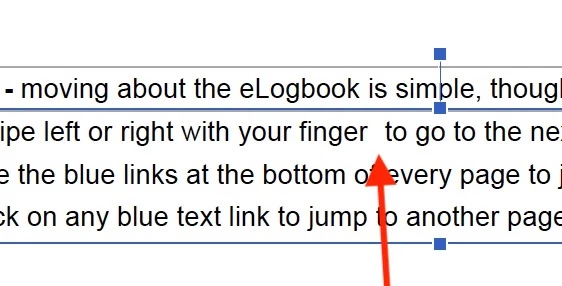
The Edit PDF module is deleting random letters throughout the document - mostly "r" and "e" and showing a double space before the next word.
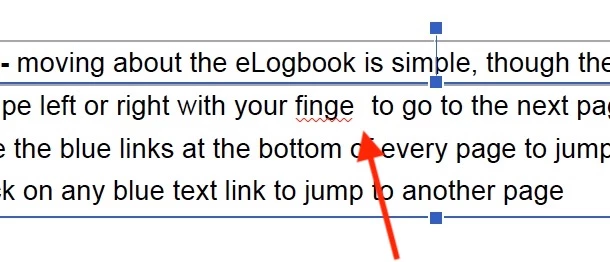
 

When the double space is deleted, the missing letter can be re-entered but the double space before the next word remains. 
 

Format Settings (in the right-hand sidebar) do not seem to change between affected text and other text in the same pargraph.


Any suggestions on what's going on and how to correct this would be very welcome.

Thanks,


Dennison

    This topic has been closed for replies.

    2 replies

    Participant
    January 16, 2024

    For future people experiencing this as it just happened to me, found a work around - you need to change the font and then change it back and it will correct. 

    Amal.
    Community Manager
    Community Manager
    March 13, 2020

    Hi Dennison, 


    We are sorry for the trouble. As described the letters e and r are getting replaced by double space. Is this a behavior with a particular PDF file or with all the PDFs that you try to Edit. Please try to Edit a different PDF file and check. If its a file specific issue please share the file with us for testing. Please upload the file on the document cloud (https://documentcloud.adobe.com/link/home/) generate the link and share it with us.


    What is the version of the application you are using? To check the version of the application please use the link (https://helpx.adobe.com/acrobat/kb/identify-product-version.html) and make sure you have the latest version of the application. Go to Help > Check for Updates. 


    You may also try to repair Installation (For Windows only) Go to Help > Repair Installation. 


    Let us know how it goes.


    Regards

    Amal 

    Participant
    March 18, 2020

    Amal,


    thanks for your very helpful reply.  apolgies for the delay in replying.

    Acrobat version 20.0006.20042

    on MacBook Pro using Catalina 10.15.2


    Happy to share the file with you - however not happy to post an open link to a public forum which would enable anyone to download ahead of publication.  Please share email or other method to share only with you.


    Thanks,


    Dennison

    Amal.
    Community Manager
    Community Manager
    March 27, 2020

    Hi Dennison,


    We are sorry for the delay in response. 


    Please share the link of the PDF file in the private message. To initiate the private message click on the message icon on the top right corner of the screen.


    Regards

    Amal