

Koko Chanel
Participant
March 1, 2023
Answered

Acrobat "auto-rotate and center" missing

  • March 1, 2023
  • 1 reply
  • 5651 views

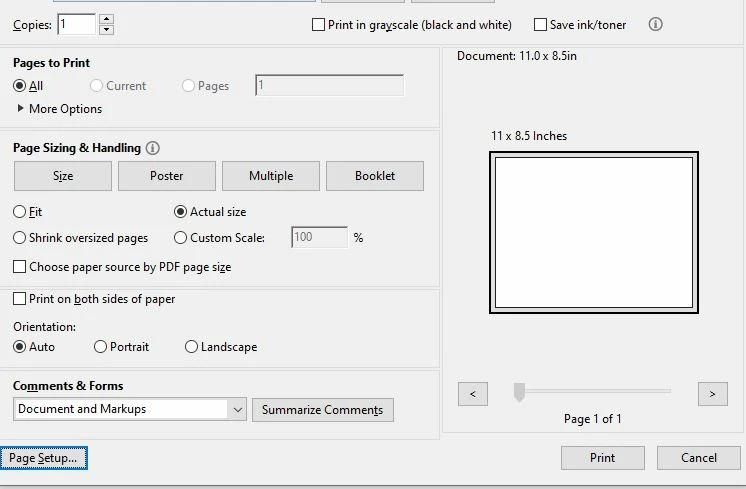
Where is the "auto-rotate and center" option? 
This topic has been closed for replies.
Correct answer Brad @ Roaring Mouse

It's there.. it's just been renamed simply : Orientation: Auto

When selected, pages are centered by default based on the information from the specific print driver's definitions of page sizes

1 reply

Brad @ Roaring Mouse
Community Expert
Brad @ Roaring MouseCommunity ExpertCorrect answer
Community Expert
March 1, 2023

It's there.. it's just been renamed simply : Orientation: Auto

When selected, pages are centered by default based on the information from the specific print driver's definitions of page sizes

Participant
March 28, 2024

So how do I stop it from auto-centering?

The option you pointed to is exclusively about orientation, but whatever I choose, Reader insists on centering both horizontally and vertically.

Participant
March 28, 2024

What are you trying to accomplish? If you select Auto, it will automatically center and orient your file to the paper size you have selected. Howver, if you manually select Portrait or Landscape, it should orient it accordingly from the top left corner of the selected paper size. This is overriden if you have selected Fit or Shrink; it will center it. If you need to reduce the size of the page, set a Custom size; it should orient from top left corner.


I was simply (or so I thought) trying to print *just the top half* of a 1-page document onto the top half of a sheet. The closest I got (among about a dozen attempts) is to zoom in to about 140-150 % and print the "Current view" in Portrait orientation. However, it always came out as vertically centered, no matter if fit, shrink or actual size is selected.

(I have since solved this particular print job by taking a screenshot of the document and printing from an image viewer application instead.)
