

rickhino
Inspiring
June 18, 2020
Question

Acrobat recent file view doesn't show complete file name

  • June 18, 2020
  • 3 replies
  • 2955 views

When I look at recent files, I get this:
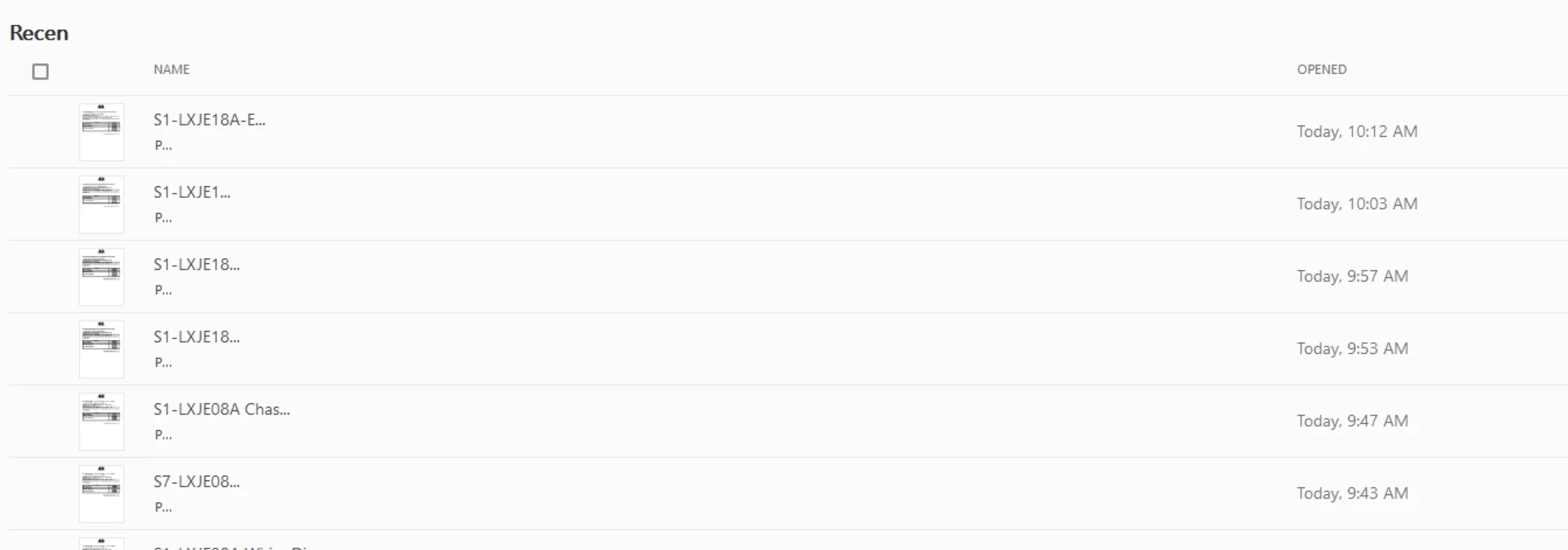
There is no way to adjust the columns so I can see the whole file name despite having lots of room.  What am I doing wrong?

This topic has been closed for replies.

3 replies

ls_rbls
Adobe Expert
July 8, 2020

Hey rickhino,


So I did more research based on the screenshot that you provided.


Can you create a PDF and give it a short name, just like "Testing"; one to three words long only and see if it gets truncated?


I have to ask , if the files that appear in your Acrobat recent view were all email attachments. If they are (or were email attachments) , consider the 50 character limitation for PDFs email attachments.


Also, it seems like the PDFs filenames are not conformant with the 8.3 filenaming convention.


And I also forgot to ask you if these are files viewed from  mapped networked drive.


I ask this because there seems to also be poblems associated with universal naming conventions that are used in mapped netwrok drives as well.  See here: https://docs.microsoft.com/en-us/openspecs/windows_protocols/ms-dfsc/149a3039-98ce-491a-9268-2f5ddef08192


If you're able to open these files in Acrobat with no problem then consider what some users have posted here in the forums.


They claim  that this is a 260 character limit handled  (or better said, a limit enforced) by the operating system only; no other applications are involved in this. 


If that is not the case, and you're also having issues when you try to open thses long filename PDFs, then see this feature request (posted back in May 2019) for additional insights:  https://acrobat.uservoice.com/forums/590923-acrobat-for-windows-and-mac/suggestions/37763941-add-proper-longpath-support


See also the article that Karl Heinz Kremer recommended in this old thread: https://answers.acrobatusers.com/Is-there-a-file-length-name-limit-in-Adobe-Acrobat-Pro-q191982.aspx


Last, I change the filename of one my PDFs to see how it would behave on my desktop (MS Windows 10), and this is how it gets truncated in the Recent view of my Acrobat:


The file I am using in my example above is not an email attachment and it has over 200 random characters, spaces, numbers, and symbols. Yet it got truncated at exactly 50 characters.


See more here:

https://nexus.od.nih.gov/all/2015/04/30/why-do-i-need-to-be-careful-naming-the-pdf-attachments-for-my-application/#:~:text=Take%20care%20to%20follow%20the,characters%2C%20including%20punctuation%20and%20spaces.

Adobe Employee
July 1, 2020

Hi,

Sorry for the trouble here.

I would need some information from you to help you with the issue.

  • Adobe Acrobat DC version info
  • Windows 10 version you have on your machine
  • Display settings of you machine (resolution & scaling)
  • Parallel to 'Recent' heading, there are buttons to switch to grid view, can you share a snapshot of grid view as well. 

Thanks,

charu karwa


rickhino
rickhinoAuthor
Inspiring
July 1, 2020

No worries, here it is.


Thanks!


rickhino
rickhinoAuthor
Inspiring
July 1, 2020

You're welcome but I don't consider myself a software designer expert of any kind as to comment on if Adobe should redesign its nterface or not. In addition, I am not having (or haven't experienced your issue on my end).


I did tried to recreate your issue in my computer and I can't find a way to manually test and change the font size for the user interface of the Acrobat applciation under MS Windows at this time.


Interestingly, I 've only seen this behavior during a forced  installation of Adobe Acrobat Reader DC on Linux.


There's a part in the installtion setup that you must select the specific type of fonts that Adobe Acrobat use for its interface, but like I said I've only seen this while testing Adobe Reader in a linux box. Besides,  I didn't know that every other application was displaying fine on your end until you mentioned it.


But if I was repairing your computer that is one thing I would try disregarding the fact that all of the other programs are displaying fine or not ...just for trial and error and be able to rule out other things. 


My background is mostly in PC repair, and I don't work for Adobe, I am an Adobe customer just like you who comes to the forums and help people on a voluntary basis. So is all fine with me if you want to try my guidance or not.


My apologies.  The first response was from an Adobe employee and I was remiss in not realizing subsequent responses were from you, simply a good person trying to help.  I really appreciate it.   I haven't had a ton of luck with Adobe products lately or their community-based support.  Don't let my poor attitude change your giving, helping nature.

ls_rbls
Adobe Expert
June 30, 2020

Is this happening in a MS Windows box?  I will assume is Windows 10.


If so, when did tyou notice this issue, was it after the latest Acrobat update or after applying latest MS Windows update?

rickhino
rickhinoAuthor
Inspiring
June 30, 2020

Thanks for the reply.  Yes, it's windows 10 and I don't remember it ever displaying correctly.