


Adobe Acrobat Accessibility: Table regularity fails, but all the rows have the same number of cells
I get files sent to me to make them compliant. Files come from a lot of sources.
The files I am having most issues never have accessibility tags. I talked to the clients and asked them to save or export to PDF so we could have the tags, but they explained that the files are produced through a web application and they do not have control over how the files get converted. These are time sensitive documents with that can have up to 40 pages of untagged content/tables. I rely on the auto tag feature to get these tagged in a timely manner. I then will do an accessibility check and go through the tag tree to fix any errors.
I have noticed lately, last 4 months or so, that sometimes Adobe Acrobat's Accessibility Full Check will flag tables for not being regular. These tables often do not have visible borders so when a cell is empty, the auto tag function will not create an empty cell making the tables irregular. I manually add the empty cell to the table structure in the tag tree to make sure every row has the same amount of cells. I will then recheck the failure, but adobe still flags it as a regularity fail.
I took sometime to troubleshoot the error and added an empty table to the tag tree and moved row by row on to the new table. After moving each row, I checked accessibility to find my problem row. The row had nothing out of the ordinary. Same number of cells as the rest and no funky tags within each cell. I added an empty row tag and the appropriate number of cell tags. I then moved all the content objects into the new empty tags. Deleted the now empty problem row and the failure was cleared.
I understand that in a perfect world, the pdf would have been created with tags from the beginning. But I and my clients do not really have control over that portion of the file.
Like I mentioned, this is a rather recent problem. It is most common on these types of files, but it has also occurred in files that have been converted from word.
I do check the span of the headers and have found nothing out of the ordinary.
Here is one of the tables in question:

3 rows. 3 columns.
After the initial scan this was marked for irregularity because the second and third row only had 2 cells. The column for trend description has no data. So, in the tag tree, I added 1 empty cell to I the middle of each row to make it regular, but it still failed regularity. I am at a loss on what my issue could be. Tag tree for the table:
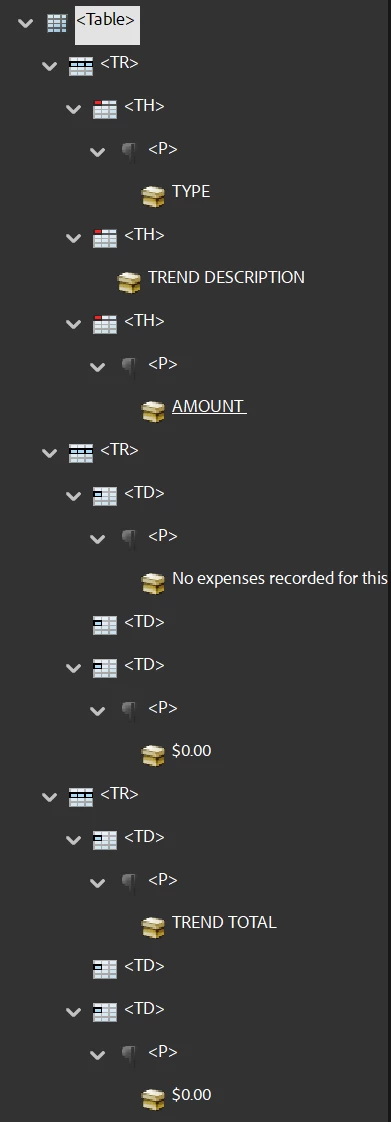
I have tens of these tables so it is very time consuming to have to “recreate” the tag structure of each table (since I can only add one new empty tag at a time) then move all the objects into the correct space. I’d appreciate any advice.
 AdChoices