


coreyb1313405
Participating Frequently
June 9, 2022
Question

Adobe Acrobat and Reader 64 Bit Missing DirectX Rendering

  • June 9, 2022
  • 5 replies
  • 37426 views

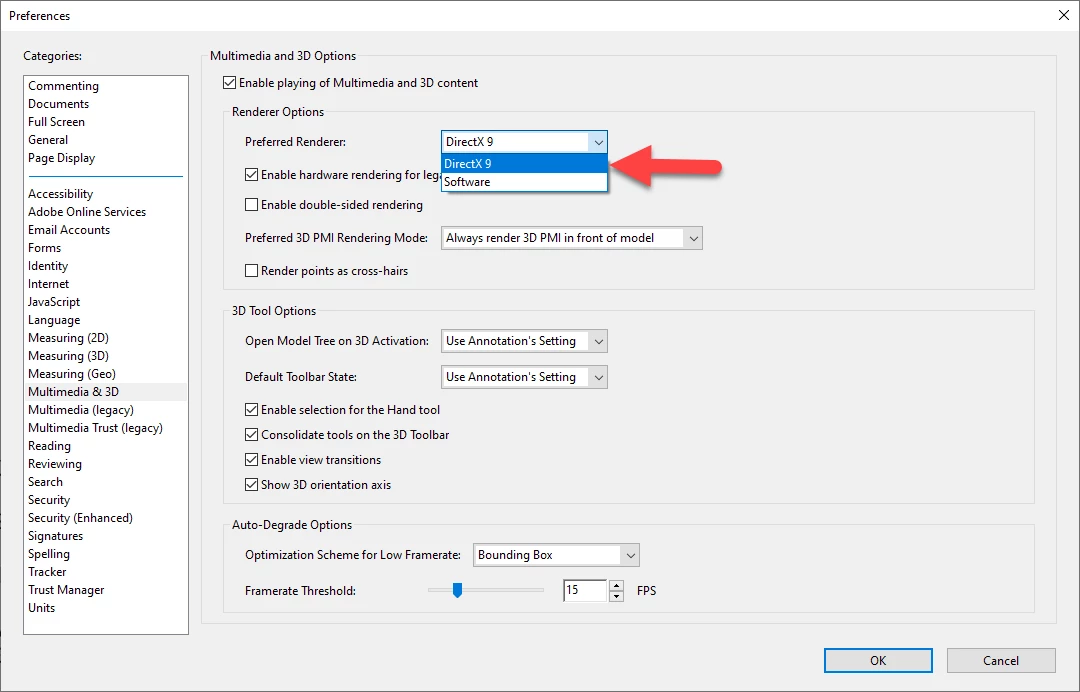
Recently it was brought to my attention that vendors and customers using Adobe Reader to view our 3D PDF's are no longer able to use the original functionality since it appears they got an automatic update to their Adobe Reader to become 64 Bit. This appears to have resulted in the lack of access to the Preferred Renderer of DirectX which seems to be the only option that allows for the renderer to work. In the 64 bit version of Adobe Reader DirectX is no longer an option, only "Software" is available to select.


What gives? Is there a fix for this? This is literally destroying my ability to deliver documentation to people and the only solution I've found to is to individually help every person uninstall 64 bit and have them reinstall 32 bit.


Adobe please tell me you tested this before ruining people's businesses with a poorly thought through update?
 

5 replies

New Participant
June 9, 2023
Please download the attached file to view this post
New Participant
June 9, 2023

Install Directx9!

New Participant
January 17, 2023

So we see that latest version of Adobe reader 64-bit has the option of DirectX9 renderer restored and avaiable .. I stil have to check if its the same for Adobe Acrobat Pro 64 bit ... Good start to the new Year ! Thank you !!


coreyb1313405
Participating Frequently
January 17, 2023

Hi @Sumit26072234l0d5 

Do you happen to have a screen shot of the version of Adobe Reader 64 bit that is showing the DirectX9?

Here was the previous version (shown below) that was missing the DirectX9.

Thanks so much!


coreyb1313405
Participating Frequently
January 17, 2023

i confirm that doing clean install of latest 64bit reader brings back directX. 


Outstanding! I just got them both Acrobat and Reader reinstalled and I confirmed the same.

Interesting though the version shown is the same 2022.003.20310, so not sure what they fixed but it appears to be working now in 64 bit. I'm thrilled!

New Participant
July 28, 2022

have the same problem and it is very very serious ..... I understand that updates exist, but it is not tolerable to force updates to people when they take away functionality and productivity. Adobe Acrobat Pro DC is everything for me, for the use and maintenance manuals ... from complete 3D PDF models I get the images to be included in the use and maintenance manuals ..... now it is not possible that I have to wait minimum 4 times of more, to orient a 3d model, because this 64-bit version of Adobe Acrobat Pro does not rely on GPU hardware ... but relies solely on SOFTWARE, so it is the CPU of the machine that works .... and that I do, in my Workstation, a graphics card with 8 Gb of ram, which costs 1000 $, if I can't use it ??? It is already STRANGE, (mind You, I do not blame You, Mr. MeenakshiNegi, who is working to collect user problems ... I blame the behavior of ADOBE) ADOBE, to have taken away from us the possibility from your Creative Desktop portal to be able to install relises older than 2 years, which perhaps, for what is really necessary, are already more than enough and run decently even on less performing hardware ..... but now, "in addition to the past, that you cannot recover", we have arrived at the absurd.... Do you remember that a few years ago, in Windows7, on Adobe ACROBAT Pro, in terms of rendering options, in addition to Software, in addition to DirectX, there was even the OpenGL option ..... ?? Now it is necessary to REALLY SOLVE THE PROBLEM, without wasting time....
PS. is time that the hardware requirements requested, on the page https://helpx.adobe.com/it/reader/system-requirements.html, with info LESS generic, and MORE technical .... RECOMMENDED GRAPHICS CARDS (brand, type,ecc) FOR ADOBE ACROBAT PRO, RENDERING OPEN GL OR DIRECTX.
Thanks for your attention. Attached is the screen shot of my situation.

Meenakshi Negi
Community Manager
Community Manager
June 9, 2022

Hi Corey,


Thank you for reaching out.


As mentioned above, the functionality does not work with the 64-bit version.

Would you mind sharing a video on how it works in the 32-bit and 64-bit versions? 

It would be helpful if you could share a sample PDF to replicate the behavior at our end.

Please share the Acrobat and OS versions used on both machines where the functionality works and does not work.


Thanks,

Meenakshi

coreyb1313405
Participating Frequently
June 9, 2022

Sure thing. Attached below is an image of the comparison.

Also attached is an example PDF built only to demostrate the issue, which was used for that comparison.

The issue occurs between 32 bit and 64 bit Adobe regardless of the machine. The direct cause is the lack of DirectX rendering.


Adobe Reader used for viewing to show the comparison is: 2022.001.20117

OS: Windows 10, 10.0.19044 Build 19044