


New Participant
May 15, 2021
Answered

Adobe Acrobat cannot connect to the Review Server: 13.107.136.9

  • May 15, 2021
  • 2 replies
  • 12574 views

Greetings,


After using the PDF Review Server on multiple docs for about a year, I am today getting this error message:

"Adobe Acrobat cannot connect to the Review Server: 13.107.136.9"
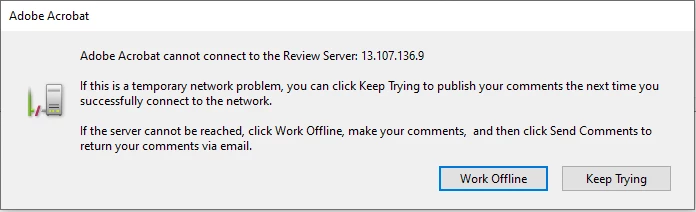
We host our Team comments on SharePoint. I have no issue visiting the SharePoint and viewing the Adobe file.

Does anyone have an idea of this error's root cause and/or how to troubleshoot this?

I am really blocked from doing work.

I have tried many of the other remedies posted in this community to no avail (tried logging in/out of SharePoint, Adobe, deleting credentials, rebooting, etc.)

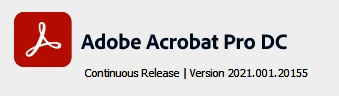
Here is the Acrobat Pro DC version:
 

Thanks,

Howard

Correct answer Howard B.

Greetings,

I solved this and wanted to post the information I found.

From the content of the error messages shown in the  Acrobat Review Tracker I got a hint that the MS SharePoint is denying access due to a bad Security Credential. A week prior I had reset and re-established my multi-factor authentication with MS Teams for other unrelated reasons.


I did two operations and solved the problem. I am not sure which of the two or both made the difference:

(1) Clear remembered account information...

Adobe Acrobat Pro DC > Preferences > Security > Adobe Experience Manager Document Security > Clear remembered account information...

(2) Reset Internet Explorer Settings

Adobe Acrobat Pro DC > Preferences > Internet > Internet Settings...

        Internet Properties > Advanced > Reset Internet Explorer settings > Reset... > Reset


After I did these two steps I can now connect to the SharePoint review server without error.


Thanks for you help and ideas to resolve this issue.

2 replies

New Participant
February 18, 2025

Hello all,

    We are seeing the same error as Howard B screen shot shows, our version of Adobe is 2024.005.20399 | 64bit.  Now I know why this message is coming up on ours.  The server which used to be the host as our Review Server died and we had to move to different hardware and host for the data.  We have several years of PDF document which have comments shared, and I am told it was easy to change the Review Server inforamtion.  However, the person who did the research and knew how to do so is no longer with the company and not reachable.  Suggestions...?

ls_rbls
Community Expert
May 15, 2021

At first I though this was related to the last update of May, but as I read the release notes for this update, there is no known issue with the Sharepoint integration.


On the other hand, it appears that Micrososft did some recent  changes that affect the way PDFs are associated with ActiveX controls, specially for Sharepoint online services.


See this troubleshooting link :


Let me know if it helps or not so I can gather more info.

Howard B.AuthorCorrect answer
New Participant
May 16, 2021

Greetings,

I solved this and wanted to post the information I found.

From the content of the error messages shown in the  Acrobat Review Tracker I got a hint that the MS SharePoint is denying access due to a bad Security Credential. A week prior I had reset and re-established my multi-factor authentication with MS Teams for other unrelated reasons.


I did two operations and solved the problem. I am not sure which of the two or both made the difference:

(1) Clear remembered account information...

Adobe Acrobat Pro DC > Preferences > Security > Adobe Experience Manager Document Security > Clear remembered account information...

(2) Reset Internet Explorer Settings

Adobe Acrobat Pro DC > Preferences > Internet > Internet Settings...

        Internet Properties > Advanced > Reset Internet Explorer settings > Reset... > Reset


After I did these two steps I can now connect to the SharePoint review server without error.


Thanks for you help and ideas to resolve this issue.

New Participant
September 9, 2021

Resetting the Internet Explorer Settings resolved this for us. Thanks you so much! You've saved me from a world of pain.