


New Participant
February 15, 2021
Answered

Adobe Acrobat DC Combine File Issues

  • February 15, 2021
  • 2 replies
  • 8383 views

Hi, document files aren't combining to create one document instead, I'm getting a pdf folder and Acrobat tells me to upgrade and pay for the higher version. I already own the entire Adobe CC Suite which is up to date. I did the Mac OS Big Sur update and there seems to be a lot of bugs in Adobe... Please help!
This topic has been closed for replies.
Correct answer jenny.ramella

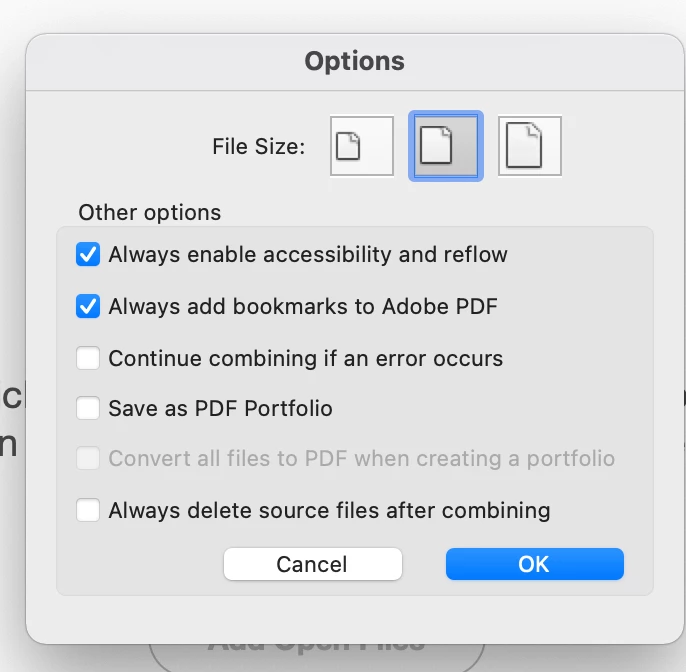
Hi, I've found the problem...it was in the combine file settings. I have changed it to this now...is that correct now? I can combine files but checking if the setting are back to default or not.


2 replies

gary_sc
Braniac
February 15, 2021

Hi Jenny,


Can you please take a screenshot of your Acrobat's "About Acrobat Pro DC" window?


Also, when you wish to share screenshots, please click on the icon above where you're typing. Thanks!!


New Participant
February 16, 2021

jenny.ramellaAuthorCorrect answer
New Participant
February 16, 2021

Hi, I've found the problem...it was in the combine file settings. I have changed it to this now...is that correct now? I can combine files but checking if the setting are back to default or not.


BarlaeDC
Participating Frequently
February 15, 2021

Hi,


How are you creating the combined files?


Malcolm

New Participant
February 16, 2021

Hi BarlaeDC, yes that is how I combine files or use tools. Been doing it for years and never had this problem.

New Participant
February 16, 2021

Yes thank you, I do all that.