


Participant
August 9, 2025
Answered

Adobe Acrobat DC error when opening documents unknown software exception (0xc06d007e adobe)

  • August 9, 2025
  • 2 replies
  • 1486 views

Running Windows 11 Pro, version 10.0.26100 Build 26100

Adobe Acrobat DC Version 2025.001.20577 64-bit - Paid subscription, single user

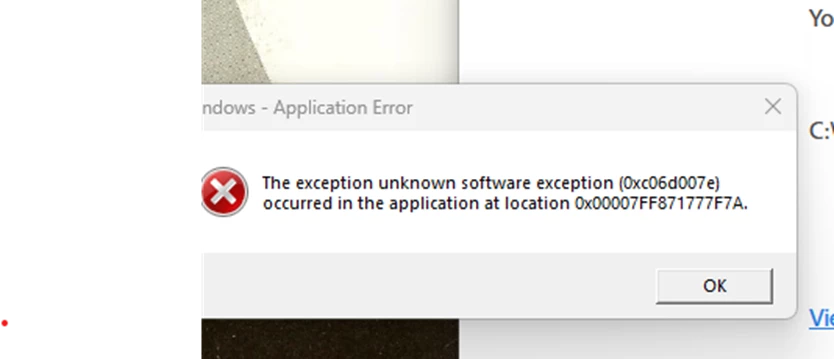
when opening Adobe PDF files now repeatedly receiving error message

"unknown software exception (0xc06d007e adobe) occurred in the application at location 0x00007FFD26A87F7A'  See screen shot below.

Dell PC SFF 7020 has plenty of resources. No new software installed - not aware of changes that might have caused this new issue.

Troubleshooting done:, Windows 11 updates are current. Adobe states it is current - no updates pending. nt.  Have tried repair of Adobe - several times - no help.  Reinstalled several times.  issue persists. Have run DISM /Online /Cleanup-Image /RestoreHealth and SFC /Scannow.  

What next to stop this repeated annoying error?  or is it time to switch to Foxit?  I have utilized a paid subscription of Adobe Acrobat for nearly 25 years.  The last two years, more and more Adobe freezing problems interrupting my work.  Thank you in advance for any solutions you might offer. 


Correct answer AnandSri

Hello @paulinet46375578


I hope you are doing well. Thanks for reaching out. We're sorry for the trouble you had with the Acrobat app.


Please reboot the machine once and check for the latest build of Acrobat 25.001.20623, Planned update, Aug 11, 2025. Go to Menu > Help > Check for updates, install any available updates, and restart the machine. 

Try opening any PDF and see if you still get the same error message. Also, ensure that you have all the operating system's mandatory and optional updates installed. Check for any pending updates of the OS as well. If the issue persists with the latest build, try resetting the Acrobat's Preferences once and reboot the machine. 


For testing purposes, create a test user profile with full admin rights, install Acrobat, and check. You can also try a clean installation using the Acrobat Cleaner tool, restarting the machine, and installing Acrobat.


If the issue continues, please provide the following information: the current version of the operating system on your device and the logs from the affected machine. To collect the logs, download and run the Log Collector tool. Make sure to select all log options and attempt to reproduce the issue. After that, close the Log Collector tool; it will generate the logs along with a log ID. Please share this log ID with us for further investigation.


Thanks,

Anand Sri.

2 replies

AnandSri
Community Manager
AnandSriCommunity ManagerCorrect answer
Community Manager
August 12, 2025

Hello @paulinet46375578


I hope you are doing well. Thanks for reaching out. We're sorry for the trouble you had with the Acrobat app.


Please reboot the machine once and check for the latest build of Acrobat 25.001.20623, Planned update, Aug 11, 2025. Go to Menu > Help > Check for updates, install any available updates, and restart the machine. 

Try opening any PDF and see if you still get the same error message. Also, ensure that you have all the operating system's mandatory and optional updates installed. Check for any pending updates of the OS as well. If the issue persists with the latest build, try resetting the Acrobat's Preferences once and reboot the machine. 


For testing purposes, create a test user profile with full admin rights, install Acrobat, and check. You can also try a clean installation using the Acrobat Cleaner tool, restarting the machine, and installing Acrobat.


If the issue continues, please provide the following information: the current version of the operating system on your device and the logs from the affected machine. To collect the logs, download and run the Log Collector tool. Make sure to select all log options and attempt to reproduce the issue. After that, close the Log Collector tool; it will generate the logs along with a log ID. Please share this log ID with us for further investigation.


Thanks,

Anand Sri.

Participant
August 12, 2025

Anand,

Thank you for your note.  Today I was able to update to the latest Adobe Acrobat build - that was not available when I posted on August 9, 2025.  It might have solved the problem....time will tell.

Cheers,

Pauline


AnandSri
Community Manager
Community Manager
August 13, 2025

Hello Pauline!


I am glad to know that you are able to use the app. Please feel free to reach out if you get any error message.


Thanks for your time and patience.

~Anand Sri.

kglad
Community Expert
Community Expert
August 9, 2025

in the future, to find the best place to post your message, use the list here, https://community.adobe.com/

p.s. i don't think the adobe website, and forums in particular, are easy to navigate, so don't spend a lot of time searching that forum list. do your best and we'll move the post (like this one has already been moved) if it helps you get responses.


<"moved from using the community bugs">
Participant
August 9, 2025

Thank you.  When i click on your link https://community.adobe.com/

I end up at https://www.adobe.com/community

You are correct, the adobe website, and forums are NOT that easy to navigate.  Forums for other technical issues are much more user friendly.  Thank you for your kind assistance.  Perhaps someone will offer a miracle resolution!

kglad
Community Expert
Community Expert
August 9, 2025

from  https://www.adobe.com/community click explore more communities and then click explore more communities again to see the full list.  then pick the one you think is the best fit.


but yes, don't stress over it.  we'll get it to the best forum sooner or later.