


New Participant
March 21, 2024
Question

Adobe Acrobat Flash Error - File requires Flash Player download

  • March 21, 2024
  • 6 replies
  • 5289 views

I am having an unusual issue with some adobe PDF files.  When I try to open the file, I get the following error message: "To view the Flash technology content in this PDF file, please install this version of Flash Player that supports Adobe Reader and Acrobat"

I am unable to open the file in Acrobat.  However, I can open the file in PDF XChange Editor, and it appears to be some sort of combined file with several documents. 
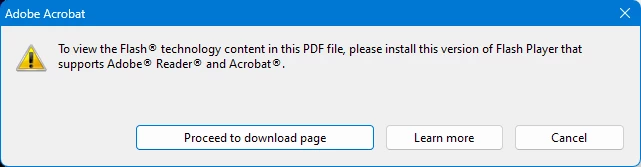
 

Since flash player has been discontinued by Adobe, and is no longer available for download, I am unable to install it. 


I am using Adobe Acrobat Pro XI.

How do I open these files in Acrobat?


6 replies

New Participant
December 19, 2024

Kapoor hatane Laga 


New Participant
December 19, 2024

 Kapoor 

johng7Author
New Participant
August 27, 2024

I found a free solution - PDF-XChange Editor.  Thios allows you to open files without flash.  The free version works fine, just open the file, select the pages to extract, and it will pull out the files.  easy.

https://pdf-xchange.eu/pdf-xchange-editor/

JR Boulay
Adobe Expert
March 22, 2024

This is obviously a PDF Portfolio created when the PDF Portfolio interface was managed by Flash Player.
There is a method (which I can't remember) for converting them into "normal" PDF Portfolios, which you can find by searching this forum.

Acrobate du PDF, InDesigner et Photoshopographe
New Participant
March 30, 2024

Thank you for your response.  I was able to find a "paid for" tool to convert the flash portfolios. 

It seems a bit strange to me that Adobe would discontinue Flash, with no replacement, and no support for fixing the previous version of portfolio files that were created using Flash.

Respectfully, If you are listening Adobe, there are many files created for business that now have this problem.  The solition is to use PDF XChange to open the files and save the individual PDFs.  I suggest you create a tool to fix this.

Abambo
Adobe Expert
March 30, 2024

There may be solutions to this, but not for Acrobat XI. If you can't open the file in a modern Acrobat, please post your version and OS.

ABAMBO | Hard- and Software Engineer | Photographer
gary_sc
Adobe Expert
March 21, 2024

When Acrobat XI was released, Flash was OK. Since then, not so much.


I suggest you try downloading the current Adobe Reader (free) and see if you have any issues opening this document. If you don't have any problems opening the document, you might consider upgrading your copy of Acrobat Pro. Sadly, Acrobat XI reached EOL (End of Life) in Oct. 2017 and will, therefore, not receive any updates.