


New Participant
September 13, 2024
Answered

Adobe Acrobat Hide next Field until previous field is entered

  • September 13, 2024
  • 1 reply
  • 871 views

I have a text field for 1 row called current plans.  I want to hide rows 2-7 until row 1 is filled, then hide rows 3-7 until row 2 is filled out
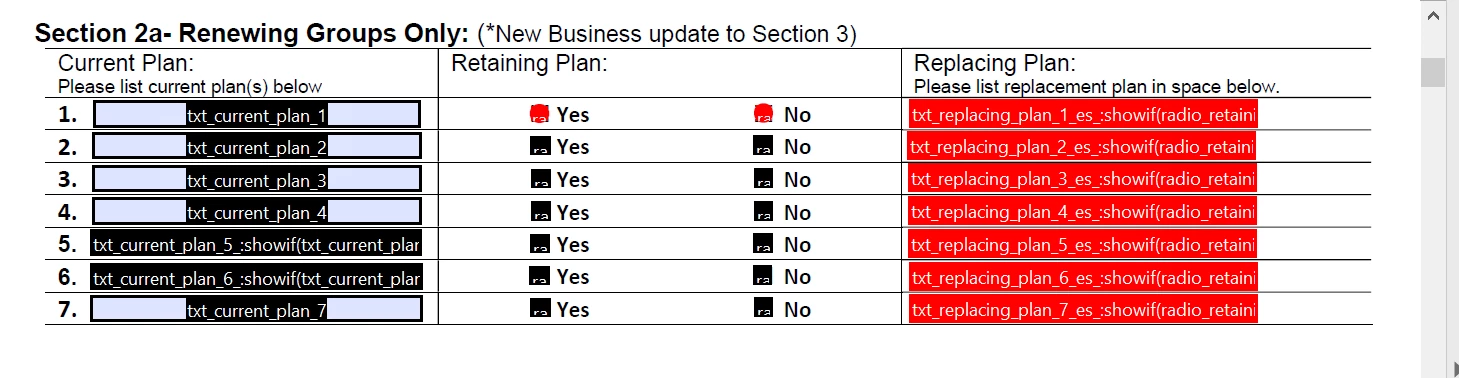
 

Can i do it with a show if condition or now


This topic has been closed for replies.
Correct answer Nesa Nurani

Rename your 5th and 6th fields, so their names are "txt_current_plan_5" and "txt_current_plan_6", then use this as custom calculation script of the first field:

for (var i=2; i<=7; i++) {
 var field = this.getField("txt_current_plan_"+i);
 var prevField = this.getField("txt_current_plan_" + (i-1));

 if (prevField.value != "") {
  field.display = display.visible;} 
 else {
  field.value = "";
  field.display = display.hidden;}}

1 reply

Nesa Nurani
Nesa NuraniCorrect answer
Community Expert
September 15, 2024

Rename your 5th and 6th fields, so their names are "txt_current_plan_5" and "txt_current_plan_6", then use this as custom calculation script of the first field:

for (var i=2; i<=7; i++) {
 var field = this.getField("txt_current_plan_"+i);
 var prevField = this.getField("txt_current_plan_" + (i-1));

 if (prevField.value != "") {
  field.display = display.visible;} 
 else {
  field.value = "";
  field.display = display.hidden;}}
New Participant
September 16, 2024

That worked.  Thank you for your help.  I'm having the issue with the middle column with the radio button.


I want to show only if txt current plan is filled out.  Would this work?  I dont see a custom calculation for radio buttons so i dont know where to enter it

for (var i=2; i<=7; i++) {
 var field = this.getField("radio_retaining_plan_"+i);
 var prevField = this.getField("radio_retaining_plan_" + (i-1));

 if (prevField.value != "") {
  field.display = display.visible;} 
 else {
  field.value = "";
  field.display = display.hidden;}}


Nesa Nurani
Community Expert
September 17, 2024

If you want to show radio buttons only when the current plan is filled, use this script and place it in one of the text fields as custom calculation script:


for(var i=1; i<=7; i++){
if(this.getField("txt_current_plan_"+i).valueAsString !== "")
 this.getField("radio_retaining_plan_" +i).display = display.visible;
else{
 this.resetForm("radio_retaining_plan_" +i);
 this.getField("radio_retaining_plan_" +i).display = display.hidden;}}