


Participating Frequently
December 8, 2022
Answered

Adobe Acrobat Pro - Calculate Average of only checked boxes

  • December 8, 2022
  • 1 reply
  • 1896 views

Hello, 


I am trying to build a field that takes the average of the fields that were selected. Currently if i use the average function it considers all uncheched checkboxes as "0". 

See bellow: 

The values on the left column correspont the the Export value of each checkbox. (Checkbox 48 is 1, Checkbox 49 is 2, so on so forth down the list
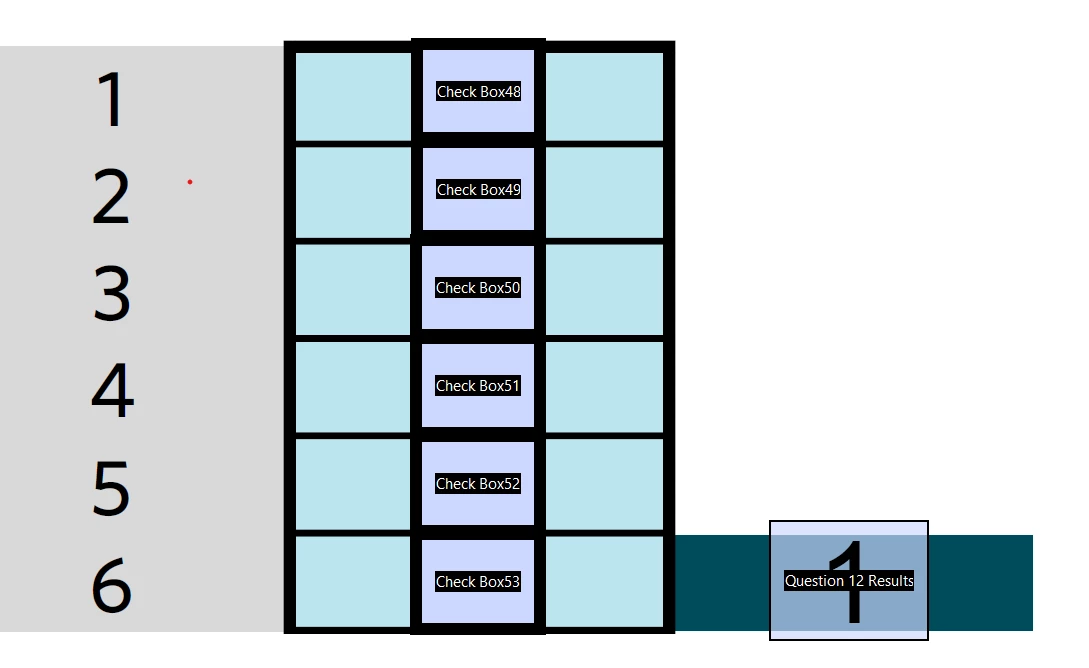
I need the field on the right (question 12 Results) to calculate the average of ONLY the checked fields. 

I am fairly new and I am completely ingnorant when it comes to coding, if anyone can help me I would greatly appreciate it. 


Thank you very much for your help!

This topic has been closed for replies.
Correct answer Thom Parker

The fields on the form are named "Question12.Check1" etc. But the code gets the field "Question1".  The fields names in the code have to exactly match the field names on the form. 


Change the code to use "Question12".  


1 reply

Thom Parker
Community Expert
December 8, 2022

This functionality is just complicated enough that a custom script will be needed.

But first, the checkbox field names will need to be changed, so they are suitable for scripting. 


Make them something like "Question1.Check1", "Question1.Check2", "Question1.Check3", etc.

Here's a custom calculation script for the result field.

 // First, get an array of all the checkbox fields for this question
var aChkFields = this.getField("Question1").getArray();

// Loop over array and sum only checkboxes that are checked. 
var nSum = 0, nCnt = 0;
for(var i=0;i<aChkFields.length;i++)
{
    if((aChkFields[i].value != "Off") && !isNaN(aChkFields[i].value)){
       nCnt++;
       nSum += Number(aChkFields[i].value);
    }
}
if(nCnt > 0)
  event.value = nSum/nCnt;
else
  event.value = "";


Thom Parker - Software Developer at PDFScriptingUse the Acrobat JavaScript Reference early and often
Participating Frequently
December 8, 2022

Hello Thom, 

Fistly, thank you so much for your help, and please, pardon my ignorance. 

I have renamed the checkboxes as you told me. 

are there any other steps I need to enter? Am I doing something wrong? 

I have pasted it into the text field calculation as a custom script. 


I tried this and the value remains at Zero. 


Could you help me out?


Again thank you so much you are saving my life. 


Thom Parker
Thom ParkerCorrect answer
Community Expert
December 8, 2022

The fields on the form are named "Question12.Check1" etc. But the code gets the field "Question1".  The fields names in the code have to exactly match the field names on the form. 


Change the code to use "Question12".  


Thom Parker - Software Developer at PDFScriptingUse the Acrobat JavaScript Reference early and often