


Exit
  • Global community
    • Language:
      • Deutsch
      • English
      • Español
      • Français
      • Português
  • 日本語コミュニティ
  • 한국 커뮤니티
1

Adobe Acrobat PRO cannot open Word files or convert them to .pdf

Community Beginner ,
May 16, 2023 May 16, 2023

Hello all,


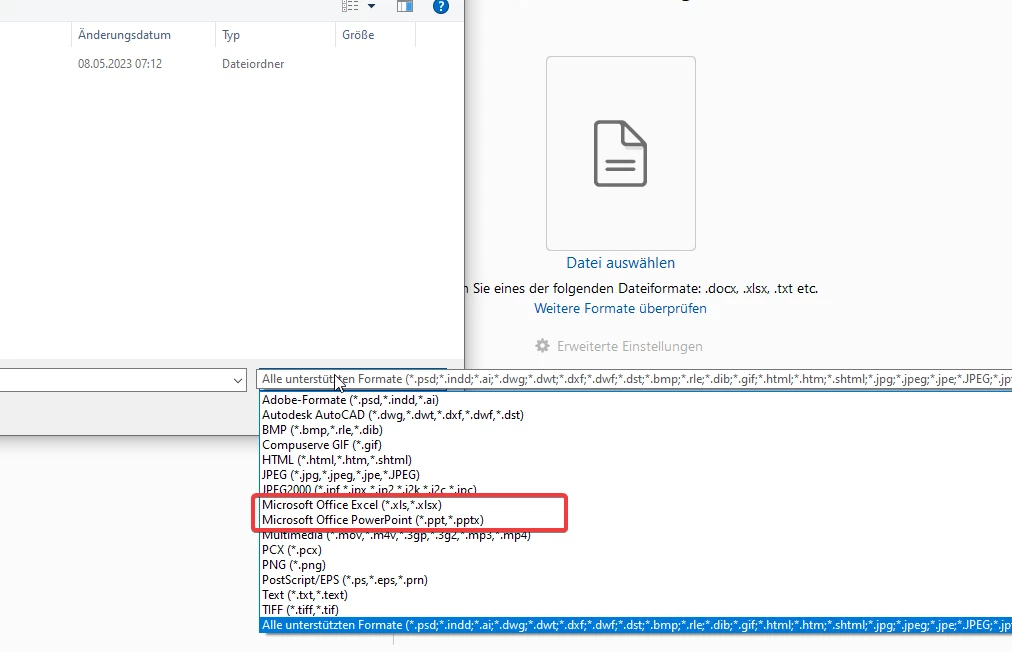
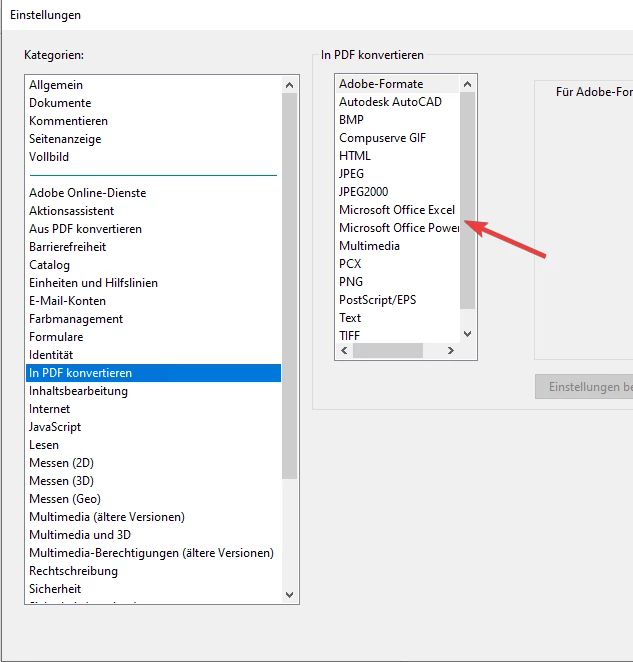
I have the problem that I can't open Word files in Adobe Acrobat or convert them to pdf on one device.
Daniel279576761s33_0-1684242815634.png


Daniel279576761s33_1-1684242838808.png


The following is installed on the computer
Windows10 22H2 (Build 19045.2846)
Office 365 2208 (Build 15601.20660)
Acrobat Pro 2023.001.20174

I have already reinstalled both Office and Acrobat once, unfortunately with no improvement.

TOPICS
Create PDFs , Edit and convert PDFs
3.0K
Translate
Report
Community guidelines
Be kind and respectful, give credit to the original source of content, and search for duplicates before posting. Learn more
community guidelines
Community Expert ,
May 16, 2023 May 16, 2023

When you open Word, do you see the Acrobat button?


Abambo_1-1684250721923.png


ABAMBO | Hard- and Software Engineer | Photographer
Translate
Report
Community guidelines
Be kind and respectful, give credit to the original source of content, and search for duplicates before posting. Learn more
community guidelines
Community Beginner ,
May 16, 2023 May 16, 2023

Yes, I see the button and it works.

But for my main problem that I want to merge several Words and PDFs to one PDF it doesn't help me much.

Translate
Report
Community guidelines
Be kind and respectful, give credit to the original source of content, and search for duplicates before posting. Learn more
community guidelines
Adobe Employee ,
May 16, 2023 May 16, 2023

Hi Daniel279576761s33,


Thank you for reaching out, and sorry about the trouble.


Please check what happens when you try to create or combine the Word file using the right-click option. Check if you get any errors.

Also, check if you can see the Acrobat ribbon on MS Word application. 

In the meantime, try creating PDF on an Acrobat Online account (https://acrobat.adobe.com/). Open the link and sign in using our Adobe ID. Go to the Convert tab and select Convert Word to PDF. 


Thanks,

Meenakshi

Translate
Report
Community guidelines
Be kind and respectful, give credit to the original source of content, and search for duplicates before posting. Learn more
community guidelines
Community Beginner ,
May 17, 2023 May 17, 2023

When I do it from the right click menu, only the PDF's are added to Acrobat.

And this is what it looks like when I drag and drop the files into Acrobat:

Daniel279576761s33_0-1684320959148.png


Yes the Acrobat ribbon I see in Word.


The online version doesn't really help me, colleagues often merge many files and since it works for 3 out of 4, I want it to work for the last one.

Translate
Report
Community guidelines
Be kind and respectful, give credit to the original source of content, and search for duplicates before posting. Learn more
community guidelines
Adobe Employee ,
May 17, 2023 May 17, 2023

Hi Daniel279576761s33,


Thank you for sharing the information.

To confirm, what happens when you use Acrobat Ribbon to create PDF in a Word application? Do you get any errors? When I say Acrobat ribbon, it is the one in the menu bar. 


MeenakshiNegi_0-1684335509000.png


Also, to be sure, did you notice this change in behavior after the recent update, or was the issue there before?


Thanks,

Meenakshi

Translate
Report
Community guidelines
Be kind and respectful, give credit to the original source of content, and search for duplicates before posting. Learn more
community guidelines
Community Beginner ,
May 18, 2023 May 18, 2023

When I create a pdf via the Word menu bar Adobe->create pdf it works, just not in adobe acrobat itself.

This is a new installation on the device, we just introduced adobe acrobat a few days ago. In the department are 4 pc's on 3 of them it works and on the one said not.

Everywhere the same Windows, Office and Acrobat version is installed.

I have already reinstalled Office and Acrobat, but the error remains.

Translate
Report
Community guidelines
Be kind and respectful, give credit to the original source of content, and search for duplicates before posting. Learn more
community guidelines
Adobe Employee ,
May 26, 2023 May 26, 2023

Hi Daniel279576761s33,


Sorry about the delay in response.


Could you please share a small screen recording of creating a PDF from Word and when trying to create PDF in Acrobat?

We will share the information with the team to get this checked.


Thanks,

Meenakshi

Translate
Report
Community guidelines
Be kind and respectful, give credit to the original source of content, and search for duplicates before posting. Learn more
community guidelines
Community Beginner ,
May 31, 2023 May 31, 2023
LATEST

Hi,

attached the video you want, as you can see no Word can be selected.

Translate
Report
Community guidelines
Be kind and respectful, give credit to the original source of content, and search for duplicates before posting. Learn more
community guidelines