


casual_responsibility0101
Participant
December 21, 2016
Question

Adobe Acrobat Pro DC crashes when running OCR on pages with tables

  • December 21, 2016
  • 6 replies
  • 10502 views

Hi all,

Very annoying error that has hit us recently. 

Bit of background - I work for a printing company that carries out a lot of scanning for a large utilities company on a regular basis.  The scanning is predominately A4 size and consists of several large lever arch folders  of 400 - 600 pages each.  Due to the pages been of mixed orientation, and to help reduce the file size, I OCR all the PDF's. 

Over the last few weeks Acrobat has started crashing during the OCR process.  It will crash on the same page every time.  If I set the page range to before or after the offending page it tends to work OK, unless a similar page occurs else where in the document.  After carrying out a lot of investigating I have figures out that the error is related to a table that appears on certain pages, scattered throughout the folders.  The tables vary on each page in size and content.  The tables are not very big, 4 to 5 rows by 9 to 14 columns, but they do contain some symbols like %<*#  The quality of the original is OK, its a copy of a copy so the outline of the table is almost invisible but the contents are clear.

This is the error message I receive (sometimes I also get a brief message stating that Adobe failed to send a DCC command):
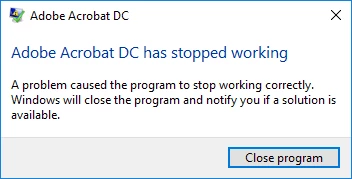
I tried OCR on another PC with Adobe Acrobat Pro DC and it crashed on the same page, however, when I run OCR on a computer with Acrobat 8, it works fine.

Anyone come across kind of error and any idea for a possible solution?

If I can figure out how to upload a file I will add one of the offending pages for you to try.

Many thanks

Michael

This topic has been closed for replies.

6 replies

Participant
February 11, 2020

Has there been any resolution to this?  I've just had the same thing happen.

Participant
May 15, 2020

Me, too.

Amal.
Community Manager
Community Manager
May 15, 2020

Hi Liuh


We are sorry for the trouble and the experience. As described, the application is crashing when running OCR on pages with tables


Is this a behavior with a particular PDF file or with all the PDFs with tables? Please try with a different PDF file and check. If its a file specific issue please share the file with us for testing.


Is the file located on shared network drive? if yes, please download the file locally to your computer and try again and check.


What is the version of the Adobe Acrobat DC you are using? To check the version go to Help > About Adobe Acrobat DC

Make sure you have the latest version installed (20.009.20063) Go to Help > Check for Updates.


You may also try to repair installation (For Windows Only) Go to Help > Repair Installation and see if that makes any difference.


If it still doesn't work, please turn off the protected mode for testing. Go to Edit (Windows), Adobe Acrobat DC (Mac) > Preferences > Enhanced Security  > Turn off the Protected Mode and uncheck the Enhanced Security
Note: Please turn on the security after testing.


Let us know how it goes


Regards

Amal

Participant
October 17, 2018

I'm having the same problem. I'm running Acrobat Pro DC version 17, last updated April 2018. I'm on a PC, Windows 10, trying to scan a document that's 290 pages long, and every time it gets to page 72, it crashes the program.

I uninstalled, shut down, reinstalled, ran it again, exact same results.

I tried deleting pages and running it on a smaller document of only 95 pages. Worked fine until it got to page 95, then it crashed.

Tried it again, this time with the document only at 69 pages. Worked fine until it got to the last page, then crashed.

With a previous version of Acrobat Pro, I was able to use the OCR function successfully on a 200+ page document at the first try.

Adobe Employee
April 13, 2017

With the latest release of Acrobat on 11th April 2017, this issue has been addressed.

To get the latest product update, within the product, click on the menu Help-> Check for updates.

Participant
January 23, 2017

I have the same issue, my Acrobat DC crashes when Enhancing large documents. This has never been an issue until recently.

Account Detail:

   User Rights: Regular

   User Account Control: Default

   Process Integrity: Undefined

   Profile Type: None

Acrobat Detail:

   Sandboxing: Unsafe Locations

   Captive Reader: No

   Multi-Reader on Desktop Support: Off

Applications Installed:

   Office Version: Office 2016 32-bit

Available Physical Memory: 1399724 KB

Available Virtual Memory: 3801764 KB

BIOS Version: HPQOEM - 1

Default Browser:

Default Mail: Microsoft Office Outlook

    mapi32.dll

    Version: 1.0.2536.0 (rs1_release.160715-1616)

Display Detail:

   Screen Width: 1366

   Screen Height: 768

   Number of Monitors: 1

   Number of Mouse Buttons: 5

   Has Mouse Wheel: Yes

   Has Pen Windows: No

   Double Byte Character Set: No

   Has Input Method Editor: Yes

   Inside Screen Reader: No

Graphics Card: AMD Radeon(TM) R5 Graphics

    Version: 8.17.10.1401

    Check: Not Supported

Installed Acrobat: C:\Program Files (x86)\Adobe\Acrobat DC\Acrobat\Acrobat.exe

    Version: 15.23.20053.211670

    Creation Date: 2016/12/23

    Creation Time: 10:10:58 AM

Installed Acrobat: C:\Program Files (x86)\Adobe\Reader 10.0\Reader\AcroRd32.exe

    Version: 10.1.16.13

    Creation Date: 2015/09/24

    Creation Time: 7:40:34 AM

Locale: English (United States)

Monitor:

    Name: AMD Radeon(TM) R5 Graphics

    Resolution: 1366 x 768 x 60

    Bits per pixel: 32

OS Manufacturer: Microsoft Corporation

OS Name: Microsoft Windows 10

OS Version: 10.0.14393 

Page File Space: 4194303 KB

Processor: AMD64 Family 22 Model 48 Stepping 1  AuthenticAMD  ~1996  Mhz

Session Detail:

   Boot Type: Normal

   Is Shutting Down: No

   Network: Available

   Inside Citrix: No

   Inside VMWare: No

   Remote Session: No

   Remote Control: No

   Using JAWS: No

   Using ZoomText: No

   Using Windows-Eyes: No

   Using NVDA: No

Total Physical Memory: 3630160 KB

Total Virtual Memory: 4194176 KB

Windows Detail:

   Tablet PC: No

   Starter Edition: No

   Media Center Edition: No

   Slow Machine: No

Windows Directory: C:\WINDOWS

Lovekesh Garg
Adobe Employee
Adobe Employee
January 24, 2017

I suggest you to please reinstall acrobat or install latest update(Help>Check for updates).

I am sure it should solve your problem. As there is no issue in Acrobat for this file.

Thanks.

Participant
January 19, 2017

I am getting the same issues with files Im working on. It seems worse in large documents, but also that it is caused by specific pages in those documents.

Lovekesh Garg
Adobe Employee
Adobe Employee
January 20, 2017

Hi jeffb92416392, ​Can you please share the document where you are facing this issue. We will verify those as well. And if this is a different kind of file causing this issue, we will confirm, this also resolved.

Thanks.

Participant
January 20, 2017

Here is the file: Shared Files - Acrobat.com

It happens with all kinds of other files too, but mostly when they are long.

Adobe DC: 2015.023.20053

On: Windows 10 Pro 1607 14393.693

Lovekesh Garg
Adobe Employee
Adobe Employee
December 22, 2016

Sorry for the issue you are facing. Can you please provide following information to help us identify and resolve the issue ASAP:

- Acrobat version

- OS detail

- Few sample pages where you are facing this issue(you can use https://cloud.acrobat.com/send to share your files)

Thanks,

Lovekesh Garg

casual_responsibility0101
Participant
December 22, 2016

Hi Lovekesh,


Thanks for getting back to me.  Details as follows:

-Acrobat Pro DC (15.020.20042)

-Microsoft Windows Pro 10 (version 10.0.14393 Build 14393)

I'll add two pages to the cloud right now.

Many thanks

Michael

casual_responsibility0101
Participant
December 22, 2016

Two example files located here: Shared Files - Acrobat.com

I've just noticed that if I select some of the Acrobat tools then I also get a crash, but just on these pages... so if I have a file with 400 pages and I select Edit PDF on the attached page Acrobat crashes, but if I do the same on any other page it works fine.