


New Participant
January 7, 2022
Question

Adobe Acrobat Standard DC - Strange Square Characters When Combining Multiple PDF Documents

  • January 7, 2022
  • 2 replies
  • 5114 views

Hi,


Some of the business users have started to report an issue when combining individual PDF documents.  When these PDF documents are opened individually the files render correctly, however when you combine around 6+ indifidual PDF documents it then displays the results below and the strange square characters.  This is extremely time consuming as the only work around to date is to save each individual PDF using Nova PDF and then combine
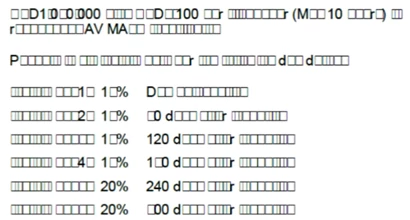


These are all PDF files which have been created by the users and sent externally to a client to stamp and then they are return to the original user to combine into one single PDF document pack.


I have tested creating local PDF documents with random numbers and letters and the issue does not occur.


FURTHER INFORMATION


1) EACH individual PDF file appears fine (both on the screen and when printed). There are NO unprintable characters within the PDF.
2) CAN combine approx 5 PDF files. All Fonts & characters appear fine (within the combined PDF). WILL also print OK. NO unprintable characters.
3) Now try to combine 6+ PDF files into ONE PDF file (NOT good). The COMBINED PDF will display on the SCREEN unprintable characters (€ = square box) on nearly every page!
Occurs RANDOMLY throughout many of the pages.
4) Fonts are Arial & Times New Roman, Calibri, Century Gothic.
5) REMEMBER: EVERY individual PDF will appear OK & Print OK.
SMALL numbers of combined PDF's will appear OK & Print OK.
ONLY when many PDF's are combined does this problem appear!!
6) Happens to multiple people in our office environment. All running Windows 10 (with latest patches), and Acrobat Acrobat DC
7) This is NOT a printer problem!!!!
You can see all the square boxes on the SCREEN when viewing the "combined" PDF files.
😎 Plenty of system memory. Plenty of Hard drive space.


Appreciate any help on this


Thanks
Rob

This topic has been closed for replies.

2 replies

Luke Jennings3
Inspiring
January 8, 2022
New Participant
January 12, 2022

Thanks Luke,


Indeed this does appear to be a very similar issue, our user are using Acrobat Standard DC version 2021.007.20099 in a Citrix environment.


If I read this article correctly it seems there is no simple solution here and a workaround is all the user can do for now until a permanent solution is identified.


Apprecaite your response

Rgds

Rob

New Participant
January 25, 2022

I suspect one or more of your returned PDFs has improperly embedded fonts, if this is the case, I suggest using an Acrobat preflight fixup to try to embed the fonts before combining them, this is more of a fix than a work-around. Ideally, your stamped pdfs should arrive with correctly embedded fonts. If the pdfs you send out have properly embedded fonts (as indicated by the document properties, not because they look and print ok), then it's possible someone is inadvertently unembedding a font, or otherwise damaging the PDF when applying a stamp. You may see improvement by trying any number of preflight fixups on the individual returned pdfs (see attached screen shot), or possibly saving as PDF/X-1a, which sometimes fixes small issues.  (this will also flatten any transparency)

Some things that can damage a pdf: Opening it in Apple Preview, optimizing it to reduce the size and unembed fonts, saving it from a non-Adobe application.

If one of the above suggestions helps, you can create an Acrobat Action to quickly apply it to a pdf or folder of pdfs.


Thanks for taking the time to respond Luke.  I will check out your suggestions


Rgds

Rob

Amal.
Community Manager
Community Manager
January 7, 2022

Hi Rob


Hope you are doing well and sorry too hear that.


Is this a behavior with a particular set of PDF files? Please try with different set of PDFs and try to combine and check if its working fine.


What is the version of the Acrobat std DC you are using? To check the version go to help > About Acrobat and make sure you have the recent version installed. Go to help > Check for updates and reboot the computer once.


You may also try to repair the installation from the help menu (Windows only)


Also, try to create the PDF portfolio of ththese files as described here https://helpx.adobe.com/acrobat/using/create-customize-pdf-portfolios.html and see if that works for you.


Regards

Amal

New Participant
January 12, 2022

Hi Amal,


Thanks for responding, this is happening on different PDFs, reported by approx 7 users that I am aware of.


The version is 2021.007.20099


They are all working within a Citrix environment


I will review the portfolio option and see if this helps


Rgds

Rob

Participating Frequently
May 10, 2024

I have the same issue.  It's sporadic though.. Same PDF document for 2x shipments created.  1st set of documents combined without issue.  Second set will not combine without changing characters to boxes!  I've checked the preferences to ensure all fonts embedded & "Save as Optimizes for Fast Web View" is UNchecked, but still the issue persists randomly.