


Adobe Acrobat Standard DC - Strange Square Characters When Combining Multiple PDF Documents
Hi,
Some of the business users have started to report an issue when combining individual PDF documents. When these PDF documents are opened individually the files render correctly, however when you combine around 6+ indifidual PDF documents it then displays the results below and the strange square characters. This is extremely time consuming as the only work around to date is to save each individual PDF using Nova PDF and then combine
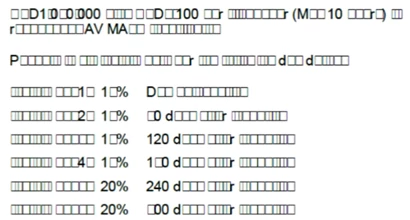
These are all PDF files which have been created by the users and sent externally to a client to stamp and then they are return to the original user to combine into one single PDF document pack.
I have tested creating local PDF documents with random numbers and letters and the issue does not occur.
FURTHER INFORMATION
1) EACH individual PDF file appears fine (both on the screen and when printed). There are NO unprintable characters within the PDF.
2) CAN combine approx 5 PDF files. All Fonts & characters appear fine (within the combined PDF). WILL also print OK. NO unprintable characters.
3) Now try to combine 6+ PDF files into ONE PDF file (NOT good). The COMBINED PDF will display on the SCREEN unprintable characters (€ = square box) on nearly every page!
Occurs RANDOMLY throughout many of the pages.
4) Fonts are Arial & Times New Roman, Calibri, Century Gothic.
5) REMEMBER: EVERY individual PDF will appear OK & Print OK.
SMALL numbers of combined PDF's will appear OK & Print OK.
ONLY when many PDF's are combined does this problem appear!!
6) Happens to multiple people in our office environment. All running Windows 10 (with latest patches), and Acrobat Acrobat DC
7) This is NOT a printer problem!!!!
You can see all the square boxes on the SCREEN when viewing the "combined" PDF files.
😎 Plenty of system memory. Plenty of Hard drive space.
Appreciate any help on this
Thanks
Rob
 AdChoices