


Adobe fillable form, with check boxes for 2 parties with 2 signatures
- March 10, 2025
- 1 reply
- 275 views
Hello Community support!
We are using Adobe Pro.
We do not want to use e-signatures.
I created a form for our vendors to fill out... check boxes Yes, No, N/A, and fillable fields. Once they are done, they sign the form. There part is now locked.
When it comes back to us. We have additional check boxes and fillable field to mark compliance and notes.. then we sign. Only then ALL fields are locked.
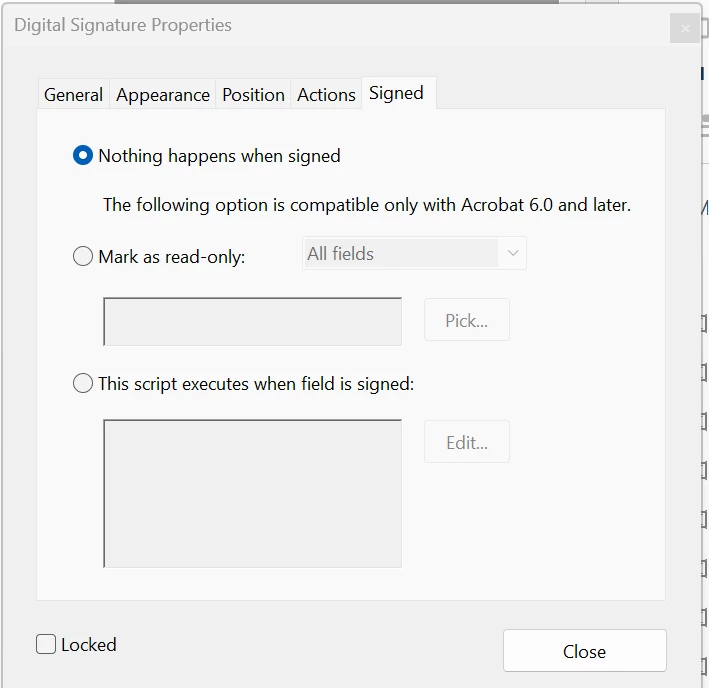
When designing the form, I could specify the cells or checkboxes that would stay open after the vendor signs at signature 1.
This would allow us to complete our part, then sign off on signature 2.
In the end the form is then locked completely.
This works successfully last year.
Why can I not seem to make this work this year, what changed in Adobe, and how can I do this again NOT usig e-signature???
See attched where you could specify "NOTHING HAPPENS WHEN SIGNED" then you "PICK" those check boxes or fillable spaces.
Thank you!
 AdChoices