


Participant
January 20, 2024
Answered

Adobe Form - Script Help! - Automatic Comparison of fields, based on the value of another.

  • January 20, 2024
  • 1 reply
  • 1393 views

Hello, Looking for a bit of assistance and guidance with the below, I am normally quite good at bumbling along problem solving basic Javas as I go, but I want to actually learn on this one rather than bumble through it. 


I have a table (below) which will summary the answers from a multi choice exam paper, there are 3 elements I want to automate within the form.


The first is the one I have least chance of solving on my own, I want to create a script that will display the correct answer in the 'Correct Answer" Column depending on the entry into the Question Number column fields (i.e. if Question Number field is "3" this will equal "A" in the corrosponding Correct Answer field or "5" will equal "C" etc. 
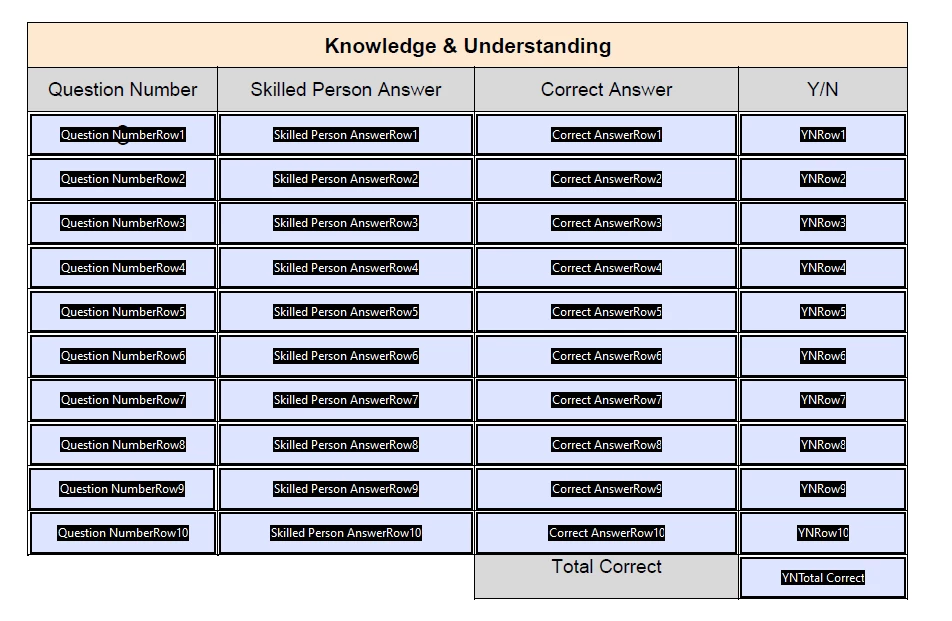
There are 14 questions and the candidates are to choose any 10. so the script will need to be flexible to allow for any number in the column1 fields to result in a different answer in the 'Correct Answer' column. I have the Question Number fields to number only. The correct answers for the questions are below. 
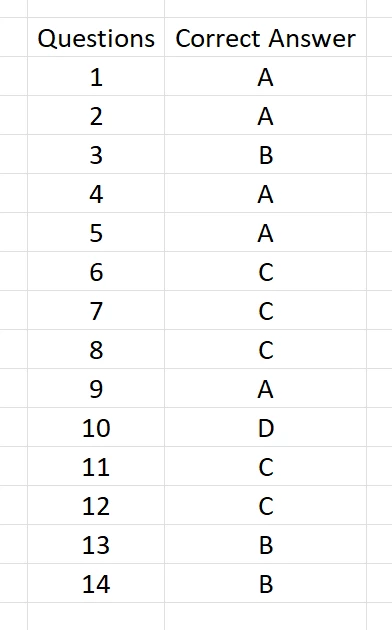
 

Second part is I want to script is a comparison between the script filled field above (correct answer) and the corrosponding manually entered Skilled Person Answer (column 2) if these are the same I want the Y/N check box to be triggered if these values match. 


Third and final stage is for the Y/N Total Correct Field to be essentially a count of the fields above it, if there are 8 check boxes activated, then I want this field to be 8. 


Any gudiance would be apprecaited. 


This topic has been closed for replies.
Correct answer Nesa Nurani

Yes the user will input numbers from 1 - 14 and I want the form to show the correct answer for that number. 

The candidate has 14 questions and they get to pick any 10 to do so any number can theoretically be skipped. 


Use this:

var cList = [
{Q:1,A:"A"},
{Q:2,A:"A"},
{Q:3,A:"B"},
{Q:4,A:"A"},
{Q:5,A:"A"},
{Q:6,A:"C"},
{Q:7,A:"C"},
{Q:8,A:"C"},
{Q:9,A:"A"},
{Q:10,A:"D"},
{Q:11,A:"C"},
{Q:12,A:"C"},
{Q:13,A:"B"},
{Q:14,A:"B"}];

for(var j=1; j<=10; j++) {
var q = Number(this.getField("Question NumberRow" +j).valueAsString);
var a = this.getField("Correct AnswerRow" +j);
var matchFound = false;

for(var i=0; i<cList.length; i++) {
if (q == cList[i].Q) {
a.value = cList[i].A;
matchFound = true;
break;}}

if (!matchFound)
a.value = "";}

1 reply

Nesa Nurani
Community Expert
Community Expert
January 20, 2024

I'm not sure if I understood how you wish the first part to work, if the user enters anything in 'question' field you want to show the correct answer in 'Answer' field?

Try this and see if that is what you look for (put it in one of the fields as custom calculation script):

var cList = ["A","A","B","A","A","C","C","C","A","D","C","C","B","B"];
for(var i=1; i<=14; i++){
var Q = this.getField("Question NumberRow"+i).valueAsString;
var A = this.getField("Correct AnswerRow"+i);
if(Q !== "")
A.value = cList[i-1];
else
A.value = "";}


Participant
January 20, 2024

Hi Nesa, That certainly seems to function exactly as I had hoped., Thank you. 


Works perfectly for the first 10, Only issue I have now is it is getting the answers wrong for 11, 12, 13 and 14. It isn't picking the corrosponding CList digits.

Nesa Nurani
Community Expert
Nesa NuraniCommunity ExpertCorrect answer
Community Expert
January 21, 2024

Yes the user will input numbers from 1 - 14 and I want the form to show the correct answer for that number. 

The candidate has 14 questions and they get to pick any 10 to do so any number can theoretically be skipped. 


Use this:

var cList = [
{Q:1,A:"A"},
{Q:2,A:"A"},
{Q:3,A:"B"},
{Q:4,A:"A"},
{Q:5,A:"A"},
{Q:6,A:"C"},
{Q:7,A:"C"},
{Q:8,A:"C"},
{Q:9,A:"A"},
{Q:10,A:"D"},
{Q:11,A:"C"},
{Q:12,A:"C"},
{Q:13,A:"B"},
{Q:14,A:"B"}];

for(var j=1; j<=10; j++) {
var q = Number(this.getField("Question NumberRow" +j).valueAsString);
var a = this.getField("Correct AnswerRow" +j);
var matchFound = false;

for(var i=0; i<cList.length; i++) {
if (q == cList[i].Q) {
a.value = cList[i].A;
matchFound = true;
break;}}

if (!matchFound)
a.value = "";}