


Participating Frequently
July 6, 2023
Answered

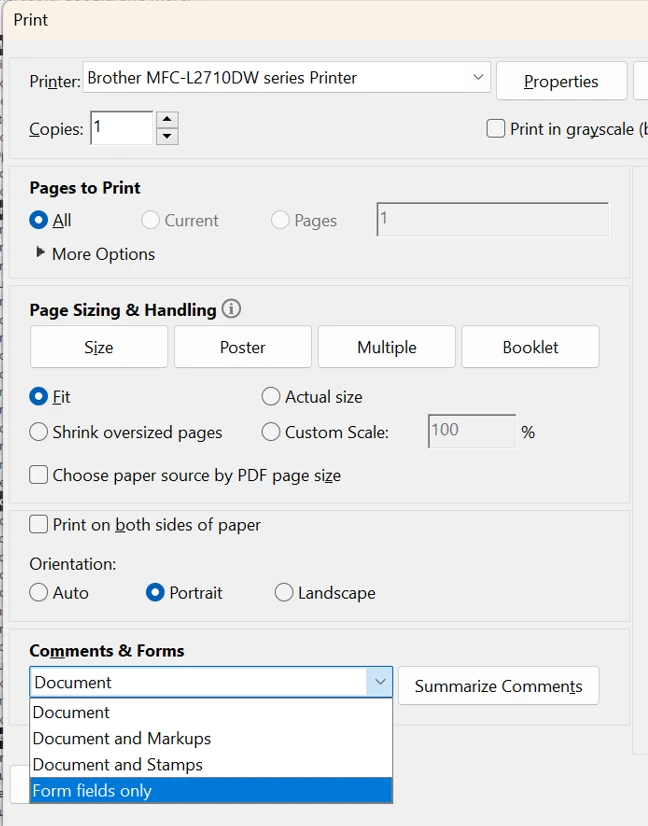
Adobe only prints blank or just with fields

  • July 6, 2023
  • 3 replies
  • 29742 views

I'm having an issue with printing a PDF from Adobe.  The document is perfectly viewable, but when I go to print, it shows up and prints blank, or only the fields that are filled out and none of the actual form.  I have attached an image of what I see (some doc info blurred).


Here are the details of what I'm using:

File type is a PDF, shown as "Adobe Acrobat Document" in File Explorer

Program is the most recent version of Adobe Reader (as of today)

Operating on Windows 10
Correct answer mariahweyne

Check your settings in the print dialog


3 replies

mariahweyne
mariahweyneCorrect answer
Inspiring
July 6, 2023

Check your settings in the print dialog


Participant
January 24, 2024

This helped me out, thanks!

Amal.
Community Manager
Community Manager
July 6, 2023

Hi @Avery5F9A 


Hope you are doing well and sorry to hear that.


Have you started experiencing this issue recently? What is the version of the Acrobat DC you are using? To check the version go to Help > About Acrobat and make sure you have the recent version 23.03.20215 installed. Go to Help > Check for updates and reboot the computer once.


Is this an issue with a particular PDF file or with all the PDFs? Please try with a different PDF file and check.

Also try to repair the installation from the help menu (Win Only) and see if that works.

Please try to print the PDF as image. Go to Print > Advanced > print as image and check.


Also, go through the steps shared in the help page https://helpx.adobe.com/acrobat/kb/troubleshoot-pdf-printing-acrobat-reader.html and see if that works.


Let us know how it goes.


Regards

Amal

try67
Community Expert
Community Expert
July 6, 2023

Does this happen with all files, or just some? Does the page's static contents actually appear if you print it out, or not?