


Adobe PDF Printer settings reverting
Hello, Adobe Community!
In my workplace I have users that utilize the Adobe Acrobat DC application and need to save all PDFs to PDF/a-1b standard due to storage standards. That said, I have gone through the Windows Settings menu to get to the Printer Preferences and edited the PDF/A-1b standard for 300 DPI and created a new job option for that standard named PDFA1b 2005 RGB_300_DPI so that when my users create a PDF through the Adobe PDF printer object the standard should be automatically applied as the Default Settings, and it is in most instances. However, there is an issue where my users are seeing that the Adobe PDF printer object's printing preferences Default Settings field reverts to Standard.
That said, I always have my users reinstate the created 300_DPI settings as needed via the Windows OS Settings menu, however eventually the issue returns. I'm not really sure what might be causing this other than maybe an update to the Acrobat DC application, however I haven't been able to pin down a distinct answer regarding this issue. Also of note is that our Adobe Acrobat DC is managed and udpated through the Adobe Creative Cloud application.
Any advice or information will be greatly appreciated!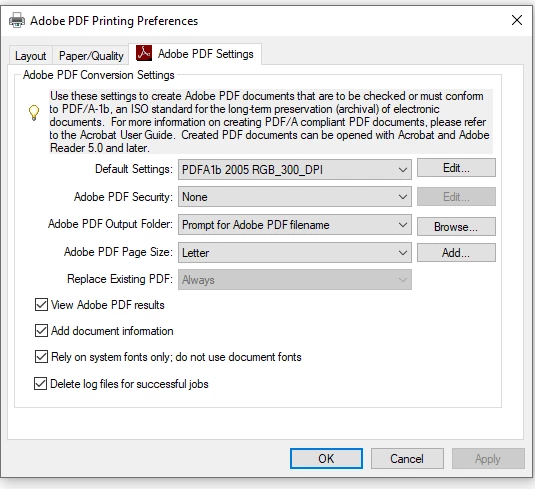
 AdChoices