


New Participant
March 6, 2019
Answered

AdobeCollabSync is slowing my PC

  • March 6, 2019
  • 8 replies
  • 92650 views

Hi, got the Acrobat Pro subscription a while ago. Since I installed it, my computer became extremely slow.

I noticed that AdobeCollabSync spawns an extremely high number of processes:
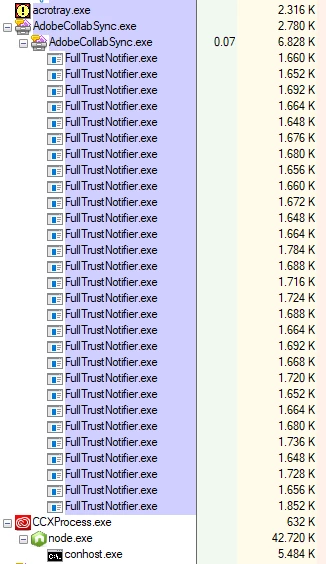
why? How could I avoid it? I don't need any sharing or collaboration, I work alone, and I don't use creative cloud file sync

There's a way to totally disable this? All apps are closed, yet that is running anyway.

Correct answer robot78533307

I deleted "C:\Program Files (x86)\Adobe\Acrobat DC\Acrobat\FullTrustNotifier.exe" and "C:\Program Files (x86)\Adobe\Acrobat DC\Acrobat\AdobeCollabSync.exe" and now i don't have this problem anymore

Acrobat seems to work fine without those two useless bloatware, hopefully my PC will be faster

8 replies

New Participant
August 28, 2021

I just researched slow start ups because my computer takes NINE MINUTES - to get to the log in screen. Truly shocking.

After I did what has been suggested in this thread, deleting fulltrustnotifier.exe and adobecollabsync.exe it reduced the startup to reach the log in screen to under TWO minutes - BUT - increased the actual logging into my pc by FOUR minutes o.O

Original time to reach login screen : 9 minutes
From logging in and being able to use pc: 2 minutes

After deleting fulltrust, collabsync : 2 minutes
From logging in and being able to use pc: 6 minutes

What else can I get rid of?

April 21, 2021

I had all the same problems, did everything but it kept coming up and running! and someone told me to just load the Adobe program, and in the right-hand corner at the top click on settings and when your name comes up just sign out of the program. So I did all of this and lo and behold it was no longer running in the task manager! Something so darn simple! All this program does is update everything for you so the program loads quicker! I am not using this program enough for it to be running constantly.!

New Participant
October 9, 2020

I have nothing but the Adobe Reader installed.  No other Adobe software.  I've noticed my PC slowing too, especially on startup.  I'm seeing this:

I saw this thread and tried the above solution.  Hopefully, that will fix the issue.

TriasTheDinoArtist
New Participant
December 18, 2020

Freelance artist and extensive user of Photoshop here.

AdobeCollabSync appeared in my system (as far as I know) when I joined the program to help improve photoshop (which seems to automically send data when it crashes and so on). I decided to not do this anymore due to me being one of those people who just doesn't like too many things automatically sending data in the background.

I did as already recommened, deleting both FullTrust and the ACS exe files and any interference seems to be gone for good after rebooting my system (THANKS FOR THE TIP!).

However (as you can see on the screencap) the collabsync still appears in the task manager for some reason, even though there is no data path anymore.


Furthermore I suspect that this also has something to do with one of my icm profiles not working. Ironically the one for my main motitor where it'd be most appreciated xD (I'm aware these icm color profiles are a wonky thing on their own, but still I thought I could mention this).

New Participant
March 25, 2021

Might be old, but you can either delete it with CCleaner or use Registry Editor as shown here: https://youtu.be/QQ8mDiQ5ykw?t=173

Gustavo_Isai
New Participant
August 11, 2020

Listo eliminados ambos, gracias por la información. En caso de fallas ahí avisen, haré lo propio. Igual si saben de mas procesos bloatware que se puedan eliminar o desinstalar o cuando menos deshabilitar.

New Participant
July 8, 2020

I too have been dealing with annoying issues caused by the collaboration synchronizer. It prevents me from deleting folder, prevents me from ejecting thumb drives, etc. I followed the suggestion of removing the program and reinstalling. When I reinstalled adobe, the collaboration synchornizer was also reinstalled. And yes, it reinstalled two versions of it, same as before. I gained nothing except the pleasure of having to setup my tools and shortcuts again and wasted part of my morning in the process. Why is it when users are experiencing trouble, the suggestion from techs is to reinstall the program?

N J A
Participating Frequently
December 12, 2019

This stupid AdobeCollabSync.exe is the culprit that has been constantly preventing our DTP software (Madcap Flare) from regenerating PDF files. AdobeCollabSync holds the PDF file open, even when the file has been closed in Acrobat, preventing Flare from rewriting a new version. Thank you for your solution; we can now use our non-Adobe software without Adobe's interference!

New Participant
May 28, 2020

I have this problem constantly when building PDFs from Flare. I have deleted  / disabled Adobe Collab Sync, and it keeps coming back!! Daily. Many times daily. How do I get rid of it for good?

N J A
Participating Frequently
May 28, 2020

a) Close Acrobat.

b) In Windows Task Manager's Details pane, end the AdobeCollabSync process.
c) In C:\Program Files (x86)\Adobe\Acrobat DC\Acrobat\, rename AdobeCollabSync.exe to something like AdobeCollabSyncPEST.exe. 
d) Click the Windows Start button, type Startup, select Startup Apps, and turn off AdobeCollabSync.

That stops it permanently, until Acrobat next receives an update (rarely). The update process repairs/recreates AdobeCollabSync.exe, so you'll need to repeat the process above.

robot78533307AuthorCorrect answer
New Participant
March 7, 2019

I deleted "C:\Program Files (x86)\Adobe\Acrobat DC\Acrobat\FullTrustNotifier.exe" and "C:\Program Files (x86)\Adobe\Acrobat DC\Acrobat\AdobeCollabSync.exe" and now i don't have this problem anymore

Acrobat seems to work fine without those two useless bloatware, hopefully my PC will be faster

jornywar
New Participant
March 19, 2020

Hooray! Thank you so much for posting. I was constantly running into this issue when trying to delete, move, and/or rename folders and files through Windows Explorer:
"The action can't be completed because the folder or a file in it is open in another program.  Close the folder or file and try again."

As soon as I deleted these bloatware .exe files, I could delete, move, and rename again with no issues!

Of course, I just tried this, and can't confirm that it doesn't cause any adverse effects... fingers crossed 🙂

Meenakshi Negi
Community Manager
Community Manager
March 6, 2019

Hi Robot,

Sorry for the trouble caused.

Please try once to uninstall the application using the cleaner tool Download Adobe Reader and Acrobat Cleaner Tool - Adobe Labs.

Reboot the machine and re-install the application from here Download and install Acrobat DC subscription

Check if that makes any difference.

Let us know if the issue persists.

Regards,

Meenakshi

Henri Pellemans
Participating Frequently
December 2, 2020

I have the same problem. My PC slows down. After I delete AdobeCollabSync.exe the problem is solved... until an update of Acrobat DC is installed.


Why can't Adobe solve this problem?

Henri Pellemans
Participating Frequently
December 20, 2020

AdobeCollabSync.exe not only slows down my PC, but it also interferes with the back-up program of my telecom provider.


Why can't we have an answer or a solution from Adobe?


If Acrobat DC Pro was for free, I could live with that, but the annual subscription is more than twice the price of Microsoft 365.


The problem exists already almost 2 years...