


Inspiring
November 20, 2018
Answered

Advanced settings not selectable

  • November 20, 2018
  • 2 replies
  • 4531 views

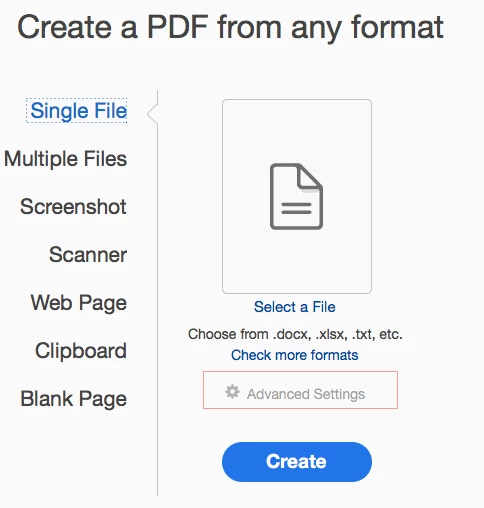
I have Adobe Acrobat DC installed on  OSX High Sierra.  In the Tools pane, when I select Create PDF, underneath the Select a File command, I see Advanced Settings. But it's greyed out and can't be selected. Any tips as to why?
This topic has been closed for replies.
Correct answer Wayfarin

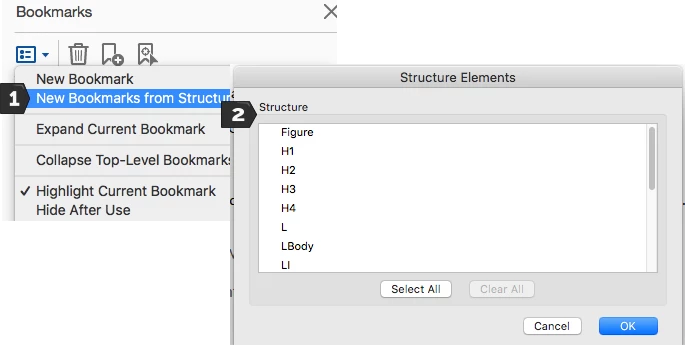
I've answered my own question. The 'levels' functionality (which is what I was looking for) has been shifted to a menu that appears inside the Bookmarks panel when you create a document called New Bookmarks from Structure. There you can select New Bookmark from Structure which allows you to choose which kind of element to bookmark. Haven't quite figured out how it works yet but I think that's what I was looking for. (I had incorrectly thought it might be attached to the 'advanced settings' control that I couldn't open.)

2 replies

WayfarinAuthorCorrect answer
Inspiring
November 20, 2018

I've answered my own question. The 'levels' functionality (which is what I was looking for) has been shifted to a menu that appears inside the Bookmarks panel when you create a document called New Bookmarks from Structure. There you can select New Bookmark from Structure which allows you to choose which kind of element to bookmark. Haven't quite figured out how it works yet but I think that's what I was looking for. (I had incorrectly thought it might be attached to the 'advanced settings' control that I couldn't open.)

gary_sc
Community Expert
Community Expert
November 20, 2018

Amusingly enough this has to be a TIF, PNG, or JPG image.

However, when you see the settings you can see why this doesn't apply to a PDF, DOC, or PSD kind of document.

Hope this helps, let us know if this is the answer you were looking for.

WayfarinAuthor
Inspiring
November 20, 2018

Thanks, hadn't realised that.

What I'm looking for is the functionality that used to be displayed when you were configuring Acrobat as to which ToC levels to include in your PDF. There was a bunch of other controls that used to appear as well, all of which don't seem to be present in the version I now have.

gary_sc
Community Expert
Community Expert
November 20, 2018

Hi Wayne,

Not sure on that as Acrobat is not an authoring tool.

What you can do is to assemble the document and create bookmarks for each section. Then in any Word processing program, copy and paste each bookmarked section to make the ToC that you want. Then save that out to a PDF, add that to your main PDF and using "Organize Pages," or Insert, place that in front and you have your ToC. If you want you can add hyperlinks to make that clickable.

Clunky yes, but again, Acrobat is not an authoring tool.

Does that work for you? (and yes, I know it's not what you wanted to hear)