


New Participant
September 14, 2022
Question

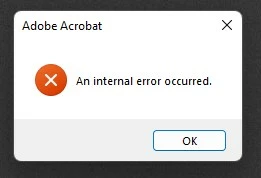
An internal error occured.

  • September 14, 2022
  • 13 replies
  • 27586 views

Hello,


I am on Windows 11 version 10.0.22000 Build 22000. My Adobe Acrobat version is 2022.002.20212. 

Whenever I click on or group select a/ a number of pdf file(s), I got the "An internal error occured" error message. I therefore cannot perform actions like copy or cut files. It sometimes crashes the File Explorer as well.

I have tried the solution in another post, but nothing worked. I have also tried uninstalling and re-installing the program using AdobeAcroCleaner_DC2021 but the problem persisted.

Please help! Thank you.
 

This topic has been closed for replies.

13 replies

New Participant
September 16, 2022

Having this exact issue, constantly popping up when I am trying to open files.

New Participant
September 16, 2022

i've got this problem as well with Acrobat Pro (paid 1 year subscription on Win 10, all files up to date, 64 bit)


AkanchhaS8194121
Braniac
September 15, 2022

Hi @Son5C1C 


Sorry to hear about the trouble caused.

This known issue has already been escalated to our engineering team. That team has been working on it. 

As soon as the fix is available, we'll keep you posted.


Thanks,

Akanchha 

New Participant
September 16, 2022

Hi there,


Commenting to add that I'm experiencing the same issue.  Acrobat is the only product I use from Adobe, and it been almost completely non-functional for at least several weeks now. 


As I'm paying a subscription to have access to a non-functional application, how would I go about getting a refund or a credit for this month's service?

RedFeathers
Inspiring
October 20, 2022

Posting here for those who may have missed it.


@markelrayesfound a solution on another thread.


"I FOUND A SOLUTION.


I had to go C:\Users\[me]\AppData\Local and right click the Adobe folder, click properties and go to security tab. I had a bunch of left-over "Account Unknown" listed besides my three main ones (System, [me], Admin). I deleted all the account unknowns."


If you can't delete all the Account Unknown files through "EDIT", select "ADVANCED" and remove them.

I didn't even have to reboot after doing this and my error disappeared.