


New Participant
September 14, 2022
Question

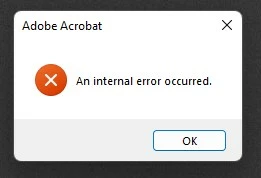
An internal error occured.

  • September 14, 2022
  • 13 replies
  • 27586 views

Hello,


I am on Windows 11 version 10.0.22000 Build 22000. My Adobe Acrobat version is 2022.002.20212. 

Whenever I click on or group select a/ a number of pdf file(s), I got the "An internal error occured" error message. I therefore cannot perform actions like copy or cut files. It sometimes crashes the File Explorer as well.

I have tried the solution in another post, but nothing worked. I have also tried uninstalling and re-installing the program using AdobeAcroCleaner_DC2021 but the problem persisted.

Please help! Thank you.
 

This topic has been closed for replies.

13 replies

IntSol
Participating Frequently
January 10, 2023

As per ThomHayes statement request below, when are Adobe going to rectifiy the issue with their product.  I note there is no response to this...
I have wasted threedays of my time dealing with a rubbish product.
Is Adobe going to reimburse me for the delays they have caused me?
The fixes spattered around this forum have not worked for me and many others who are unable to use the products we are paying for.
I work for a large corporation and they have repaired and reinstalled to product numerous times over the past month.
I have stated this in previous posts, Acrobat is not worth the money we are paying for it.

Adobe have No Excuse, get a developer to respond and tell us when they are going to fix their product?

Amal.
Community Manager
Community Manager
February 16, 2023

Hi @IntSol 


Hope you are doing well and sorry for the trouble.


This issue has been reported to our engineering team and is being worked upon. Would you mind sharing the Procmon logs (Win Only) https://www.adobe.com/devnet-docs/acrobatetk/tools/Labs/acromonitor.html  and the dump file of Acrobat https://helpx.adobe.com/acrobat/kb/collect-logs-crash-freeze.html when the issue reproduces and share them via any cloud storage. Just upload the logs to the cloud and create the link and share that link with us for further drill down.


Waiting for your reply


Regards

Amal

S_S
Community Manager
Community Manager
November 7, 2024

Hi Everyone, 


We are live with the latest release (2024.004.20243).


Please update the app and let us know if the issue stands fixed for you.

To check for updates, click on Menu-> Help-> Check for updates.


-Souvik

Participating Frequently
January 5, 2023

@adobe please can we have an update on this? The solutions mentioned aren't working for everyone. It's been months. PDFs are a staple part of my day to day, and they're constantly crashing my machine, not saving, not loading, not previewing, crashing programs etc etc. Whats going on, when will this be fixed?

New Participant
December 12, 2022

I have tried to follow the fix below, but in my case there are no such occurrences of unknown accounts.  But the exact error described here persists.  I am also a subscriber and i find this very problematic.  I use Acrobat for work and it is now impossible to do anything with it.  Any advice?  Thank you very much!

Inspiring
November 28, 2022

This is boring... nothing helps. Any ideas how to fix that? It's hard to work in my office with tons of PDF's


RedFeathers
Inspiring
October 20, 2022

@markelrayesfound a solution on another thread.


"I FOUND A SOLUTION.


I had to go C:\Users\[me]\AppData\Local and right click the Adobe folder, click properties and go to security tab. I had a bunch of left-over "Account Unknown" listed besides my three main ones (System, [me], Admin). I deleted all the account unknowns."


If you can't delete all the Account Unknown files through "EDIT", select "ADVANCED" and remove them.


Spread the word. I didn't even have to reboot after doing this and my error disappeared.

New Participant
October 20, 2022

I have the same issue. Everytime I select a pdf file, system keeps loading and it takes unreasonably long to process. Then "An internal error occurred" pops up! I'm also not able to select multiple files to drag/copy/paste. Everything freeze! This is stupid, we paid for enterprise subscription and it slows down my work! Adobe, can you please fix this, or are you going to compensate us back for the chargeable hours from my client?

RedFeathers
Inspiring
October 27, 2022

I've seen similar issues with Adobe Acrobat as soon as the preview pane is enabled in your documents in forum posts going back to 2017. I take it that they've just tried to patch the bug and it just comes up in different ways, but because it doesn't happen to most users, it doesn't get a proper fix.

New Participant
October 19, 2022

Same issue here as everyone else. Have also tried the fixes. ADOBE---WHEN ARE YOU GOING TO FIX THIS????? WE ARE PAYING FOR A WORKING PRODUCT!!!! COME ON!!!!!


New Participant
September 22, 2022

저도 같은 문제를 겪고있어요.

파일을 선택하면 "An internal error occurred" 오류 메세지가 나타납니다.

파일은 잘 열리지만, 계속 오류 메세지가 떠서 불편합니다.

몇 번이나 재설치를 해도 똑같은 문제가 발생합니다.

I'm having the same problem.
When you select a file, an "An internal error occurred" error message appears.
The file opens well, but I feel uncomfortable because I keep getting error messages.
The same problem occurs after several reinstallations.

Known Participant
September 19, 2022

I'm experiencing the same issue when trying to click on files as well. 

New Participant
September 16, 2022

Same here Windows 10 - Just started today! I have tried everything but nothing works.....Repair, Reinstall, Permissions, Security settings etc.