

Inspiring
February 16, 2024
Answered

*APP DISABLE NOTIFICATION IN FIVE DAYS.*

  • February 16, 2024
  • 2 replies
  • 4906 views

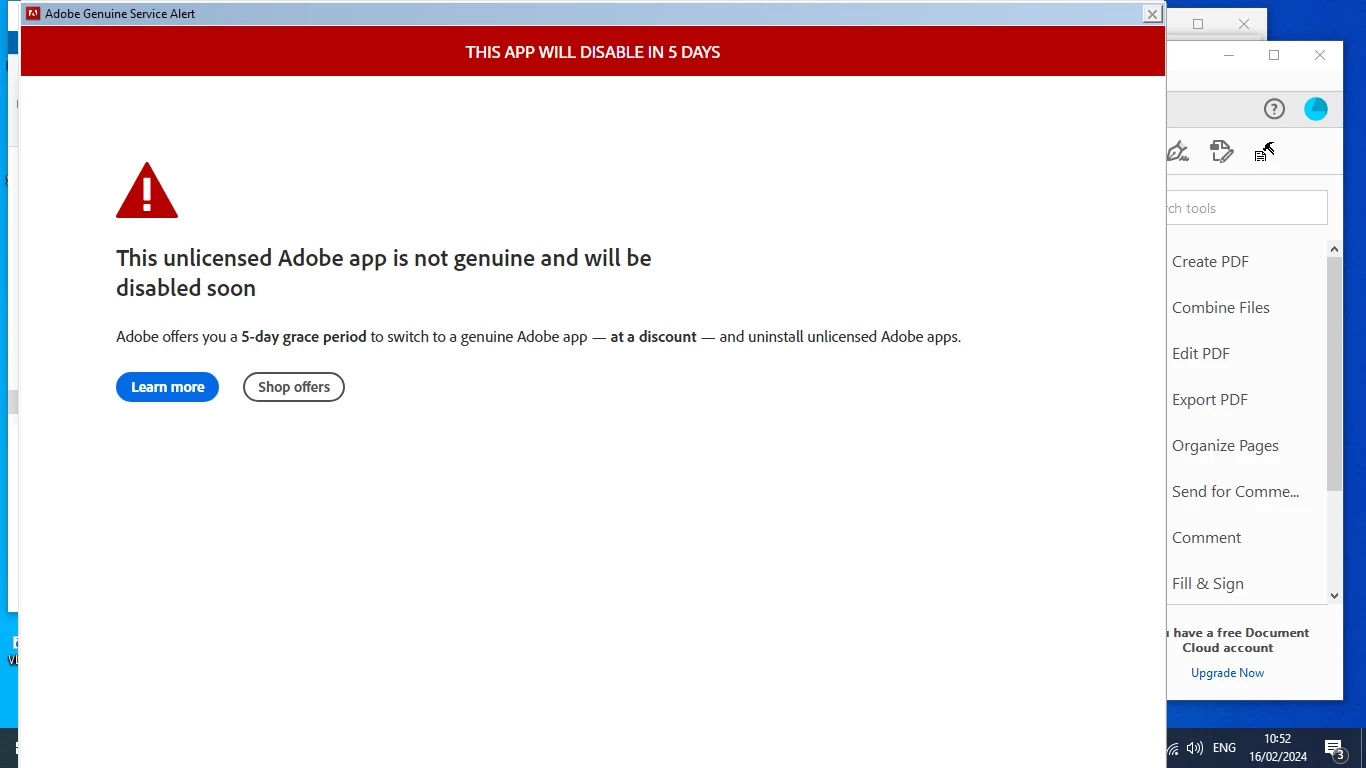
Adobe genuine service alert is sending me notification my app would be disabled in five days.
My app is genuine. what should i do?
i have attached the screenshot

Correct answer Amal.

Amal, thank you! That is the ideal professional response! I hope that your product team will take this to heart and follow through with fixing these messages.


Hi there,


Our engineering team has addressed the issue, and the Genuine Service alerts have now been successfully removed from the affected machines.


Feel free to reach out if you need any assistance in the future.


2 replies

Inspiring
April 22, 2025

This morning - more than 1 year after sakaSFD5's post - I received the same notifice (my screenshot, uploaded with this post, demonstrates the notice has not improved in any respect). It is also apparent that this has been happening to others for several years. This annoying, persistent notice looks and behaves as if its malware, popping up and down two or three times per minute, with nothing to verify it really is from Adobe and no way to get rid of it. First I verified that my subscription to my Adobe apps is active and paid up to date, then, still convinced it was malware, wasted well over an hour of my billable time (1) running a malware scan of my computer, (2) searching this forum, (3) running Chat gpt inquiries, and (4) otherwise searching online and following recommendations on how to get rid of this nuisance. Finally, in Acrobat Pro I checked for and found an available update, ran the update, and what do you know: this ridiculous notice, that looks as if some hack created it to entice someone to click on one of its two buttons so it could implant a virus, immediately disappeared. It really did originate from Adobe. I can't for the life of me understand why Adobe would create such an unprofessional notice - that goes to paid-up Adobe customers - apparently oblivious to the fact that it looks like a scammer hackjob, with no means for legitimate users to know otherwise. Adobe, you should at least apologize to your customers, and please fix this so it doesn't happen to other legitmate customers.

Amal.
Community Manager
Community Manager
April 22, 2025

Hi there,


Hope you are doing well, and thank you for sharing your experience. We're truly sorry for the frustration this caused.

You're right—a pop-up like that can seem suspicious, and that’s not what we want for our users.

Updating the app was the right fix, thanks for sharing. That said, no one should have to troubleshoot something that feels so unprofessional. We will share this with our product team and work to improve how these messages appear.


Inspiring
April 22, 2025

Amal, thank you! That is the ideal professional response! I hope that your product team will take this to heart and follow through with fixing these messages.

Abambo
Community Expert
Community Expert
February 16, 2024

Contact Adobe customer service. Adobe customer care can be contacted by beginning a secure chat session at https://helpx.adobe.com/contact.html?rghtup=autoOpen. Pop-up blockers need to be disabled, you need to accept cookies! If the chat window fails to open, or is non-responsive, use a different device and/or browser to start the interaction.

For support via Twitter:
https://twitter.com/AdobeCare

(see also here: https://community.adobe.com/t5/creative-cloud-services/how-to-contact-adobe-support/td-p/11875703 or here
https://community.adobe.com/t5/account-payment-plan/how-to-contact-adobe-support/td-p/11843852)

Important: Adobe does NOT contact you unsolicited by e-mail or direct message. If you get contacted by direct message from a person, claiming to be an Adobe employee, look at that profile and check if they bear the “Adobe Employee” marking under their name. Adobe support does not use Skype to give you support.
If in doubt, ask the forum.

ABAMBO | Hard- and Software Engineer | Photographer