

mdwpsyd27
Inspiring
October 23, 2023
Answered

Appearance Integrity Report - Should we try to remove the cause of signature report error codes?

  • October 23, 2023
  • 1 reply
  • 4371 views

The Appearance Integrity Report seems to cause concern about the integrity of a PDF with a digital certificate signature, and such a signature "could not be considered legal as the user could have signed something they couldn’t see," although one member suggested that "you can ignore those notices you see under Review."


When we review a certificate signature, Adobe advises us: "for the greatest security, remove the following items before certifying."
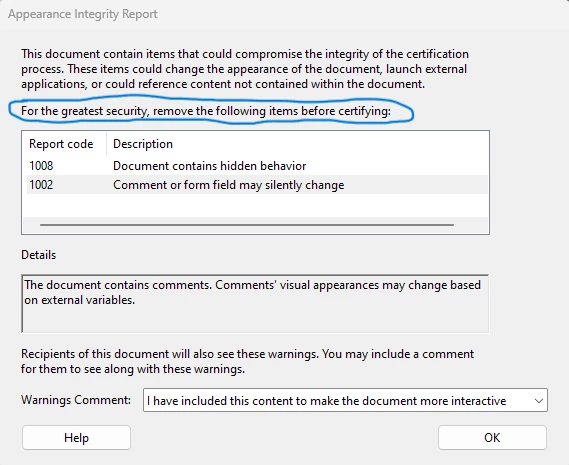


There are other such codes, in addition to the two I received:
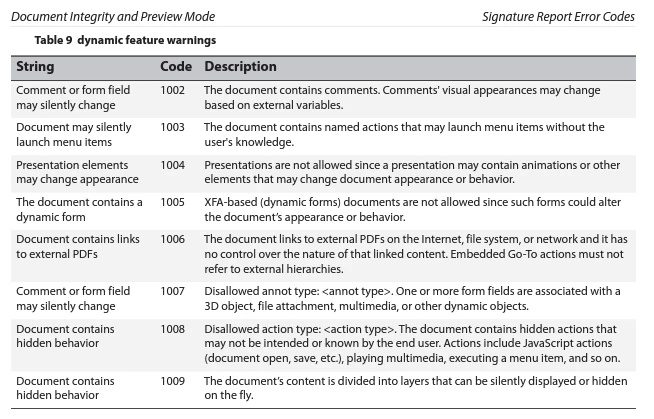
Digital Signatures Workflow Guide for the Adobe® Acrobat Family of Products (rev. 28 Sep 2012), p. 62,  https://www.adobe.com/devnet-docs/acrobatetk/tools/DigSig/Acrobat_DigSig_WorkflowGuide.pdf


Some of the documents (PDFs) I sign are for legal proceedings, so I do not want the validity of my signature to be questioned. On the other hand, I'm signing documents that I created, so presumably I know what is in my document when I sign it, and therefore it seems I can ignore these signature report error codes. 


I don't expect anyone to say definitively, "Yes, you can ignore those error codes", but do you see any flaws in my reasoning? (For clarity, my reasoning is: When signing a document we have created, these error codes do not seem problematic.)


TIA.,


Mark


P.S. For customers who would like to remove the underlying cause of the error code—particularly for documents that you want someone else to sign—are instructions available guiding customers through the removal process? I could not find anything searching the Adobe website (help guides and this community) or when doing a Google search. 

This topic has been closed for replies.
Correct answer MikelKlink

There of course is a reason why Acrobat emits these appearance integrity warnings, certain constructs in a PDF may be abused to create different appearances of a PDF. Thus, in general you should not ignore those warnings.


Thus, I would propose you take the time and try and find out what omissions or features of your documents the warnings refer to and whether those really are necessary. If you create your document essentially identically all the time, it should suffice to do that check only once.


quote

Some of the documents (PDFs) I sign are for legal proceedings, so I do not want the validity of my signature to be questioned. On the other hand, I'm signing documents that I created, so presumably I know what is in my document when I sign it, and therefore it seems I can ignore these signature report error codes. 


I don't expect anyone to say definitively, "Yes, you can ignore those error codes", but do you see any flaws in my reasoning? (For clarity, my reasoning is: When signing a document we have created, these error codes do not seem problematic.)


You should also consider the recipients of your signed documents. If they see something different in the documents than you did while signing, you might be in trouble. And if a small change in your PDF creation process would prevent that, why take the chance?


quote

P.S. For customers who would like to remove the underlying cause of the error code—particularly for documents that you want someone else to sign—are instructions available guiding customers through the removal process? 


Well, for some warnings the text is quite clear. For example, if the warning talks about non-embedded fonts, try and configure your PDF creation process to embed all fonts. Or if it talks about form fields and there is no need for further form fill-ins, try and flatten the form fields (e.g. by printing to PDF).


Some warnings should make the warning bells ring in your head, e.g. if you create your PDFs using Adobe products and there suddenly get a 400x warning (unrecognized or malformed stuff in your document), your document generation process might be compromised.


I don't know whether there are any general instructions on this. Chances also are that the constructs warned about change over time anyways. So probably simply ask Adobe support or here whenever you stumble over a warning you cannot resolve; please include an example PDF, though, illustrating the issue.

1 reply

MikelKlink
MikelKlinkCorrect answer
Participating Frequently
October 24, 2023

There of course is a reason why Acrobat emits these appearance integrity warnings, certain constructs in a PDF may be abused to create different appearances of a PDF. Thus, in general you should not ignore those warnings.


Thus, I would propose you take the time and try and find out what omissions or features of your documents the warnings refer to and whether those really are necessary. If you create your document essentially identically all the time, it should suffice to do that check only once.


quote

Some of the documents (PDFs) I sign are for legal proceedings, so I do not want the validity of my signature to be questioned. On the other hand, I'm signing documents that I created, so presumably I know what is in my document when I sign it, and therefore it seems I can ignore these signature report error codes. 


I don't expect anyone to say definitively, "Yes, you can ignore those error codes", but do you see any flaws in my reasoning? (For clarity, my reasoning is: When signing a document we have created, these error codes do not seem problematic.)


You should also consider the recipients of your signed documents. If they see something different in the documents than you did while signing, you might be in trouble. And if a small change in your PDF creation process would prevent that, why take the chance?


quote

P.S. For customers who would like to remove the underlying cause of the error code—particularly for documents that you want someone else to sign—are instructions available guiding customers through the removal process? 


Well, for some warnings the text is quite clear. For example, if the warning talks about non-embedded fonts, try and configure your PDF creation process to embed all fonts. Or if it talks about form fields and there is no need for further form fill-ins, try and flatten the form fields (e.g. by printing to PDF).


Some warnings should make the warning bells ring in your head, e.g. if you create your PDFs using Adobe products and there suddenly get a 400x warning (unrecognized or malformed stuff in your document), your document generation process might be compromised.


I don't know whether there are any general instructions on this. Chances also are that the constructs warned about change over time anyways. So probably simply ask Adobe support or here whenever you stumble over a warning you cannot resolve; please include an example PDF, though, illustrating the issue.

mdwpsyd27
mdwpsyd27Author
Inspiring
October 25, 2023

Thank you very much @MikelKlink.  :0) 

Mark D Worthen PsyD
mdwpsyd27
mdwpsyd27Author
Inspiring
October 25, 2023

I figured out how to fix the two errors I was getting and posted the fixes here:

How to fix Appearance Integrity Report codes 1002 ... - Adobe Community - 14183512


Thanks again for your help!

Mark D Worthen PsyD