


Participant
November 28, 2022
Question

Applying random discount off total price and adding set GST (TAX rate) to final total

  • November 28, 2022
  • 1 reply
  • 788 views

Hi there just need some help as I'm very very fresh at using Adobe so I'm trying to learn as i go


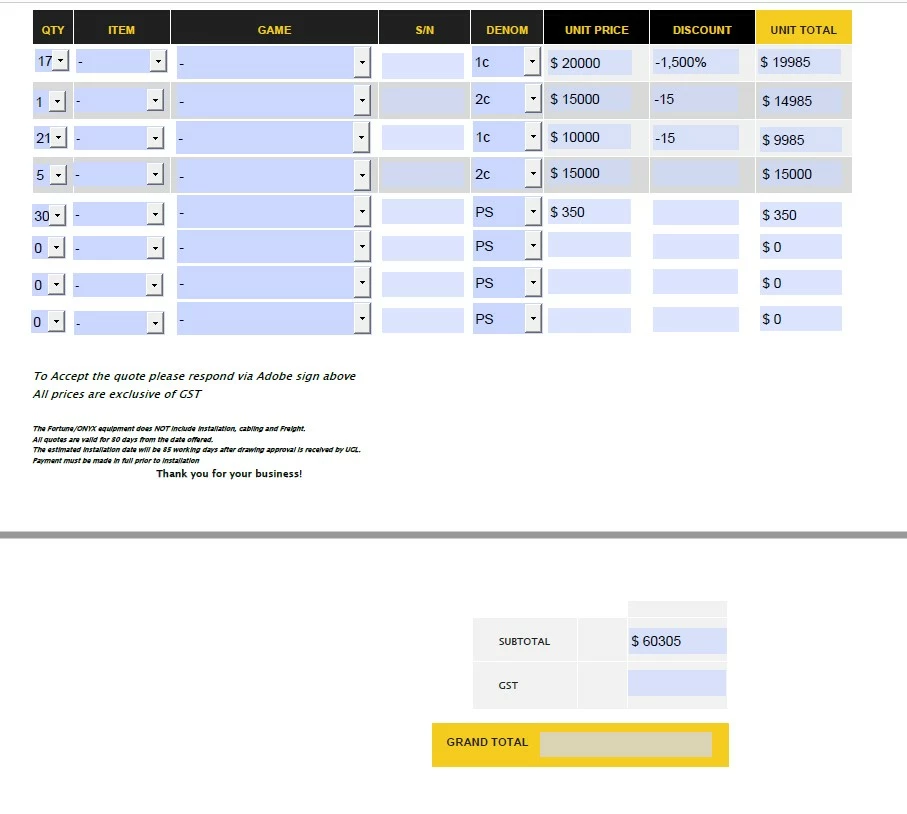
So i cannot work out how to apply random discounts that will subtract automatically from my unit total. Going into the setting and changing to percentage does nothing except subtract 15 off the total price


The same thing applies to the GST (tax) here in my country NZ at 15%, then adding this to the grand total.


Any help would be appreciated
This topic has been closed for replies.

1 reply

Nesa Nurani
Community Expert
Community Expert
November 28, 2022

If you format field as percentage then you need to enter numbers like this for 15% - 0.15…etc. if you still want to enter 15 while formatted as percentage then as validation script of that field use this:

if(event.value)
event.value = Number(event.value)/100;

it will convert to right input, so you can just write percentage normally.

Let's say your fields are named "UnitPrice1" and "Discount1" as Simplified field notation of "Unit Total" field, enter this:

UnitPrice1*(1-Discount1)

If you have trouble to make it work, please share actual field names or even better, your file.

Participant
November 28, 2022

Thanks Nesa i will give this a go and give you follow-up on how i went,