


Attach a file Button that shows the preview/file on the button(Box) they clicked on
Okay, here is my situation. I want to create a button that is interactive, but in a simple way. Thanks to other forums, here's what I have done so far. Go to Forms, Add button, size it and Save. Then go to properties/Actions/Run A Javascript/Add and put input: if (app.viewerVersion < 11) etc.... OK then I go to Tools, Javascript/Document Javascript and put in my script. Thanks to all in previous chats. All of that works well. The only one thing, I need now that will make it perfect, is to be able to preview the pdf/jpeg that I attachment as a small image as well as an attachment. Now I did however find a way to do it using this: ( event.target.buttonImportFile();) but the only problem is that particular script attached to the button, causes the browse file search, to open twice to do 1 file. Once to lock in the icon, then a 2nd time to attach the file. So is there anyway to insert a script, in the open javascript button that will save the mini-image on the button and save the attachment together as one? Any help would be GREATLY appreciated. See illustration for further details.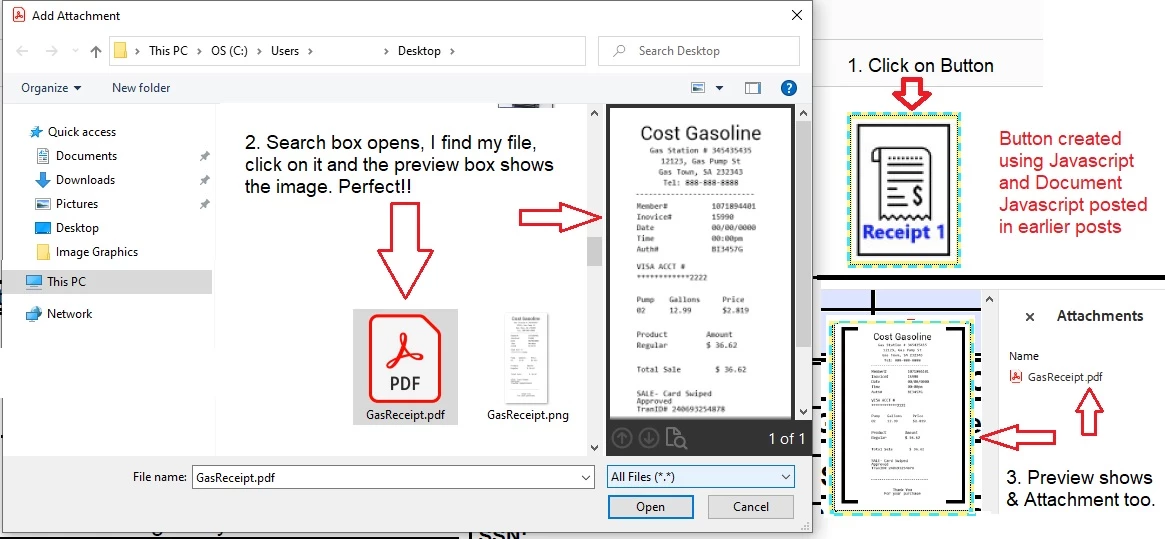
 AdChoices