


Nikolaos.
Inspiring
November 8, 2021
Answered

Automatic calendar in text boxes when month is selected

  • November 8, 2021
  • 1 reply
  • 2598 views

Hello everyone,


how can I create a calendar with TextBoxes so that the underlying text field always adds a day. Since I am unsure how and whether I can formulate it correctly, I have included the picture.

Would like to do the same with Adobe (TextBoxes instead of cells) as in Excel, is that possible? …if yes how?
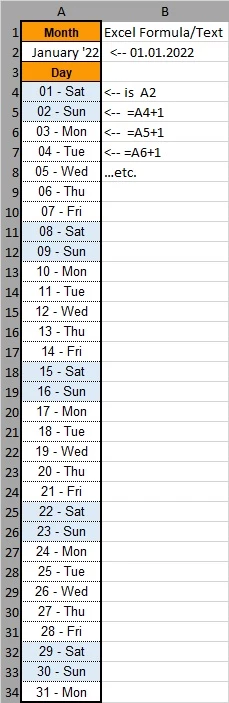
 

Thanks everyone in advance


Nikolaos.

This topic has been closed for replies.
Correct answer try67

additionally here the file ... January works ... but february and the rest ... I probably have a mistake somewhere.


thx 🙂


I don't understand why you changed my code. It would have worked fine. Here's the fixed version.

1 reply

try67
Community Expert
Community Expert
November 8, 2021

Yes. It's possible using a script.

So the user will enter the first date, right? What format will they be using?

Nikolaos.
Nikolaos.Author
Inspiring
November 8, 2021

The user should only enter the month.

The format is German, otherwise the way it looks.


Thx 🙂

try67
Community Expert
Community Expert
November 9, 2021

I would be happy to receive a suggested solution.


... and thanks again in advance 🙂


OK, create a Drop-down field with all the month names (and a default value, something like "Select Month"), and 31 text fields called "Day.1", "Day.2", etc.

Then use this code as the custom Validation script of the drop-down (you'll need to adjust the first two arrays to have the correct day and month names to match the ones you're using):


var days = ["Sunday", "Monday", "Tuesday", "Wednesday", "Thursday", "Friday", "Saturday"];
var months = ["January", "February", "March", "April", "May", "June", "July", "August", "September", "October", "November", "December"];

for (var i=1; i<=31; i++) this.getField("Day."+i).value = "";
if (event.value!=event.target.defaultValue) {
	var monthIndex = months.indexOf(event.value);
	var d = util.scand("m/d/yyyy", (monthIndex+1) + "/1/" + new Date().getFullYear());
	while (d.getMonth()==monthIndex) {
		this.getField("Day."+d.getDate()).value = d.getDate() + " - " + days[d.getDay()];
		d.setDate(d.getDate()+1);
	}
}