





Answered
Automatically modify the content of a drop-down menu In a dialog box
Hi,
In a dialog box, is it possible to automatically modify the content of a drop-down menu in accordance with the choice of a radio button?
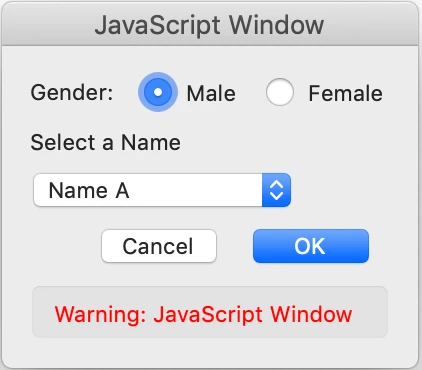
So, here the default value is "Male", but if I choose the "Female" radio button the content of the drop-down menu must change.
Here is the code for the dialog box:
var theItems1=["Name A","Name B","Name C","Name D"];
var listItems1="var thisList1 \= \{";
for (var i=0; i < theItems1.length; i++) listItems1+="\""+theItems1[i]+"\": "+(-1*(i+1)).toString()+",";
var listItems1=listItems1.substring(0, listItems1.length-1);
listItems1+="\}";
eval(listItems1);

theChoice="";

var dialog={
	DoDialog: function(){return app.execDialog(this);},
    GetRadioSel:function(oRslts,aCtrls){
      for(var strRtn=aCtrls[0]; aCtrls.length>0; strRtn=aCtrls.pop()){
		  if (oRslts[strRtn]==true) return strRtn;
      }
      return "";
    },
	initialize: function(dialog) {
		var dlgInit={
			"Rad0": true,
		};
        dialog.load(dlgInit);
		this.loadDefaults(dialog);
	},
	commit: function(dialog) {
		oRslt=dialog.store();
		var listItems1=dialog.store()["sub1"];
		for (var i in listItems1) {
			if (listItems1[i]>0) {
				nameItem1=i;
			}
		}
		strGRP0=this.GetRadioSel(oRslt,["Rad0","Rad1"]);
		switch (strGRP0) {
			case "Rad0":
				theChoice="Male";
				break;
			case "Rad1":
				theChoice="Female";
		}

	},
	loadDefaults: function (dialog) {
		dialog.load({
			sub1: thisList1,
		});
	},
	description: {
		name: "Sample Dialog",
		align_children: "align_top",
		elements: [
			{
				type: "view",
				align_children: "align_left",
				char_height: 2,
				elements: [
					{
						type: "view",
						align_children: "align_row",
						alignment: "align_center",
						elements: [
							{
								type: "static_text",
								name: "Gender: ",
								font: "dialog",
							},
							{
								type: "radio",
								group_id: "GRP1",
								item_id: "Rad0",
								name: " Male",
							},
							{
								type: "radio",
								group_id: "GRP1",
								item_id: "Rad1",
								name: " Female",
							},
						]
					},
				]
			},

			{
				type: "static_text",
				name: "Select a Name",
				font: "default"
			},
			{
				type: "popup",
				item_id: "sub1",
				width: 100,
			},
			{
				type: "ok_cancel",
			},
		]
	}
};
if("ok"==dialog.DoDialog()) {
	this.getField("Name").value=nameItem1+" -> "+theChoice;
}
...and an attached example.
I have a solution with 2 drop-down menus and only one enabled in accordance with the choice of the radio button, but I wonder if it's possible with only one drop-down menu!
Thanks in advance.
@+
 AdChoices