


Answered
Batch add header text based on file name
I have a large number of files. Is it possible to automate adding a header to the upper right side of the page based on their file names? Thanks!

I have a large number of files. Is it possible to automate adding a header to the upper right side of the page based on their file names? Thanks!
Hi,
You can create an action wizard with the script below or use the one attached into the pdf file.
this.addWatermarkFromText({
	cText: this.documentFileName, // The text to use as the watermark
	nTextAlign: app.constants.align.left, // (optional) The text alignment to use for cText within the watermark
	cFont: font.HelvB, // (optional) The font to be used for this watermark
	nFontSize: 10, // (optional) The point size of the font to use for the watermark
	aColor: color.black, // (optional) The color to use for the watermark
	nStart: 0, // (optional) The 0-based index of the first page
	nEnd: this.numPages-1, // (optional) The last page
	bOnTop: true, // (optional) A Boolean value specifying the z-ordering of the watermark
	bOnScreen: true, // (optional) A Boolean value to indicate whether the watermark should be displayed when viewing the document on screen
	bOnPrint: true, // (optional) A Boolean value to indicate whether the watermark should be displayed when printing the document
	nHorizAlign: app.constants.align.left, // Al(optional) A number indicating how the watermark should be aligned horizontally
	nVertAlign: app.constants.align.top, // (optional) A number indicating how the watermark should be aligned vertically
	nHorizValue: 15, // (optional) A number used to shift the horizontal position of the watermark on the page
	nVertValue: -15, // (optional) A number used to shift the vertical position of the watermark on the page
	bPercentage: false, // (optional) A Boolean value used to indicate whether nHorizValue and nVertValue represent a percentage of the page size or an explicit number of points
	nScale: 1.0, // (optional) The scale to be used for the watermark
	bFixedPrint: false, // (optional) A Boolean value that indicates that the watermark should be added as a FixedPrint Watermark annotation
	nRotation: 0, // (optional) The number of degrees to rotate the watermark counterclockwise
	nOpacity: 1 // (optional) The opacity to be used for the watermark
});
this.saveAs(this.path);
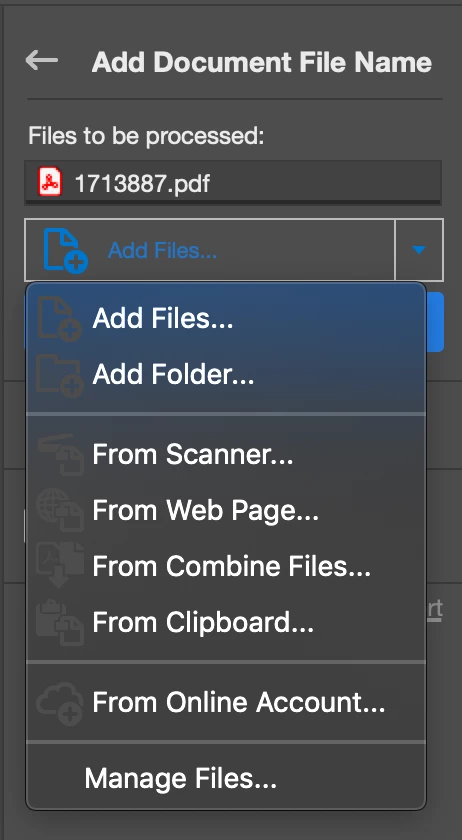
Then you run it and you add files or folder before starting.
@+
Already have an account? Login
Enter your E-mail address. We'll send you an e-mail with instructions to reset your password.
 AdChoices