

Correct answer bebarth

Hi,

You can create an action wizard with the script below or use the one attached into the pdf file.

this.addWatermarkFromText({
	cText: this.documentFileName, // The text to use as the watermark
	nTextAlign: app.constants.align.left, // (optional) The text alignment to use for cText within the watermark
	cFont: font.HelvB, // (optional) The font to be used for this watermark
	nFontSize: 10, // (optional) The point size of the font to use for the watermark
	aColor: color.black, // (optional) The color to use for the watermark
	nStart: 0, // (optional) The 0-based index of the first page
	nEnd: this.numPages-1, // (optional) The last page
	bOnTop: true, // (optional) A Boolean value specifying the z-ordering of the watermark
	bOnScreen: true, // (optional) A Boolean value to indicate whether the watermark should be displayed when viewing the document on screen
	bOnPrint: true, // (optional) A Boolean value to indicate whether the watermark should be displayed when printing the document
	nHorizAlign: app.constants.align.left, // Al(optional) A number indicating how the watermark should be aligned horizontally
	nVertAlign: app.constants.align.top, // (optional) A number indicating how the watermark should be aligned vertically
	nHorizValue: 15, // (optional) A number used to shift the horizontal position of the watermark on the page
	nVertValue: -15, // (optional) A number used to shift the vertical position of the watermark on the page
	bPercentage: false, // (optional) A Boolean value used to indicate whether nHorizValue and nVertValue represent a percentage of the page size or an explicit number of points
	nScale: 1.0, // (optional) The scale to be used for the watermark
	bFixedPrint: false, // (optional) A Boolean value that indicates that the watermark should be added as a FixedPrint Watermark annotation
	nRotation: 0, // (optional) The number of degrees to rotate the watermark counterclockwise
	nOpacity: 1 // (optional) The opacity to be used for the watermark
});
this.saveAs(this.path);

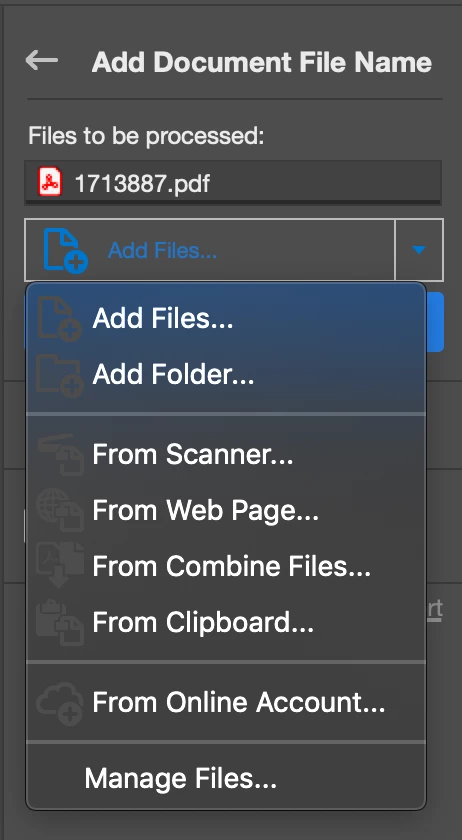
Then you run it and you add files or folder before starting.
@+

2 replies

bebarth
bebarthCorrect answer
Community Expert
December 31, 2022

Hi,

You can create an action wizard with the script below or use the one attached into the pdf file.

this.addWatermarkFromText({
	cText: this.documentFileName, // The text to use as the watermark
	nTextAlign: app.constants.align.left, // (optional) The text alignment to use for cText within the watermark
	cFont: font.HelvB, // (optional) The font to be used for this watermark
	nFontSize: 10, // (optional) The point size of the font to use for the watermark
	aColor: color.black, // (optional) The color to use for the watermark
	nStart: 0, // (optional) The 0-based index of the first page
	nEnd: this.numPages-1, // (optional) The last page
	bOnTop: true, // (optional) A Boolean value specifying the z-ordering of the watermark
	bOnScreen: true, // (optional) A Boolean value to indicate whether the watermark should be displayed when viewing the document on screen
	bOnPrint: true, // (optional) A Boolean value to indicate whether the watermark should be displayed when printing the document
	nHorizAlign: app.constants.align.left, // Al(optional) A number indicating how the watermark should be aligned horizontally
	nVertAlign: app.constants.align.top, // (optional) A number indicating how the watermark should be aligned vertically
	nHorizValue: 15, // (optional) A number used to shift the horizontal position of the watermark on the page
	nVertValue: -15, // (optional) A number used to shift the vertical position of the watermark on the page
	bPercentage: false, // (optional) A Boolean value used to indicate whether nHorizValue and nVertValue represent a percentage of the page size or an explicit number of points
	nScale: 1.0, // (optional) The scale to be used for the watermark
	bFixedPrint: false, // (optional) A Boolean value that indicates that the watermark should be added as a FixedPrint Watermark annotation
	nRotation: 0, // (optional) The number of degrees to rotate the watermark counterclockwise
	nOpacity: 1 // (optional) The opacity to be used for the watermark
});
this.saveAs(this.path);

Then you run it and you add files or folder before starting.

@+

New Participant
April 20, 2024

@bebarth 

Thank you for your script. It works perfect. Could you please help me by changing the font. I want to use the font "Segoe UI". I was not able to do it.

Additionally, do you know how it is possible, to read only a part of the file name and add this text to the watermark?

All my file names look like this (numbers and text of course differs from this example below): 

01 Text1.pdf

02 Text2.pdf

03 Text3.pdf

XY Text4.pdf

XYZ Text5.pdf

........

Would it be possible to write only the numbers/text which is in front of the space or after the text after the space? If the space is a problem, I could use the "-" sign as well, in case this helps. The final result should look like this:

01

02

03

XY

XYZ

or the text after the space

Text1

Text2

Text3

Text4

Text4


Thank you for any help. 

Best Regards, Ischni


bebarth
Community Expert
April 20, 2024

Thank you for your quick answer. Both does not work for me. Would you mind to insert it into the code which you have posted above on Dec 31, 2022? Many Thanks.


Yes, of course!

Meenakshi Negi
Community Manager
Community Manager
December 31, 2022

Hi xcd.a,


Thank you for reaching out.


Please try the Action Wizard tool in Acrobat to add the header to the file. For more information on Acrobat Header, please refer to the following help page: https://helpx.adobe.com/acrobat/using/action-wizard-acrobat-pro.html.

Check if that works for you.


Thanks,

Meenakshi
