Participant
December 1, 2012
Answered

Batch convert pdf to Excel

  • December 1, 2012
  • 4 replies
  • 103976 views

Certainly in my Win 7, Acrobat 11 I can convert a single pdf file to excell (File->Save as Other->spreadsheet).  But I have 200+ scanned pdf files to convert - so I need to load these as a batch to process the whole bunch.  I cannot find a batch function for scanned pdf to excel conversion.  Any suggestions greatly appreciated.  Thanks.
Correct answer dave_m_k

With Acrobat XI Pro you can use the Action Wizard.

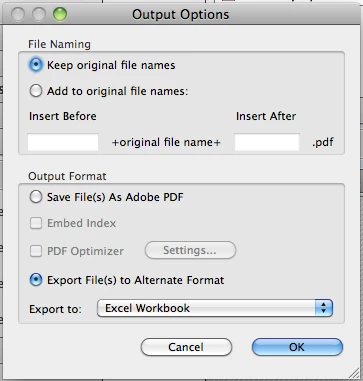
Use the 'Save' command from the 'Save & Export' toolset. Configure the Output Format to Excel as seen here:

4 replies

Xzila
Participant
December 15, 2015

The action-wizard is a good idea if you want to convert each pdf to a separate excel spreadsheet. If you are okay with having one aggregate excel spreadsheet you can simply combine all of the pdf files into one pdf. Then convert that one pdf into an excel spreadsheet.

Participant
October 28, 2015

I just discovered that I could use the Adobe Document Cloud to process a batch of files to export.

https://cloud.acrobat.com/exportpdf

Login to your account. (Annual fee is cheap.)

Select "Export PDF" tab at top of the page.

Click "Select PDF Files to Export"

Drag multiple files into the window

"Continue"

Under "Convert To" Select file type. In this case, Excel.

(You can still add files to export)

Click the Export button and once converted "Download all"

You get a zip file with all the converted files.

I'm not sure if there is a limit on how many you can do at a time.  I only tried a handful at a time.

Rick

Participant
November 22, 2024

This helped me in 2024. I didn't need to run any macro or use any desktop tool. Gotta have an active subscription of Adobe though. It's expensive. 

ryanjohnsond
Participant
September 4, 2014

Found this good description

You can use an Action in Adobe Acrobat Pro to convert your PDF files to Excel in one operation. To do that, create a new action (Tools>Action Wizard>Create new action...).

Then add the "Save" tool from Save&Export to your new action. Click on the "Specify Settings" button for your save tool and check "Export File(s) to Alternate Format" and select your output format.

Now you can run this action on a number of files, and all of them will be exported to Excel.

Karl Heinz Kremer

PDF Acrobatics Without a Net

PDF Software Development, Training and More...

http://www.khkonsulting.com

Source Link: Can I BATCH LOAD PDF files for conversion to Excel? (Convert PDF to other formats)

Participant
March 8, 2015

I need to do something similar and when I use this solution I run into problems: after adding a long list of files (5000+) to apply this action to, the computer will hang up after a while when only some of the files have been converted. Is this a known issue? (running on Windows server 2012)

Bernd Alheit
Community Expert
Community Expert
March 8, 2015

‌5000 files are too much for Acrobat.

dave_m_k
dave_m_kCorrect answer
Legend
January 21, 2013

With Acrobat XI Pro you can use the Action Wizard.

Use the 'Save' command from the 'Save & Export' toolset. Configure the Output Format to Excel as seen here:

dave_m_k
Legend
January 21, 2013

Sorry, forgot to add that you'll need to include the 'Recognize Text using OCR' command from the 'Recognize Text' toolset first. 

But ultimately, you can accomplish the batch conversion you're looking for.