


Participating Frequently
March 24, 2020
Answered

Bookmark not visible when I open the file and have to manually open it

  • March 24, 2020
  • 2 replies
  • 14094 views

Hi

Created a boomark and saved the file, no problem.


However each time I open the file, the bookmark is not visible unless I click on the bookmark icon.


How can I code the file so that each time I open it, bookmark list becomes visisble with it?


Thank you
This topic has been closed for replies.
Correct answer Dave__M

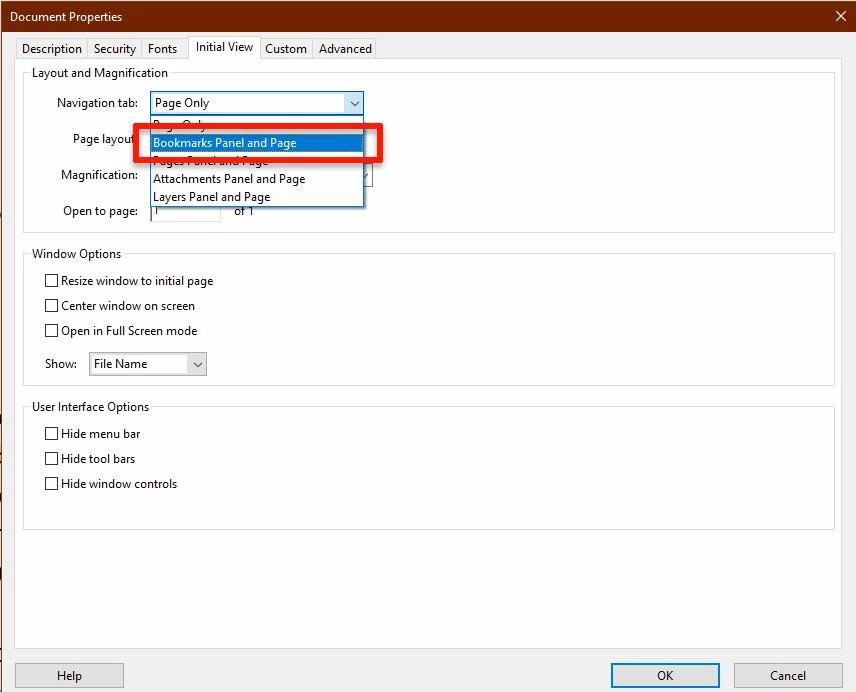
With the file open, go to File>Properties, click on the Initial View tab, and change the setting for Navigation tab to Bookmarks Panel and Page.  Then, be sure to save the file.  It should then open with the bookmarks panel showing every time, on every machine.

I hope this helps solve your problem.

My best,

Dave

2 replies

jakyasarAuthor
Participating Frequently
March 25, 2020

It worked.

A follow question. How can As i move down the pages, the bookmark list stays the the same i.e. it does not move down with the pages.

Is there a way for the list to show which page belongs to that bookmark? This is important especially with many bookmarks and if I am looking for a specific word.

Thank you for your time.

Dave__M
Community Expert
Community Expert
March 25, 2020

There is (sort of) a feature for this.  In the top of the Bookmarks panel, the icon farthest to the right executes a "Find current Bookmark" command, which will highlight the bookmark that points to the page you are viewing.


Probably not the dynamic feature you'd like, but it gently works.

My best,

Dave

jakyasarAuthor
Participating Frequently
March 25, 2020

Not bad, better than nothing.


I remember getting a PDf file from a company where I had to click on each bookmark to go to that section. That section (any one), once I was on the last page did not move to the next page and I had to click on the bookmark to move to the next page. One good thisng about this, I knew exactly how many pages was that section. How do I accomplish this?


Thank you again,

Dave__M
Community Expert
Dave__MCommunity ExpertCorrect answer
Community Expert
March 24, 2020

With the file open, go to File>Properties, click on the Initial View tab, and change the setting for Navigation tab to Bookmarks Panel and Page.  Then, be sure to save the file.  It should then open with the bookmarks panel showing every time, on every machine.

I hope this helps solve your problem.

My best,

Dave

Participant
December 5, 2023

This just started I use Bookmarks all the time = I have my properties set to open BOOKMARKS, but is opening PAGES instead!!!! Why? and how do I fix????