


Bug: Enhance Image function not working in latest update
I'm running this on Windows 11...
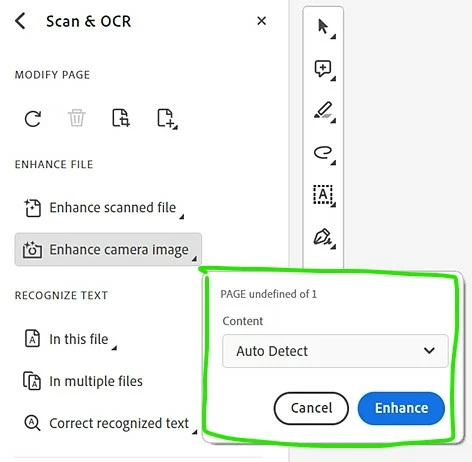
I important an image to be enhance. Click OCR on the left, then click the Enhance Camera Image. Sometimes the blue corners/handles appear. When they do, I adjust them as necessary. However, the drop-down (in green box attached) never appears. I had to do a screenshot from an online source for this.
I've had 2 one hour long chat sessions with the tech department. Both have been able to get it to work again. However, upon logging in and closing the program, the problem starts the next day again. The last tech person told me not to update and clicked the update automatically preference off. After that session, I reopened Acrobat, and the preference was clicked on again. Rather than sitting with IT for another hour, I clicked "Disable new Acrobat". While it's the old version that I don't know as well as the newest, all the functions work now.
It's unfortunate because my company pays good money for this product and I'm having to use an old version.
Any ideas out there? The tech person hopefully passed it along as something that needs to be fixed. They admitted their personal Acrobat does that too.
 AdChoices