Known Participant
January 27, 2017
Answered

Calculation of the Average of Fields

  • January 27, 2017
  • 2 replies
  • 11692 views

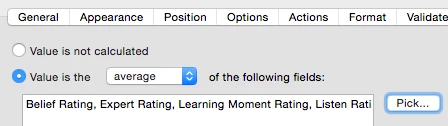
I am creating a form that has several fields (9) for a "Rating" (NA, 1,2,3,4) and want the average of the fields.

I have:

Problem is if the field is blank or NA is chosen, than it is calculated as a ZERO and throws off the average result.

Any ideas?

This topic has been closed for replies.
Correct answer gkaiseril

That is a pretty common approach used when software assumes how a calculation should be done. Excel excludes non-numeric data from both the sum and count but  throws an error condition when all the input fields are empty. The only way around this is to create a custom calculation script to compute the average and exclude the "N/A" items from the sum and the count of items to be averaged.

I would put the values of the fields as strings into an array, filter out any null entries or non-numeric values form the array and then process the resulting array of values when the length of the array is not zero.

Once could also create a for loop to read each field and only accept numeric values for the count and sun and then compute the average when the count of non-null fields is not zero.


2 replies

Participant
January 9, 2024

I have created a form that has roundedAverage calculation fields to average scores. Everything works, and the rounded value populates in another field.


However, now I want to take that value and select a radio dial, in a group, that represents that value. For example, Text3 (value currently = 3) and I want Choice3 radio dial to be selected.   The Javascript I have compiled is below and it won't select the radio dial.  What am I doing wrong?

// Custom calculation script for the calculation of average and selection of a radio button

// Function to calculate average, excluding "N.R."

function calculateAverageAndSetRadioButton() {


// Retrieve field values

var values = [];

values.push(this.getField("Angles").value);
values.push(this.getField("Squareness").value);

values.push(this.getField("Depth Management").value);

values.push(this.getField("Post Play").value);


// Calculate average excluding "N.R."

var sum = 0; var count = 0;

for (var i = 0; i < values.length; i++) {

     var fieldValue = parseFloat(values[i]);

     if (!isNaN(fieldValue) && values[i] !== "N.R.") {

          sum += fieldValue;

          count++;

     }

}

// Calculate average

var average = count > 0 ? sum / count : 0;


// Round the average to the nearest whole number

var roundedAverage = Math.round(average);


// Set the value of the 'averageField' (in this case Text3) with the rounded average
this.getField("Text3").value = roundedAverage;


// Set the radio button based on the value of 'Text3' for Group 11

var radioGroup = this.getField("Group11");

var text3Value = this.getField("Text3").value;


// Define the options or values available in Group11 along with their corresponding indexes

var radioOptions = { "Choice1": 1, "Choice2": 2, "Choice3": 3, "Choice4": 4 };


// Set the radio button value based on the value of Text3

var selectedOption = Object.keys(radioOptions).find(

key => radioOptions[key] === parseInt(text3Value) );

if (selectedOption) {

     radioGroup.setValue(selectedOption);

} else {

// Handle the case when the value in Text3 doesn't match any radio button option

// For instance, set a default value if needed

radioGroup.setValue("");


// Set a default value or handle as required } }

// Call the calculateAverageAndSetRadioButton

function on the 'calculate' event calculateAverageAndSetRadioButton();

Nesa Nurani
Community Expert
Community Expert
January 9, 2024

What when value is not round number, for example if "Text3" value is 3.2?


To answer your question you can change radio button choices to numbers, change "Choice1" to 1, "Choice2" to 2...etc, then you can use this:

var radioGroup = this.getField("Group11");
var text3Value = Number(this.getField("Text3").valueAsString);
radioGroup.value = text3Value !== 0 ? text3Value : "Off";


Participant
January 9, 2024

Thank you so much for the reply!


Based on the code, the number should always be a round number.

To be more clear...

  1. The values are calculated by averaging a number of fields into a single number. 
  2. That number is then rounded and populates a total field, in this case Text3.
  3. Once the value is set in the total field (Text3), I want to set a radio dial to equal that number.
  4. If the value of the total field (Text3) = 3, the I want the Choice 3 radio dial to be selected. However, if the total field = 2 I want the Choice2 radio dial selected.


How would I achieve this within your construct?


Marc

gkaiserilCorrect answer
Inspiring
January 27, 2017

That is a pretty common approach used when software assumes how a calculation should be done. Excel excludes non-numeric data from both the sum and count but  throws an error condition when all the input fields are empty. The only way around this is to create a custom calculation script to compute the average and exclude the "N/A" items from the sum and the count of items to be averaged.

I would put the values of the fields as strings into an array, filter out any null entries or non-numeric values form the array and then process the resulting array of values when the length of the array is not zero.

Once could also create a for loop to read each field and only accept numeric values for the count and sun and then compute the average when the count of non-null fields is not zero.

Known Participant
January 27, 2017

Thanks!! Tried using your logic and did come up with the answer:

function myAverageFunction(aNames) {

    // n = number of fields that have a numerical value

    // sum = some of values for the named fields

    var n = 0;

    var sum = 0;

    var v;

    // loop through array of name strings

    for (i = 0; i < aNames.length; i++) {

      v = this.getField(aNames).valueAsString;

      // check for not a null string and not a space  and not is Not a Number

      if (v != "" & v != " " & isNaN(v) == false) {

         n++; // increment count

         sum += Number(v); // add to sum

      }

    }

    return (n != 0) ? (sum / n): "";

}

event.value = myAverageFunction(["Rating1", "Rating2", "Rating3", "Rating4", "Rating5"]);

Participating Frequently
September 29, 2018

Use the code above but change this line:

if (isNaN(Number(v)) == false) {

To:

if (v!="" && isNaN(Number(v)) == false) {

If the results seem to be "delayed" then you probably need to check the fields calculation order and make sure that the average field is calculated after all the fields its dependent on.


I tried it. It doesn't seem to work. Does it make a difference that I'm on a Mac?

Here is a screenshot of my document and what I would like to do with it.

Here is what I have typed in the "custom calculation script":

function myAverageFunction(aNames) {

    // n = number of fields that have a numerical value

    // sum = some of values for the named fields

    var n = 0;

    var sum = 0;

    var v;

    // loop through array of name strings

    for (i = 0; i < aNames.length; i++) {

      v = this.getField(aNames).valueAsString;

      // check for not a null string and not a space  and not is Not a Number

      if (v!="" && isNaN(Number(v)) == false) {

         n++; // increment count

         sum += Number(v); // add to sum

      }

    }

    return (n != 0) ? (sum / n): "";

}

event.value = myAverageFunction(["CALPGO1", "CALPGO2", "CALPGO3", "CALPGO4", "CALPGO5", "CALPGO6", "CALPGO7", "CALPGO8", "CALPGO9", "CALPGO10", "CALPGO11", "CALPGO12", "CALPGO12", "CALPGO13", "CALPGO14", "CALPGO15", "CALPGO16", "CALPGO17", "CALPGO18", "CALPGO19", "CALPGO20", "CALPGO21", "CALPGO22", "CALPGO23", "CALPGO24", "CALPGO25", "CALPGO26", "CALPGO27", "CALPGO528", "CALPGO29", "CALPGO30", "CALPGO31", "CALPGO32", "CALPGO33", "CALPGO34", "CALPGO35", "CALPGO40"]);